EasyManua.ls Logo

Wasserstein Smart Water Sensor - User Manual

Wasserstein Smart Water Sensor
6 pages
Print Icon
To Next Page IconTo Next Page
Loading...
Smart Water Sensor User Manual
Box Content:
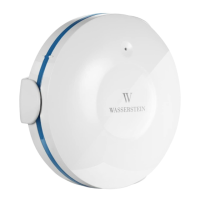
Water Sensor x 1
Base Cover x 1
CR2 Baery x 1
User Manual x 1
Screws & Wall Anchor x 1
A. Download the App
Search Wsteinfrom App Store ,Google Play
store or scan QR code for installaon.
The Wstein mobile App is your central hub for
your smart home connecon. Control all your
Wasserstein smart devices from one App.
B. Connect your mobile device to your home
Wi-Fi network
To nd more products from our smart home universe, please visit our
website:
Wasserstein-home.com
We oer free US Shipping above $30 and for your rst purchase you can
use discount code: BestDeal15 to get 15% o.
LED Indicator
Probe
Waterproof ring
Base Cover
Probe Connecon
port
Question and Answer IconNeed help?

Do you have a question about the Wasserstein Smart Water Sensor and is the answer not in the manual?

Summary

Download the Wstein App

Connect Mobile Device to Wi-Fi

Registration and Sign-in

Add New Device to App

Hardware Installation

Warning and Notification

Q&A

Problems Connecting Device with App

Troubleshoot connection issues by resetting the device or using AP mode.

No Notification with Water Leakage

Ensure push notifications are enabled in the app and mobile settings.

General Specifications

Wasserstein Smart Water Sensor Specifications

General IconGeneral
BrandWasserstein
ModelSmart Water Sensor
CategoryAccessories
LanguageEnglish