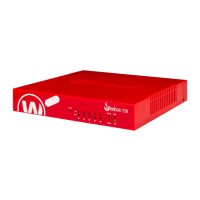
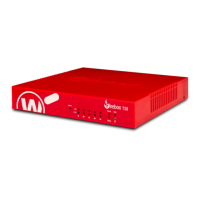
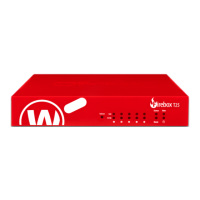
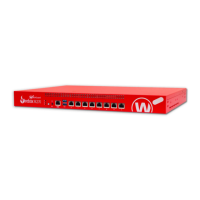
The WatchGuard Firebox T40-CW is a network security appliance designed for small organizations and branch offices, delivering unified threat management (UTM), superior performance, ease of use, and value. It provides comprehensive protection against various threats, including spyware, spam, viruses, worms, trojans, web-based exploits, and blended threats. The device supports firewall and VPN protection, as well as secure remote access, making it suitable for a broad range of network environments.
Technical Specifications:
- Processor: NXP LS1043A, 1.0GHz, 4-Core
- Memory: DDR4 4GB
- Storage: mSATA 16GB
- Power Supply: Input Ratings: 100-240V AC, MAX 1.2A, 50-60Hz; Output: 54V DC
- Dimensions: D = 205.5 mm (8"), W = 217 mm (8.5"), H = 43 mm (1.7")
- Weight: T40: 0.88 kg (1.94 lbs); T40-W: 0.9 kg (1.98 lbs)
- Network Interfaces: 5 RJ45 connectors, 1000Base-TX (10/100/1000Mbps), and 1 embedded 4G/LTE wireless WAN module.
- Radio Type and Frequency Band (T40-CW): Dual radios, one dedicated to 2.4 GHz for 2x2, the other to 5 GHz for 4x4. Both radios operate in 802.11ac.
- I/O Interfaces: 2x USB3.0, Type-A, and 1 RJ45 Serial Port.
- Environmental Requirements:
- Operating temperature: 0° to 40°C (32° to 104°F)
- Operating humidity: 5% to 90% non-condensing
- Non-operating temperature: -25° to 75°C (-13° to 167°F)
- Non-operating humidity: 0% to 95% non-condensing
Usage Features:
The Firebox T40-CW runs on WatchGuard's next-generation UTM OS, Fireware® OS, which provides robust protection against sophisticated threats. The device includes several indicators on the front panel to monitor its status:
- Failover Indicator: Lit when there is a WAN failover from the primary external interface to the backup interface. It turns off when the connection fails back to the primary interface.
- WAP Indicator (Firebox T40-W model): Lit when the appliance acts as a wireless access point or client. The color indicates the active radio band (Yellow for 2.4 GHz, Green for 5 GHz). It blinks when data is sent/received, with increased speed indicating higher data flow.
- Network Interface Status Indicators (1000 Yellow / 10/100 Green): Each of the five network interfaces has two status indicators.
- When "On," the 1000 Yellow indicator signifies a 1000 Mbps link speed, while the 10/100 Green indicator signifies a 10 Mbps or 100 Mbps link speed.
- When "Blinking," these indicators show data being sent and received, with the blink speed increasing as data flow increases.
- Status Indicator: Lit when there is a management connection to the device (e.g., via Fireware Web UI or command line interface) or when polled by WatchGuard System Manager. It stays lit for 30 seconds after connection.
- Mode Indicator: Shows the status of the external network connection. Green indicates a successful connection and traffic flow; flashing indicates an inability to send traffic to the external network.
- Attn Indicator: Yellow when the device is started with the Reset button pressed, typically for restoring factory-default settings.
- Power Indicator: Green when the Firebox is powered on.
The rear panel features:
- Serial Port (Console): An RJ45 serial console port for direct device management (cable not included).
- USB Interfaces: Two USB 3.0 ports for backup and restore functions or storing support snapshots.
- Network Interfaces: Five Ethernet interfaces (0/WAN, 1/LAN, 2, 3, & 4) with standard RJ45 connectors, supporting 10, 100, or 1000 Mbps link speeds.
- Reset Button: Used to restore the device to factory-default settings.
- Power Switch: Controls power to the device (position 1 for on, 0 for off).
- Power Input: Connects to the supplied AC power adapter.
Maintenance Features:
- Restore Factory-Default Settings: If a configuration file is corrupted or the administrator passphrase is unknown, the device can be restored to factory defaults. This involves powering off, pressing and holding the Reset button, powering on while holding Reset until the Attn indicator flashes, releasing Reset, and waiting for the Attn indicator to stay lit. After this, the device must be powered off and on again to restart with default settings.
- AC Power Adapter: The device uses a specific AC power adapter. Users should verify the color band on the cord matches the color ring around the power plug before connecting. To disconnect, slide the black plastic external housing away from the Firebox to expose the internal silver metal connector, then pull to disconnect.
- Environmental Considerations: For safe installation, the Firebox should be installed indoors in a secure, locked area and connected to a conditioned power supply to prevent damage from sudden power changes.
- Battery Warning: The device contains a Lithium-Ion battery. There is a risk of explosion if the battery is replaced incorrectly. Users must dispose of used batteries according to the manufacturer's instructions and replace them only with the same or equivalent type recommended by the manufacturer. The system should only be placed in locations where children are unlikely to be present.
The Firebox T40-CW is designed to be RoHS-compliant (lead-free) and adheres to various product safety certifications and global compliance standards, including CAN/CSA, UL, IEC, and EN standards for safety, electromagnetic compatibility, and radio spectrum matters. It also complies with EU directives such as RoHS, WEEE, and REACH, ensuring responsible manufacturing and disposal practices. For wireless models, specific radiation exposure statements and restrictions apply, particularly regarding indoor use in certain frequency bands and minimum separation distances from the body.

 Need help?
 General

 To Next Page