Need help?
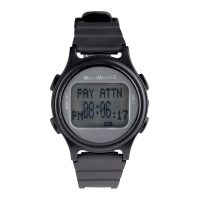
Do you have a question about the WatchMinder 3 and is the answer not in the manual?
Charge for 6 hours, 2-3 times for new WM3 to maximize Li-Polymer battery capacity.
Recharge monthly to prevent full battery discharge and potential damage.
Push all 4 buttons simultaneously to adjust contrast for better visibility.
Place WM3 on clip, ensuring metal contact, for a 4-6 hour charge.
Recharge when battery icon shows one bar or blinks, typically every 7-14 days.
Pressing buttons 2 and 4 simultaneously resets the watch.
Suitable for AD/HD, LD, elderly, chronic illness, and other applications.
Alerts with self-help message at fixed intervals, e.g., 'RELAX' every 15 minutes.
Allows up to 30 daily reminders for specific tasks at pre-specified times.
Uses 24-hour clock for setting; display shows 12-hour with AM/PM and day.
Training/Reminder alerts last 10s, repeat in 20s. Any button (except Light) stops vibration.
Reminder alert prioritizes simultaneous alerts.
Hold buttons 2/4 for 3 seconds to reset to factory settings, deleting programs.
Hold buttons 2 or 3 for rapid scrolling through numbers/messages.
Create up to 12 personalized messages (max 8 chars) for Training/Reminder Modes.
Press Mode/Set button (1) to enter time setting mode.
Press Mode/Set button (1) again to select Time or Date setting.
Hour blinks. Use buttons 2 or 3 to adjust, button 1 to set (uses 24-hour format).
Minutes blink. Use buttons 2 or 3 to adjust, button 1 to set.
Seconds blink. Use buttons 2 or 3 to adjust, button 1 to set and exit.
Press Mode/Set button (1) to enter date setting mode.
Press Mode/Set button (1) again to select Date setting, not Time.
Month blinks. Use buttons 2 or 3 to adjust, button 1 to set.
Day blinks. Use buttons 2 or 3 to adjust, button 1 to set.
Year blinks. Use buttons 2 or 3 to adjust, button 1 to set and exit.
Push button 2 to turn ON vibration, then button 1 to set and exit.
Push button 3 to turn OFF vibration, then button 1 to set and exit.
Press button 1 three times to begin setting up the Training Mode.
Scroll through 15 preset or personalized messages using buttons 2/3, then button 1 to set.
Set the start hour and minutes for the training alert.
Set the end hour and minutes for the training alert.
Select fixed interval (1-60 mins) for training alerts using buttons 2/3, then button 1 to set.
Press button 1 three times to access Training Mode review or delete options.
Push button 3 to review the current Training Mode settings.
Push button 2 to delete the current Training Mode setting.
Hold button 2 for 3 seconds to confirm deletion, or button 3 to cancel.
Press button 1 four times to enter the Reminder Mode setup.
Scroll through 50 preset or personalized messages using buttons 2/3, then button 1 to set.
Reminder hour blinks. Use buttons 2 or 3 to adjust, button 1 to set.
Reminder minutes blink. Use buttons 2 or 3 to adjust, button 1 to set.
Press button 1 four times to access Reminder Mode review or delete functions.
Push button 3 to review the currently set Reminder Mode messages and times.
Push button 3 to delete a selected Reminder Mode setting.
Hold button 2 for 3 seconds to confirm deletion, or button 3 to cancel.
Press button 1 five times to enter the Personalized Message (PERS MSG) setup.
Push button 2 to program a new personalized message (PERS MSG).
Scroll through alphabet (buttons 2/3) and select letters (button 4) up to 8 characters.
Push button 1 to save the selected personalized message.
Press button 1 five times to access the Personalized Message (PERS MSG) review.
Push button 3 to delete a selected personalized message.
Hold button 2 for 3 seconds to confirm deletion, or button 3 to cancel.
One-year warranty against manufacturing defects, void if misused, neglected, or tampered with.
Ship watch with original invoice, packing, and $6.00 for return shipping to the address provided.
Technical support available via phone (800-961-0023) or email (customersupport@watchminder.com).
 General
| Vibration Alerts | Yes |
|---|---|
| Water Resistance | Splash resistant |
| Number of programmable alarms | 30 |
| Locking Feature | Yes |
| Alarms | Vibrating |
| Reminders | Custom text reminders |
| Target Audience | Individuals with ADHD |
| Purpose | Reminder watch for ADHD, medication, and behavior prompts |

 To Next Page