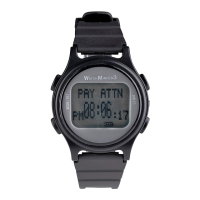
Need help?
Do you have a question about the WatchMinder WATCHMINDER3 and is the answer not in the manual?
Instructions to recharge the watch for 12 hours as shown on page 2.
Contact information for technical support via phone (212)222-5665 or email.
Lists various applications for children and adults with AD/HD and other conditions.
Overview of the two basic modes: Training Mode for self-help messages and Reminder Mode for tasks.
Notes on 24-hour clock usage, AM/PM display, and date/year settings.
Describes vibration alerts for Training and Reminder modes, including snooze feature.
Covers screen timeout, alert priority, reset procedure, and preset messages.
Lists 15 preset Training Mode messages and 50 preset Reminder Mode messages.
Low battery warning, importance of full charge, and consequences of complete power loss.
Using buttons 2 or 3 to rapidly scroll through numbers or messages.
Steps to enter time setting mode by pressing button 1.
Choosing between TIME or DATE setting via button 2.
Steps to enter date setting mode by pressing button 1.
Choosing DATE setting from the TIME/DATE menu via button 3.
Pressing button 1 twice to access the vibration ON/OFF menu.
Using buttons 2 or 3 to turn vibration ON or OFF and setting with button 1.
Pressing button 1 three times to begin setting up Training Mode.
Scrolling through 15 preset messages and selecting one with button 1.
Pressing button 1 three times to access review/delete options.
Pressing button 3 to review the current Training Mode settings.
Pressing button 1 four times to begin setting up Reminder Mode.
Scrolling through 50 preset messages and selecting one for a reminder.
Pressing button 1 four times to access reminder review/delete.
Using button 3 to review the current Reminder Mode settings.
Details on free manufacturing defect coverage for one year, exclusions, and owner responsibility.
Instructions for shipping the watch for defect repair, including required items and fees.
 General
| Model | WATCHMINDER3 |
|---|---|
| Display | LCD |
| Battery Life | Up to 1 year |
| Vibration Alerts | Yes |
| Water Resistance | Splash Resistant |
| Maximum Number of Alarms | 30 |
| Alarm Type | Vibration |
| Type | Vibration Reminder Watch |
| Target Users | Children, Adults |

 To Next Page