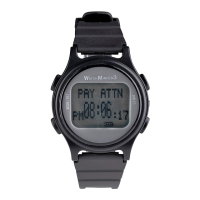
THE WATCHMINDER3 HAS THE FOLLOWING FUNCTIONS
TIME
& DATE (real-time calendar clock with time and date) (P8-P13)
VIBRATION
ALERT (P14-15)
TRAINING MODE (P16-P23)
REMINDER MODE (P24-P30)
SPECIAL OPERATING NOTES FOR WATCHMINDER3
1.A 24 hour clock is used in setting the watch. The display will be
in a regular 12 hour clock. AM or PM and day of a week will
appear on the screen automatically after time,date and year are set.
2.Vibration alert:
a. Training Mode: A training alert will last 10 seconds
and will automatically repeat again in 20 seconds.
Pushing any button, EXCEPT FOR LIGHT BUTTON, will
stop the vibration.
b. Reminder Mode: A reminder alert will last 10 seconds
and will automatically repeat again in 20 seconds.
There is also a “snooze feature”. The alert will automatically
repeat the first cycle in 2 minutes. Pushing any button,
EXCEPT FOR LIGHT BUTTON, will stop the vibration and
eliminate the automatic repeat “snooze”feature.


 To Next Page