Step 6: Start up the System
I .Turn on the cold water supp y valve. Check for leaks;
2. Insert the power plug into the socket;
NOTE: Ifthe system can't be powered on after you insert the power plug, check the power under the sink, as
this mostly occurs when the power under the sink is powered off Also, check the connection between the
power plug and the power outlet, and ensure that the system has been plugged correctly into the power
outlet, as this may occur in afew cases.To test if there is a prob em with the system itself, just pick up the
system and try another power outlet. Please contact us if the system can't be powered on. We will help you
figure it out.
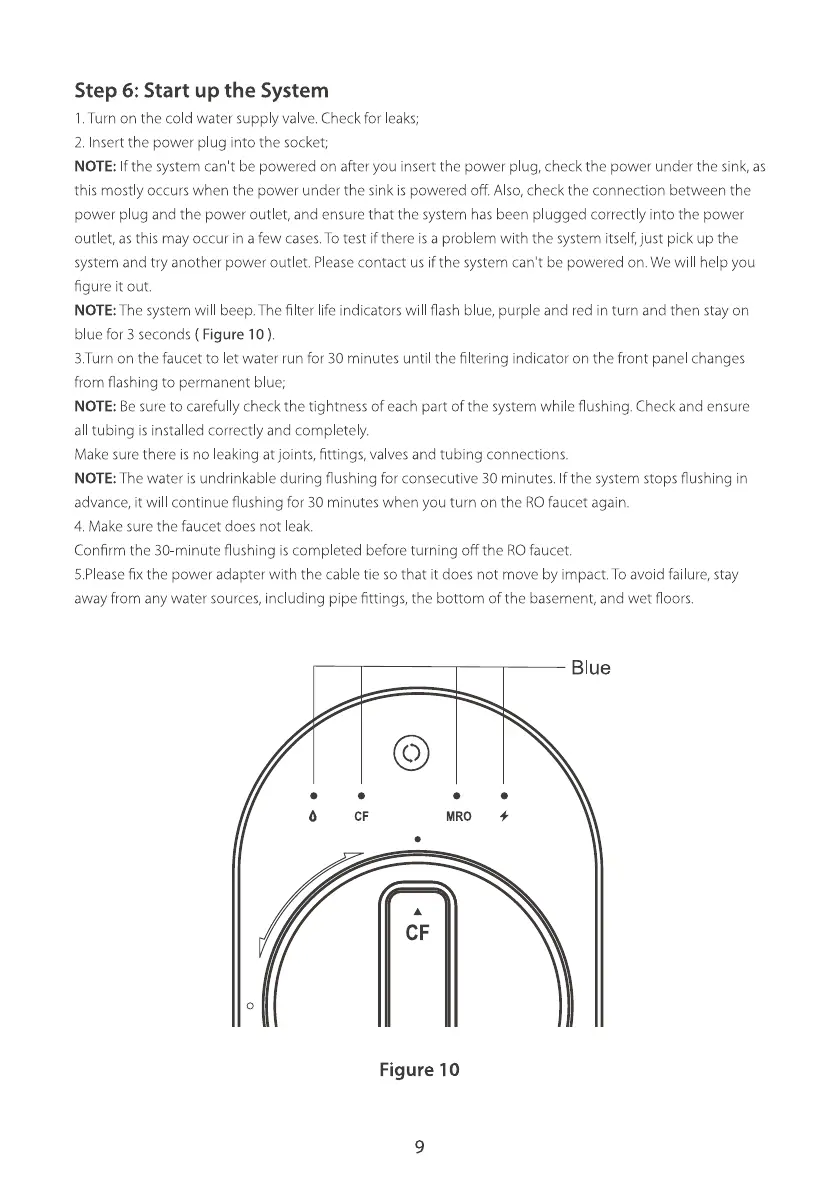
NOTE:The system wil beep. The filter life indicators will flash blue, purple and red in turn and then stay on
blue for 3 seconds ( Figure 10).
3.Turn on the faucet to let water run for 30 minutes until the filtering •ndicator on the front panel changes
from flashing to permanent blue;
NOTE: Be sure to carefully check the tightness of each part of the system while flushing. Check and ensure
all tubing is installed correctly and completely.
Make sure there is no leaking at joints, fittings, va ves and tubing connections.
NOTE: The water is undrinkable during flushing for consecutive 30 minutes. If the system stops flushing in
advance, it wil continue flushing for 30 minutes when you turn on the RO faucet again.
4. Make sure the faucet does not leak.
Confirm the 30 minute flushing is completed before turning off the ROfaucet.
5.PIeasefix the power adapter with the cable tie so that it does not move by impact. To avoid failure, stay
away from any water sources, including pipe fittings, the bottom of the basement, and wet floors.
Blue
MRO
CF
Figure 10
9







 To Next Page