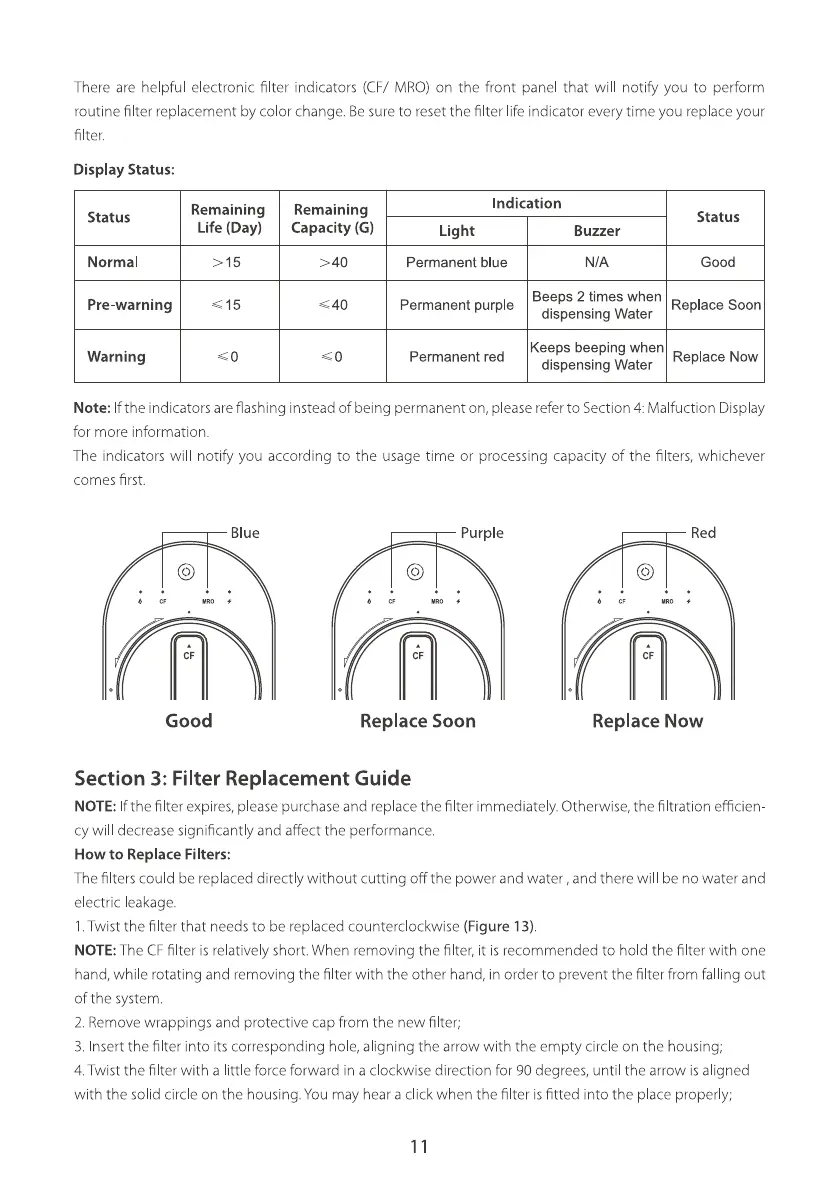
There are helpful electronic filter indicators (CF/ MRO)on the front panel that will notify you to perform
routine filter rep acement by color change. Besureto resetthe filter life indicator everytime you replaceyour
filter.
Display Status:
Status
Normal
Pre-warning
Warning
Remaining
Life (Day)
> 15
Remaining
Capacity (G)
> 40
< 40
Indication
Light
Permanent blue
Buzzer
Status
Good
Beeps 2 times when
Permanent purple Replace Soon
dispensing Water
Permanent red
Replace Now
dispensing Water
Note: If the indicators are flashing instead of being permanent on, p ease refer to Section 4 Malfuction Display
for more information.
The indicators will notify you according to the usage time or processing capacity of the filters, whichever
comes first.
Blue
MRO
CF
Good
Purple
CF
Replace Soon
Red
CF
Replace Now
Section 3: Filter Replacement Guide
NOTE: Ifthe filter expires, p ease purchase and replace the filter immediately. Otherwise, the filtration efficien
cy wil decrease significantly and affect the performance.
How to Replace Filters:
The filters cou d be replaced directly without cutting off the power and water , and there wil be no water and
electric eakage.
1.Twist the filter that needs to be replaced counterclockwise (Figure 13).
NOTE: The CFfilter is relative y short. When removing the filter, it is recommended to hold the filter with one
hand, while rotating and removing the filter with the other hand, in order to prevent the filter from falling out
of the system.
2. Remove wrappings and protective cap from the new filter;
3. Insert the filter into its corresponding hole, aligning the arrow with the empty circle on the housing;
4.Twist the filter with a little force forward in a clockwise direction for 90 degrees, until the arrow is aligned
with the solid circle on the housing. You may hear a click when the filter is fitted into the place properly;
11







 To Next Page