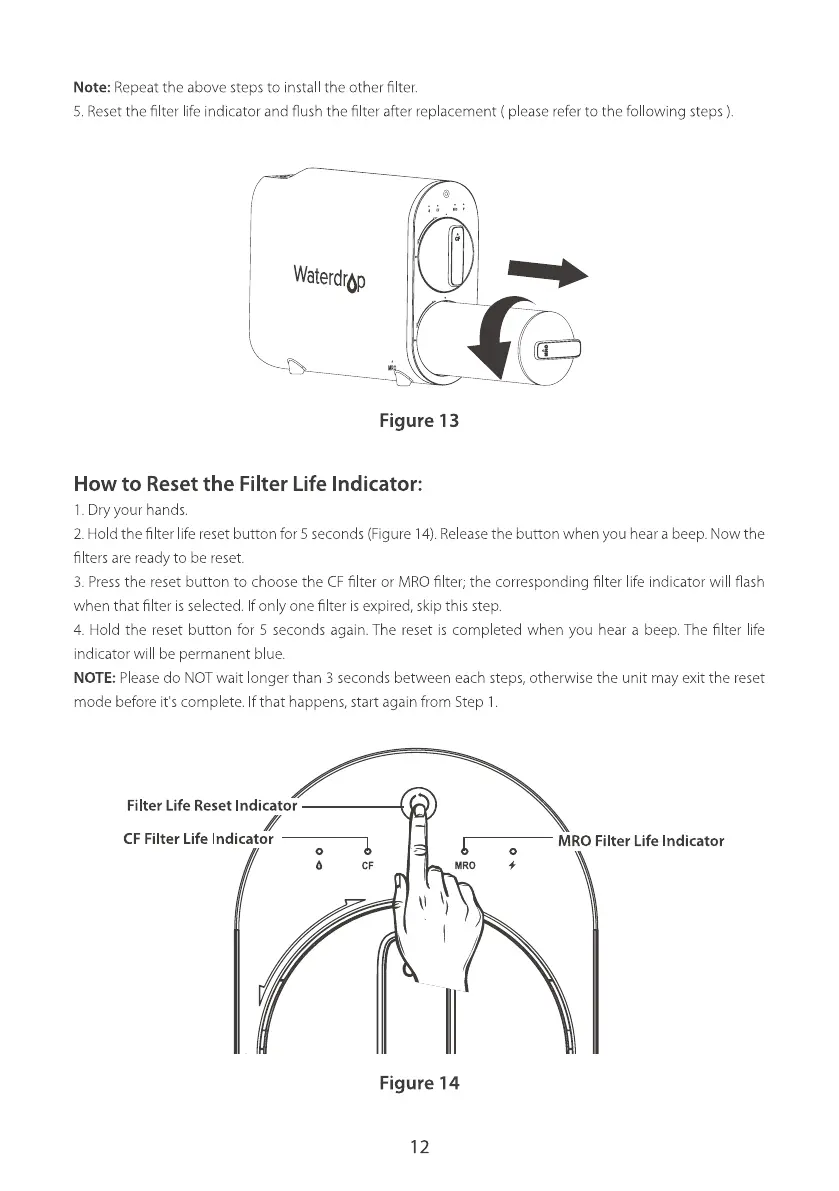
Note: Repeatthe above stepsto install the other filter.
5.Resetthe filter lifeindicator and flush the filter after replacement ( pleasereferto the following steps
Waterdrop
Figure 13
How to Reset the Filter Life Indicator:
I. Dry your hands.
2. Hold the filter life reset button for 5 seconds (Figure 14).Releasethe button when you hear a beep. Now the
filters are ready to be reset.
3. Pressthe reset button to choose the CFfilter or MRO filter; the corresponding fi ter life indicator will flash
when that filter is selected. fon y one filter is expired, skip this step.
4 Hold the reset button for 5 seconds again. The reset is completed when you hear a beep. The filter life
indicator will be permanent blue.
NOTE: Please do NOT wait onger than 3 seconds between each steps, otherwise the unit may exit the reset
mode before it's complete. f that happens, start again from Step I
Filter Life Reset Indicator
CF Filter Life Indicator
0
CF
MRO Filter Life Indicator
MRO
Figure 14
12







 To Next Page