11
DISK HANDLING
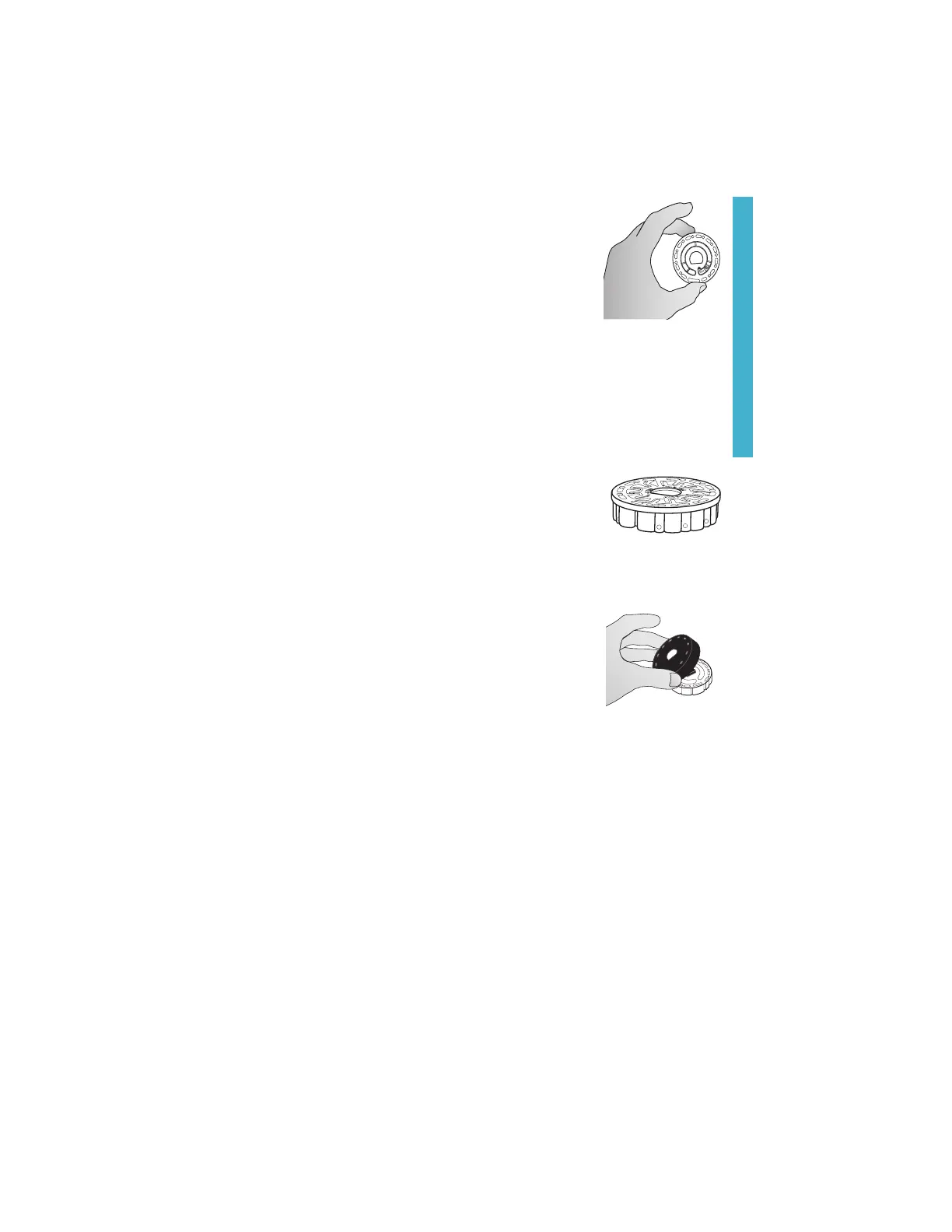
The disk should be handled only by the edges. Avoid touching the
top or bottom of the disk. The light passes through the non-frosted
areas of the disk so these areas must be kept free of smudges and
fingerprints. Wet disks should never be placed in the meter. Wet
disks should be dried with a lint free cloth before placing them into
the chamber.
The disk is positioned in the chamber by aligning the D-shaped hole in the center of the
disk over the D-shaped hub in the photometer chamber. The disk should be placed gently
on the hub. There is no need to firmly press the disk down onto the hub.
DISK STORAGE
Disks are sensitive to moisture. Avoid opening more packs than are needed. Disks
have a limited shelf life and should not be exposed to the humidity in the air more than
necessary.
Between tests store multiple-use disks flat. Do not agitate a
partially filled disk. It could leak or contaminate unused sections
of the disk. Multiple-use disks that are partially used should be
discarded at the end of the day. Do not transport the meter with a
disk in the chamber.
Store disks at 70-80 °F/21-27 °C. Disks with Salt reagent should be
stored and used at room temperature (68-74 °F/20-23 °C).
DISK COVER
The black disk cover is placed over the disk in the photometer
chamber to reduce interference from stray light. The disk cover is
positioned over the disk by aligning the D-shaped hole in the center
of the disk over the D-shaped hub in the photometer chamber. The
disk cover should be placed gently on the hub. There is no need
to firmly press the disk cover down onto the hub. The test will be
aborted if the disk cover is not used.
Only the Universal Disk Cover (Code 1719) that is included with the
WaterLink
®
Spin Touch
®
can be used with the multi-use disks.
METER CHECK DISK
The Meter Check Disk (Code 1705/1705-EU) serves multiple purposes:
¬ When the Meter Check Disk (MCD) is run as an option from the Disk Series menu
following the Range Check Procedure, the values on the display are compared to the
values on the chart of the Meter Check Disk package to determine whether the meter
is reporting results in the expected ranges.
¬ The LED Calibration procedure uses the MCD to set the brightness of the LEDs.
¬ The MCD is used in the Angle Calibration procedure to analyze the alignment of the
hub and disk.
For use of the Meter Check Disk see TROUBLESHOOTING WITH THE METER CHECK DISK.
USB CABLE
A USB cable connects the Waterlink
®
Spin Touch
®
to a Windows
®
-based PC. When used with
the AC Power Adapter, it connects the meter to an AC outlet.
GENERAL OPERATING PROCEDURES
www.GlobalTestSupply.com
Find Quality Products Online at: sales@GlobalTestSupply.com


 To Next Page