
 Need help?
Do you have a question about the Waterpik WP-580 Series and is the answer not in the manual?
Details risks and precautions related to electrical shock hazards during use.
Outlines significant safety warnings to prevent burns, electrocution, fire, and personal injury.
Specifies age limits and supervision requirements for using the appliance safely.
Explains the meaning of various symbols found on the product and packaging.
Indicates that not all listed accessory tips are included with every model.
Details the various types of Water Flosser tips available and their intended uses.
Provides instructions on how to charge the Water Flosser unit before its first use.
Guides users on how to properly fill the water reservoir for operation.
Explains the procedure for inserting and removing the flosser tips from the handle.
Details how to adjust the water pressure settings on the device for user preference.
Offers guidance on the proper technique for effective water flossing.
Explains the specific usage methods for various types of flosser tips.
Instructions for using the Plaque Seeker tip for effective plaque removal.
Guides on using mouthwash and the water spill protection feature for travel.
Provides instructions for cleaning the unit exterior and removing hard water deposits.
Details procedures and warnings regarding the removal and disposal of the product's battery.
Information on routine maintenance, service needs, and contact details for support.
Outlines the terms and conditions of the limited two-year warranty for the product.
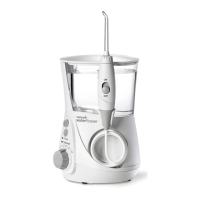
This document describes the Waterpik® Water Flosser, Model WP-580 Series, an oral hygiene device designed for household use. The primary function of this product is to provide a water flossing experience, which involves directing a stream of water to clean between teeth and below the gumline, supplementing traditional brushing.
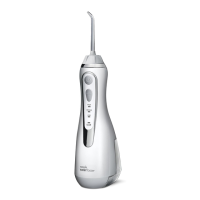
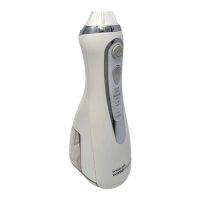
The Waterpik® Water Flosser is engineered to deliver water or other dental professional-recommended solutions to various areas of the mouth. It operates by generating a pressurized stream of fluid that helps remove plaque, food debris, and bacteria from areas that brushing alone might miss. The device features a magnetic charging system, allowing for convenient power replenishment. It is designed to be used with a user-supplied USB Type-A charger with a rated output of 5.0 VDC, 1.0 A. The unit includes a reservoir for holding water or solution, a power button for activation, and a mode/pressure button to adjust the intensity of the water stream. LED pressure indicators provide visual feedback on the selected pressure setting. The device is equipped with a tip eject button for easy removal and replacement of various specialized tips.
To begin using the Water Flosser, the unit must first be charged. A full charge typically takes approximately 8 hours and can last up to 4 weeks with typical use. The charge indicator on the handle flashes during charging and turns off when fully charged. When the battery is low (approximately 30% charge remaining), the indicator blinks quickly three times, signaling the need for recharging. It is recommended to charge the unit every 3-4 weeks for once-a-day users, or more frequently for those who use it twice a day or more. The charging process automatically stops when the batteries are full, and leaving the charger connected will not harm the battery.
Before use, the magnetic charging cable should be disconnected. The reservoir is filled with lukewarm water by lifting the flip top. Specialized tips are inserted into the center of the knob at the top of the handle until they click into place. To remove a tip, the tip eject button is pressed while pulling the tip from the handle; it is crucial not to press this button while the unit is running.
The pressure setting can be adjusted by pressing the mode button on the handle, allowing users to start with the lowest setting and gradually increase it to their preference. For optimal results, users should lean over a sink, place the tip in their mouth, aim it toward the gumline, and then turn the unit ON. The recommended technique involves starting with the back teeth and working towards the front, gliding the tip along the gumline, and pausing briefly between teeth. The jet stream should be directed at a 90-degree angle to the gumline. Lips should be slightly closed to minimize splashing, allowing water to flow freely into the sink. The unit should be kept upright during use. After use, the unit should be turned off, and any remaining liquid in the reservoir should be emptied. The reservoir can be removed by sliding the reservoir release latch to the unlock position and then sliding the reservoir down.
The Water Flosser comes with various specialized tips, although not all may be included in every model. These tips are designed for specific oral care needs:
The device can also be used with mouthwash and antibacterial solutions. These can be added by removing the reservoir and pouring the solution into the top opening, or by filling the reservoir through the fill door. After using any special solution, the unit should be rinsed by partially filling the reservoir with warm water and running it until empty to prevent clogging.
The Waterpik® Water Flosser requires minimal maintenance. The unit should never be immersed in water. For cleaning the exterior, the device should be unplugged from the electrical outlet, and a soft cloth with a mild non-abrasive cleanser should be used. The water reservoir is removable, top-rack dishwasher safe (with the heat cycle off), and should be removed and cleaned weekly.
To remove hard water deposits, which can build up depending on the mineral content of the water and hinder performance, a general cleaning process is recommended every 1 to 3 months. This involves adding 1 tablespoon of white vinegar to a full reservoir of warm water, pointing the handle and tip into a sink, turning the unit ON, and running it until the reservoir is empty. The unit should then be rinsed by repeating the process with a full reservoir of clean warm water.
The product contains a rechargeable lithium-ion battery and is considered electronic waste. It should not be disposed of with household waste. When the battery life ends, it should be disposed of or recycled according to local administrative regulations. If the battery is to be removed by the user for disposal, it should be fully discharged beforehand, and appropriate Personal Protective Equipment (e.g., goggles, gloves) should be worn. The battery is not replaceable by the consumer, and disassembling the product (unless for disposal) will void the warranty.
 General
| Product Name | Waterpik WP-580 Series |
|---|---|
| Category | Personal Care Products |
| Type | Water Flosser |
| Model Number | WP-580 |
| Color | Various |
| Power Source | Electric |
| Frequency | 50/60 Hz |
| Pressure Settings | 10 |
| Tips Included | 7 |
| Warranty | 3 years |
| Cordless | No |
| Water Tank Capacity | 22 ounces |
| Voltage | 100-240V |


 To Next Page