8 9
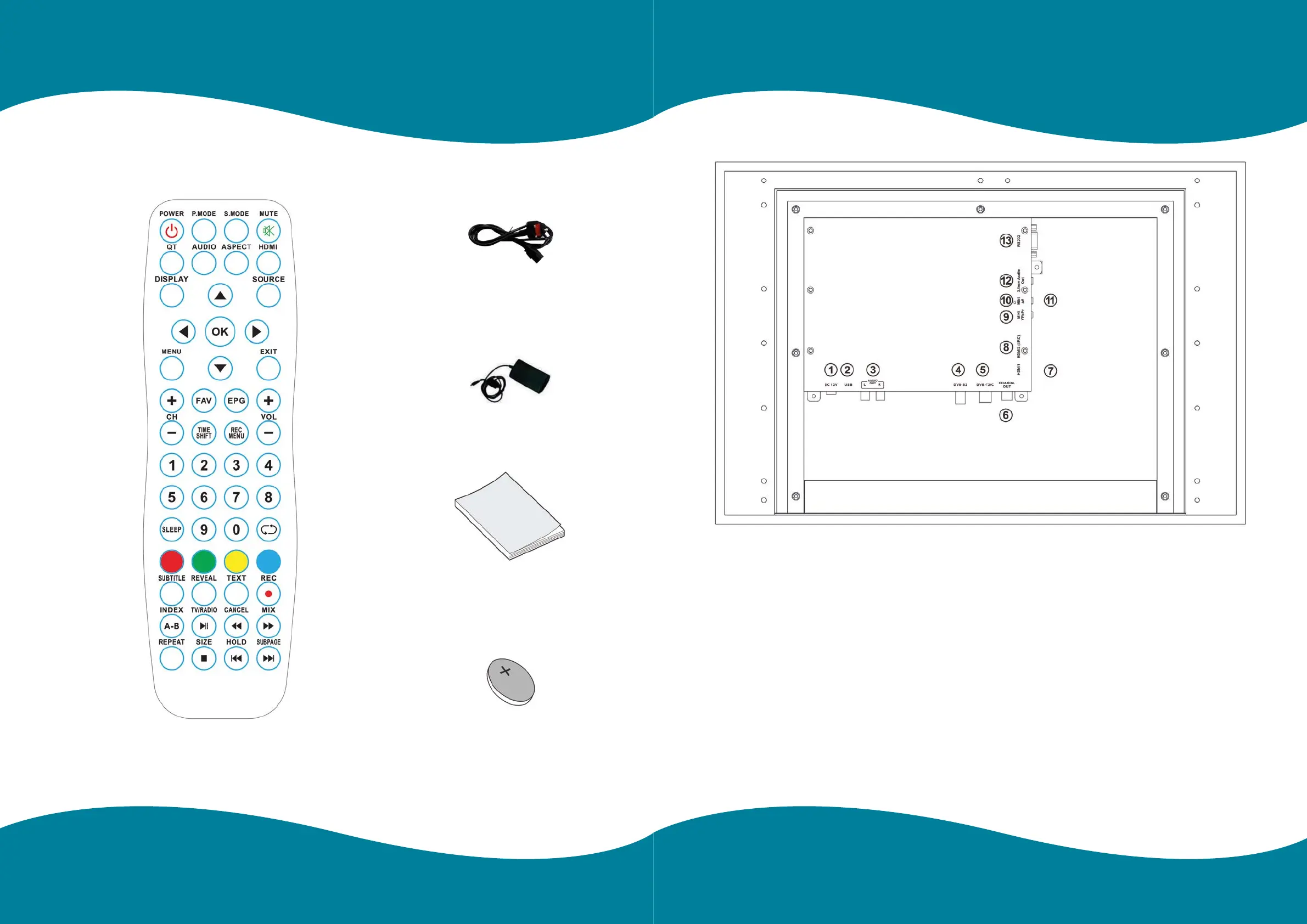
Overview of back panel
1 9 ”/2 4 ”/3 2 ”/4 3 ”
1. DC 12V
DV 12V input.
2. USB
Connect media stick for content.
3. L/R
Connect to the audio output jacks on your
amplier/home theatre.
4. DVB-S2
Connect to external SATELLITE to receive.
5 . DVB -T2/C
Connect to external antenna to receive the
ATV/DTV program in ATV/DTV mode.
6. COAXIAL OUT
Coaxial Digital audio output.
7. HDMI 1
Connect for HDMI.
8. HDMI 2(ARC)
Connect for HDMI.
9. MINI YPBPR
Connect for the Y/Pb/Pr Input in Component mode.
10. CI SLOT
Use to insert the Cl card.
11. MINIAV
Connect for VIDEO signal input in Composite mode.
12. 3.5mm Audio Out
Connect for headphones.
13. RS232
Use PC or other device to achieve the application of
controlling the TV by RS232 port.
Please make sure the following items are included with your LED TV. If any items are missing, contact your dealer.
Power Cord
Mains Adaptor
Owner’s Instructions
Battery (CR2032) Remote Control
Accessories


 To Next Page