EasyManua.ls Logo

Waterway TWM - User Manual

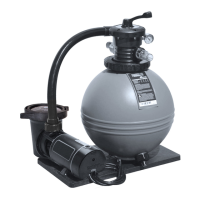
Waterway TWM
2 pages
Print Icon
To Next Page IconTo Next Page
Loading...
SAVE THESE INSTRUCTIONS
Read all instructions prior to installation
IMPORTANT: Follow all national and local building and safety codes.
SAFETY
Warning: A GFCI is required. System will require a 110Volt / 20 Amp service. DO NOT use extension cords. Use will void
warranty on pump motor. The pool equipment should be located between the pool skimmer and return line. The filtration system
should not be installed less than 2 ft. and no more than 5 ft. from the pool. The TWM Sand Filter System needs to be on a completely
flat / level surface. (patio block, cement slab, etc.).
INSTALLATION
1. Position Equipment Base, #18, P/N 672-1000, on a level, secure surface. Using Bolt, #16, P/N 819-0020, and Washer, #15, P/N
820-9001, position Support Mount, #17, P/N 218-6680, between the Equipment Base and Sand Filter Body, #12, and secure the
Sand Filter Body. Do Not over-tighten. There is no need to disassemble filter or pump assemblies.
2. Open box and remove pump and trap assemblies. Open pump trap lid and remove 1
1
2ʺ gasket. Position gasket into end of pump
trap union nut. Hand tighten union nut onto suction side of pump. Do Not over-tighten.
3. Place pump on left side of filter. Secure pump to base with 4 screws and washers provided.
4. Remove collar assembly from filter tank. Do Not lose screws. Important: To prevent damage to internal filter lateral compo-
nents, fill filter tank
1
2 full with water prior to adding sand. With sand fill guide, #10, P/N 502-2010, positioned in filter tank
opening, add only recommended #20 grade silica sand. See Fill Chart. Remove sand fill guide. Important: Clean and remove
all debris from filter tank flange after adding sand.
5. Assure that O-Ring, #9, P/N 805-0435, is positioned onto multiport throat.
6. Install Multiport Valve with inlet and outlet ports facing pool. Top of internal stand pipe seats directly into Multiport Valve. Push
multiport Valve evenly onto tank flange. Note: Make sure tank flange is clear of any sand debris.
7. Install filter tank collar assembly, #6, P/N 718-1960 and #7, P/N 819-0015, by threading collar clockwise until hand tight. Then use col-
lar wrench to tighten further.
8. To use collar wrench, #5, P/N 505-1970, place on collar assembly use both hands to turn wrench
1
2 to
3
4 of a turn to secure multiport
valve to filter body.
9. Apply teflon tape (4 wraps ideal) onto 1
1
2ʺ Hose fittings with
3
8ʺ Barb, #27, P/N 417-6151. Hand tighten into valve inlet (top)
and outlet (bottom), onto pump outlet and to Pump suction side.
10. Connect 3 ft. corrugated hose to top inlet port and onto pump using hose clamps, #28.
11. Connect 6 ft. corrugated hose to 1
1
2ʺ Hose fittings with
3
8ʺ Barb, #27, P/N 417-6151, onto bottom outlet port and to pump suction side.
12. Apply Teflon tape (4 wraps ideal) to Pressure Gauge, #1, P/N 830-2001. Thread into Multiport Valve.
13. Install Waste Adapter Fitting, #3, P/N 425-1928, with O-Ring for Waste Adapter, #2, P/N 805-0224.
SYSTEM START-UP
1. Fill pool until water is halfway up length of skimmer throat.
2. Make sure pump trap is full of water. Slightly loosen trap lid to relieve pressure and allow water to fill trap. Re-tighten lid.
3. Make sure Multiport Valve handle is in Filter position.
4. Plug pump into GFCI outlet and turn pump on. Turn two (2) speed pumps to high.
5. Make note of start-up pressure on gauge.
CLEANING INSTRUCTIONS
Note: When pressure gauge reading is 5 PSI or higher than original starting pressure, the filter needs to be cleaned. The TWM Sand
Filter System features our exclusive 7-Position Multiport Valve, which ensures safe and simple filter maintenance.
Pressurized vessel. Never attempt to loosen or open Collar Assembly, #6, P/N 718-1960 and #7, P/N 819-0015, while system is running.
It could cause severe injury or harm to user.
1. Turn off pump.
2. Attach backwash hose (optional) to waste port adapter.
3. Rotate Multiport Valve handle to Backwash position, Turn pump on and run for 90 second intervals or until discharge water is clear. Turn pump off.
4. Rotate Multiport Valve handle to rinse position. Turn pump on for 30 seconds.
5. Repeat steps 3 & 4 until all discharge water is clear while pump is turned on.
6. Rotate Multiport valve handle to filter position.Turn pump on. Filter is now in normal operating position.
TWM SAND FILTER SYSTEM
16
ʺ
ʺ
P/N 520-1610 19
ʺ
ʺ
P/N 520-1910 22
ʺ
ʺ
P/N 520-1700
WINTERIZATION
1. Backwash filter system completely. See Cleaning Instructions.
2. Run a filter cleaning chemical through filter system as, per cleaner instructions.
3. Turn pump off. Disconnect hoses from skimmer and return fitting.
4. Remove drain plug from bottom of filter tank. Do Not remove hex drain assembly, #13.
5. Unscrew drain plugs located at bottom of pump trap and front of pump housing. Let water drain completely.
6. Disconnect filter to pump connection. Loosen union connection on discharge of pump and remove from pump.
Do Not lose 2ʺ union gasket. Lift and remove pump and pump base from filter base. Store inside.

Question and Answer IconNeed help?

Do you have a question about the Waterway TWM and is the answer not in the manual?

Summary

Safety and Installation Instructions

General Safety Warnings

GFCI requirement, service amp, extension cord use, pool equipment location, and filtration system placement on a level surface.

System Installation Steps

Detailed procedure for positioning equipment base, securing sand filter body, and connecting components with fittings and hoses.

System Start-Up Procedure

Instructions for filling the pool, ensuring pump trap is full, priming the pump, and noting the initial pressure reading.

Cleaning Instructions and Safety

Guidance on when to clean the filter and a critical warning against loosening the collar assembly while the system is running.

Filter Operation and Maintenance

Filter Backwash and Rinse

Steps for performing backwash and rinse cycles on the multiport valve to clean the filter media.

Filter Operation Modes

Description of how to operate the multiport valve for filtration, waste, and closed modes.

Troubleshooting Common Issues

Motor Does Not Start

Diagnosing reasons why the motor fails to start, such as power supply or circuit breaker issues.

Excessive Pump Noise

Identifying causes for noisy pump operation, including worn bearings or suction line issues.

Thermal Overload Trips

Troubleshooting thermal overload trips, wiring faults, and incorrect voltage.

Inadequate Filtering

Addressing causes of poor filtering performance, such as clogged baskets, dirty sand, or system pressure.

No Water Flow

Diagnosing the lack of water flow, including obstructions, closed valves, or clogged impellers.

Replacement Parts and Diagram

Replacement Parts List

A comprehensive list of part numbers and their corresponding descriptions for the sand filter system.

System Component Diagram

An exploded view diagram illustrating the assembly of the sand filter system and its components.

Overview

The Waterway TWM Sand Filter System is a pool filtration unit designed for residential use, emphasizing safety, ease of installation, and straightforward maintenance. It is available in various sizes, indicated by the part numbers: "16" P/N 520-1610, "19" P/N 520-1910, and "22" P/N 520-1700, likely corresponding to filter tank diameters in inches.

Function Description

The primary function of the TWM Sand Filter System is to filter pool water, removing debris and impurities to maintain water clarity and hygiene. It operates by pumping pool water through a sand-filled filter tank, where the sand acts as a natural filter medium. The system includes a pump for circulating water, a filter tank for filtration, and a Multiport Valve for controlling various operational modes such as filtering, backwashing, rinsing, and waste. The Multiport Valve is a key component, allowing users to easily switch between these modes without complex plumbing changes.

Important Technical Specifications

  • Electrical Requirements: The system requires a 110 Volt / 20 Amp service. It is crucial to use a Ground Fault Circuit Interrupter (GFCI) for safety and not to use extension cords, as this will void the pump motor warranty.
  • Pump: The system includes a center-discharged, 3/4 HP, 1-speed pump (Part No. 3410310-15). The pump is designed to circulate water efficiently through the filter.
  • Filter Tank Sizes and Sand Capacity:
    • 16" Sand Filter Body (Part No. 515-1601): Requires 50 lbs of #20 grade silica sand.
    • 19" Sand Filter Body (Part No. 515-1901): Requires 100 lbs of #20 grade silica sand.
    • 22" Sand Filter Body (Part No. 515-2001): Requires 150 lbs of #20 grade silica sand.
    • 26" Sand Filter Body (Part No. 515-2601): Requires 200 lbs of #20 grade silica sand.
  • Multiport Valve: The system features an exclusive 7-Position Multiport Valve (Part No. WVS003), which simplifies filter maintenance and operation.
  • Pressure Gauge: A 0-30 PSI Pressure Gauge (Part No. 830-2001) is included to monitor filter pressure, indicating when cleaning is necessary.
  • Hose Fittings: The system uses 1½" Hose Fittings with 3/8" Barb (Part No. 417-6151) and includes corrugated hoses of 3 ft. (Part No. 872-9001) and 6 ft. (Part No. 872-9002) lengths.
  • Installation Location: The filtration system should be located between the pool skimmer and return line, not less than 2 ft. and no more than 5 ft. from the pool. It must be installed on a completely flat/level surface (e.g., patio block, cement slab).

Usage Features

  • Easy Installation: The manual provides detailed, step-by-step instructions for assembly, including positioning the equipment base, securing the pump and filter body, adding sand, and connecting hoses. It emphasizes hand-tightening unions and using Teflon tape for threaded connections.
  • System Start-Up: A clear start-up procedure is outlined, involving filling the pool and pump trap, setting the Multiport Valve to "Filter," and turning on the pump. Users are instructed to note the initial pressure gauge reading for future maintenance reference.
  • Multiport Valve Operations: The 7-Position Multiport Valve allows for various operational modes:
    • Filter: Normal operating position for filtering pool water.
    • Backwash: Used for cleaning the filter by reversing water flow to flush out trapped debris.
    • Rinse: Used after backwashing to ensure all discharge water is clear before returning to filter mode.
    • Waste: Allows water to bypass the filter and be discharged directly, useful for lowering pool water level or vacuuming heavy debris directly to waste.
    • Other positions (not explicitly detailed in the provided text but implied by "7-Position") typically include Recirculate/Bypass (circulates water without filtering), Closed (shuts off flow to the filter), and Winterize (for draining the filter).
  • Two-Speed Pump: The instructions mention "Turn two (2) speed pumps to high" during start-up, indicating that the system may be compatible with or include a two-speed pump, offering energy efficiency at lower speeds for continuous filtration.

Maintenance Features

  • Cleaning Instructions: The system provides a straightforward cleaning process using the Multiport Valve:
    1. Turn off the pump.
    2. Attach a backwash hose to the waste port adapter (optional).
    3. Rotate the Multiport Valve handle to "Backwash" position.
    4. Turn the pump on for 90-second intervals or until discharge water is clear, then turn the pump off.
    5. Rotate the Multiport Valve handle to "Rinse" position.
    6. Turn the pump on for 30 seconds.
    7. Repeat steps 3 & 4 until all discharge water is clear while the pump is turned on.
    8. Rotate the Multiport Valve handle to "Filter" position and turn the pump on for normal operation.
  • Pressure Gauge Monitoring: The pressure gauge is a critical maintenance tool. When the reading is 5 PSI or higher than the original start-up pressure, it indicates that the filter needs cleaning.
  • Winterization: A comprehensive winterization procedure is provided to protect the system during cold weather:
    1. Completely backwash the filter.
    2. Run a filter cleaning chemical through the system.
    3. Turn off the pump and disconnect hoses from the skimmer and return fitting.
    4. Remove the drain plug from the bottom of the filter tank (but not the hex drain assembly).
    5. Unscrew drain plugs from the bottom of the pump trap and front of the pump housing to drain water completely.
    6. Disconnect the filter-to-pump connection, loosen the union connection on the pump discharge, and remove it from the pump.
    7. Do not lose the 2" union gasket.
    8. Lift and remove the pump and pump base from the filter base and store them indoors.
  • Troubleshooting Guide: The manual includes a troubleshooting section to help diagnose common issues such as the motor not starting, thermal overload trips, excessive pump noise, inadequate filtering, and no water flow. This section provides potential causes for each problem, aiding users in self-diagnosis and resolution.
  • Replacement Parts List: A detailed list of replacement parts with item numbers, part numbers, and descriptions is provided, facilitating easy identification and ordering of components for repairs or maintenance. This includes parts for the pump, filter tank, Multiport Valve, and various fittings and hardware.

Safety Features

  • GFCI Requirement: Emphasizes the mandatory use of a GFCI for electrical safety.
  • No Extension Cords: Strictly prohibits the use of extension cords to prevent electrical hazards and warranty voidance.
  • Warning Against Opening Under Pressure: A prominent warning advises against attempting to loosen or open the Collar Assembly while the system is running due to the risk of severe injury or harm from pressurized water.
  • Proper Sand Filling: Instructions for filling the filter tank with water first (half full) before adding sand are crucial to prevent damage to internal filter lateral components.
  • Debris Removal: Users are instructed to clean and remove all debris from the filter tank flange after adding sand to ensure a proper seal with the Multiport Valve.

Waterway TWM Specifications

General IconGeneral
BrandWaterway
ModelTWM
CategoryWater Filtration Systems
LanguageEnglish

Related product manuals