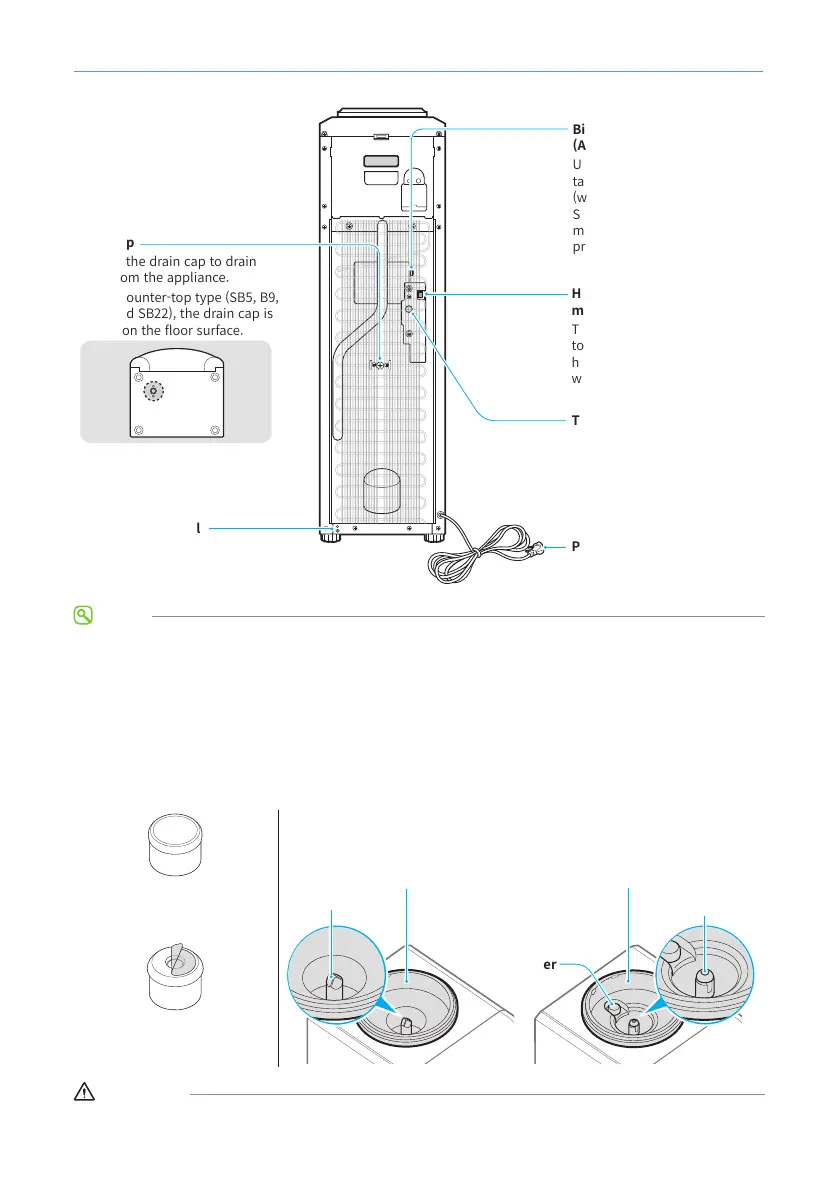
Turn on the hot water switch
to get hot water. The appliance
heats water only when the hot
water switch is on.
Plug the end of the power cord
into a power outlet.
Remove the drain cap to drain
water from the appliance.
For the counter-top type (SB5, B9,
SB19, and SB22), the drain cap is
located on the oor surface.
Used to control the
temperature of the cold water.
Used to reset the hot water
tank. Refer to home page
(www.clovercooler.com) >
Support > Service Manuals for
more details about the specic
procedures.
NOTE
• This user's manual was written based on the B19 model. The location of components may dier depending
on the model.
• Depending on the country, the grounding connection and power plug specications may dier.
The NSK prevents water spillage when loading or unloading the water bottle. Check which NSK type your
appliance is tted with before loading the water bottle, as the bottle caps dier depending on the type of
NSK.
The end of the water inlet is
round and it is compatible
with a dual cap.
The end of the water inlet is
pointed and it is compatible
with a common cap.
WARNING
Do not use the appliance without the NSK. If water overows and enters the appliance, it may create a risk of
electric shock or damage electronic components inside the appliance.


 To Next Page
 Loading...