EasyManua.ls Logo

Watts Clever EW4006 - User Manual

Watts Clever EW4006
5 pages
Print Icon
To Next Page IconTo Next Page
Loading...
WIRELESS
Energy Monitor
Monitor household electricity use
Instruction Manual
EW4006
Question and Answer IconNeed help?

Do you have a question about the Watts Clever EW4006 and is the answer not in the manual?

Summary

Safety Precautions

General Safety Warnings

Essential safety guidelines for handling the device, avoiding electrical hazards, and proper usage to prevent injury.

Usage Disclaimer

Clarifies that the device is educational and should not replace official energy meter readings for billing purposes.

Device Overview and Installation

Parts Identification

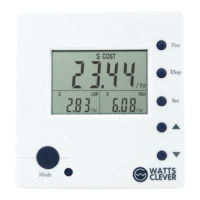
Identifies the main components of the Wireless Energy Monitor, including the LCD display, buttons, and associated parts.

Initial Installation Steps

Covers the initial steps for installing the Sensor Clip around the electricity meter wire and locating the main unit.

Setup and Pairing

Pairing the Transmitter and Monitor

Instructions on how to wirelessly connect the Power Transmitter and the Energy Monitor unit for data communication.

Initial Configuration

Guides users through setting the date, time, currency, and unit cost for accurate electricity usage calculations.

Display Modes and Operation

Navigating Display Modes

Explains how to cycle through different display views such as power, cost, CO2, and time periods (daily, monthly, yearly).

Data Display Examples

Illustrates typical readings for power consumption, monetary cost, and CO2 emissions displayed by the monitor.

Important Information

Electrical Safety and Usage

Provides critical safety information regarding mains voltage, damaged wiring, and proper usage of the monitor.

Battery Replacement

Details how to identify low battery status and the process for replacing batteries in the transmitter and monitor units.

Product Specifications

Summary

Safety Precautions

General Safety Warnings

Essential safety guidelines for handling the device, avoiding electrical hazards, and proper usage to prevent injury.

Usage Disclaimer

Clarifies that the device is educational and should not replace official energy meter readings for billing purposes.

Device Overview and Installation

Parts Identification

Identifies the main components of the Wireless Energy Monitor, including the LCD display, buttons, and associated parts.

Initial Installation Steps

Covers the initial steps for installing the Sensor Clip around the electricity meter wire and locating the main unit.

Setup and Pairing

Pairing the Transmitter and Monitor

Instructions on how to wirelessly connect the Power Transmitter and the Energy Monitor unit for data communication.

Initial Configuration

Guides users through setting the date, time, currency, and unit cost for accurate electricity usage calculations.

Display Modes and Operation

Navigating Display Modes

Explains how to cycle through different display views such as power, cost, CO2, and time periods (daily, monthly, yearly).

Data Display Examples

Illustrates typical readings for power consumption, monetary cost, and CO2 emissions displayed by the monitor.

Important Information

Electrical Safety and Usage

Provides critical safety information regarding mains voltage, damaged wiring, and proper usage of the monitor.

Battery Replacement

Details how to identify low battery status and the process for replacing batteries in the transmitter and monitor units.

Product Specifications

Watts Clever EW4006 Specifications

Power IconPower
maximum rated sensor current100 A
minimum current sensitivity0.1 A
wireless transmission frequency433 MHz
Weight and Dimensions IconWeight and Dimensions
length84 mm
width80 mm
height39 mm