EasyManua.ls Logo

WaveForm MIMO - User Manual

WaveForm MIMO
16 pages
Print Icon
To Next Page IconTo Next Page
Loading...
by
Your MIMO External Antenna is sold and supported by Waveform
and our team of Signal Specialists.
We’ve helped over 20,000 customers boost their signal since our
company was founded in 2007. We’ve installed and con gured
thousands of devices in buildings across the country, and we’re
here to help. If you have any issues at all, please don’t hesitate to
reach out.
52 Maxwell,
Irvine, CA 92618
+1 (800) 761-3041
www.waveform.com
help@waveform.com
About Waveform
MIMO External
Antennas
We know, reading manuals isn’t always fun. But we promise its worth it.
We’ve helped hundreds of customers improve signal to their cellular LTE/5G
routers. We’ve compiled everything we’ve learned in this manual.
Give it a read before you start: it’ll save you time and help you get the best
performance out of your MIMO External Antenna.
PLEASE READ THIS FIRST:
Question and Answer IconNeed help?

Do you have a question about the WaveForm MIMO and is the answer not in the manual?

Summary

Install Manuals, Who Needs Em?

Contact Us

Provides contact information and availability for customer support and inquiries.

Before You Start

How Much Improvement Should You Expect?

Install Process Overview

Outlines the suggested step-by-step process for installing the MIMO External Antenna.

Assembling the Antenna(s)

Positioning and Aiming the Antenna(s)

Test Mode Setup

Details how to connect antennas and router/hotspot for testing in different locations.

Positioning Recommendations

Provides guidance on optimal antenna locations, avoiding interference for better signal.

Your Data Rate Measurements

Assembling Your System

Test & Install Permanently

Surge Protection and Grounding

Recommends surge protector kits and grounding methods for outdoor antennas and mounts.

Need Help and Support

Overview

This document is a user manual for Waveform's MIMO External Antennas, designed to improve cellular LTE/5G signal for routers and hotspots. The manual emphasizes the importance of reading it thoroughly to save time and achieve optimal performance.

Function Description:

The Waveform MIMO External Antennas are designed to enhance cellular LTE/5G signal reception for routers and hotspots, leading to improved data rates. The system works by conditioning the outdoor signal, which is particularly beneficial in areas with weak or unusable indoor signal. The manual highlights that while some outdoor signal is necessary for the antennas to be effective, they can significantly boost data rates even if the outdoor signal is only marginally "usable" (defined as having at least 0.1 Mbps download and upload speed when the router/hotspot is outdoors without external antennas). The antennas utilize MIMO (Multiple-Input Multiple-Output) technology, which involves using multiple antennas to improve wireless communication performance. For the Log Periodic Antennas, cross-polarization (angling two antennas at 45 degrees in opposite directions) is crucial for optimal MIMO performance.

Important Technical Specifications:

The MIMO Panel and Log Periodic Antennas support a wide range of cellular bands, ensuring compatibility with most 3G, 4G LTE, and low/mid-band 5G services in the US and globally.

  • 4G LTE Bands (600 - 2700 MHz):
    • AT&T: B2, B4, B5, B12, B17, B29, B30, B66
    • Verizon: B2, B4, B5, B13, B66
    • T-Mobile: B2, B4, B5, B12, B25, B26, B41, B66, B71
  • 5G Bands (600 - 2700 MHz):
    • AT&T: n2, n5, n66
    • Verizon: n2, n5, n66
    • T-Mobile: n41, n71
  • Cable Type (for complete kits): 2x 30 ft RS400 Cables.
  • Pigtail Adapters (for complete kits): 2x U.FL, 2x TS9, or 2x SMA, depending on the router/hotspot connectors.
  • Barrel Adapters (for complete kits): 2x N-Male to N-Male.
  • Mounting: Compatible with the optional J-Mount (included in complete kits) or other suitable mounts.

Usage Features:

The manual outlines a comprehensive installation process designed to guide users from initial setup to permanent installation and optimization.

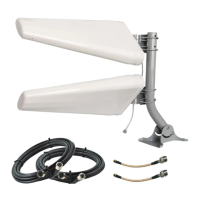
  • Kit Contents: The manual details the components included in the kit, which vary depending on whether a single MIMO Panel Antenna or two Log Periodic Antennas were purchased. Complete kits also include cables, adapters, and mounting hardware (J-Mount bracket and mount).
  • Assembly:
    • Log Periodic Antennas: Users are instructed to mount two Log Periodic Antennas at 45 degrees in opposite directions (cross-polarization) on the mount, treating them as a single antenna unit.
    • MIMO Panel Antenna: A single MIMO Panel Antenna is mounted directly.
    • Detailed online instructions for assembling the J-Mount and L-bracket(s) are provided at waveform.com/polemount-instructions.
  • Positioning and Aiming (Test Mode): This is highlighted as the most crucial step for optimal performance.
    • Test Setup: Users are advised to set up the antenna(s) in "test mode" by connecting them directly to a battery-powered hotspot/router or using a power extension cord to take the setup outdoors. If taking the router outdoors isn't feasible, a longer coax cable can be used to take only the antenna(s) outside while the router remains indoors.
    • Speed Tests: The goal is to find the location and direction that maximize data rates. Users are instructed to run 1-2 speed tests at each potential location and direction using a speed test app (e.g., Speedtest by Ookla via waveform.com/speedtest or speedtest.net). A table is provided to record download and upload speeds for different positions and directions.
    • Location Strategy: The manual suggests testing various locations, including different sides of the building and the roof. It notes that while higher positions often have stronger signals, they can also introduce more interference, making side-of-building mounts potentially better for shielding.
  • Provisional Installation: After identifying the best location, users are advised to perform a temporary installation by running cables indoors through a window or door to test performance before making permanent modifications.
  • Permanent Installation: Once satisfied with data rates, users can proceed with drilling holes and finalizing cable runs.
  • Advanced Optimization (Optional): For users seeking further technical optimization, the manual provides guidelines:
    • Tower Identification: Use CellMapper.net to locate nearby towers and identify eNodeBIDs (if available through the router's admin interface).
    • Band Locking: Aim antennas at nearby towers and band-lock the hotspot/router to each band transmitted by the tower, running speed tests to find the fastest bands.
    • Carrier Aggregation: Experiment with enabling multiple bands and carrier aggregation to find the fastest band combination. The manual notes that carrier aggregation doesn't always improve performance, so sticking to a single fast band might be better.
    • Device-Specific Guides: Waveform provides device-specific guides at waveform.com/hotspot-guides for common cellular routers and hotspots, as device interfaces vary.
  • Referral Program: Users excited about their MIMO antenna can refer friends, family, or neighbors to receive 5% cash back (via PayPal) on their purchases, while the referred person gets 5% off their kit. Details are available at waveform.com/referrals.

Maintenance Features:

The manual includes important recommendations for long-term performance and safety.
  • Cable Management: If there is extra cable, it should not be coiled tightly. Loops should be as large as possible (4 ft or wider) to minimize negative side-effects.
  • Re-optimization: If data rates decrease over time, users are advised to consider re-optimizing their system. This is because carriers may change tower configurations, broadcast different bands, or activate/deactivate towers.
  • Surge Protection & Grounding:
    • Lightning Surge Protectors: It is strongly recommended to use two Lightning Surge Protector Kits (available at waveform.com/surge-protector) to ground outdoor antennas. These should be installed just before the coaxial cable enters the building to protect the router/hotspot from high-voltage power in case of lightning.
    • Grounding Cable: At least 10 AWG cable is recommended for grounding. Thinner cables (e.g., 12 AWG, 14 AWG) are not suitable.
    • Mount Grounding: Both the surge protectors and the antenna mount (e.g., J-Mount) should be grounded. If a satellite or HDTV antenna is already on the roof and grounded, the mast and lightning surge protectors can be grounded to it. Alternatively, they can be grounded directly to a grounding rod.
  • Weatherproofing Outdoor Connections: N-type connectors are outdoor-rated, but water ingress can still cause issues. Users are strongly recommended to wrap all outdoor N-type connections with stretch-and-seal self-fusing silicone rubber tape (available at most hardware stores) to prevent water damage.
  • Lifetime Technical Support: Waveform offers lifetime technical support for every system sold. Users can contact Waveform's team of Signal Specialists via phone (+1 (800) 761-3041) or email (help@waveform.com) from 9 am to 5 pm PT, Monday to Friday, for troubleshooting, fine-tuning, and general assistance.

WaveForm MIMO Specifications

General IconGeneral
BrandWaveForm
ModelMIMO
CategoryAntenna
LanguageEnglish

Related product manuals