EasyManua.ls Logo

Wavetek 143 - Page 10

Wavetek 143
62 pages
Print Icon
To Next Page IconTo Next Page
To Previous Page IconTo Previous Page
Loading...
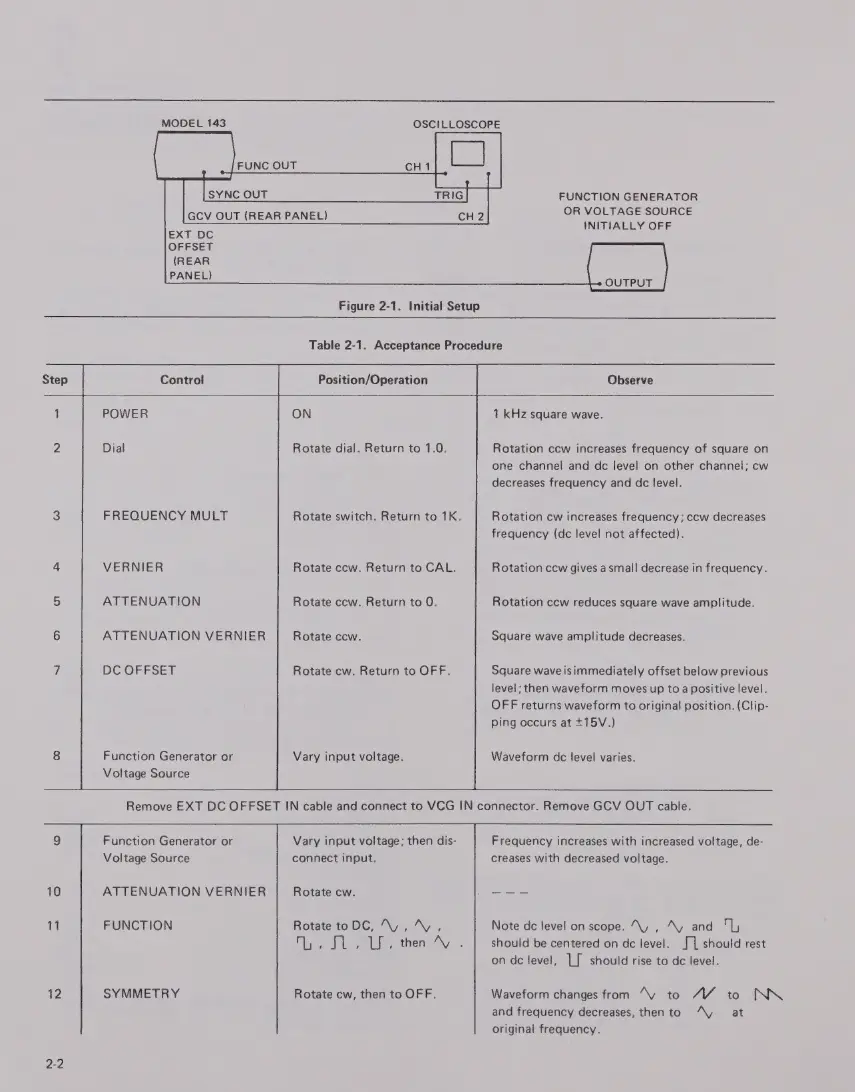
MODEL
143
SYNC
OUT
TRIG
GCV
OUT
(REAR
PANEL)
OSCILLOSCOPE
CH
1
сн?
FUNCTION
GENERATOR
OR
VOLTAGE
SOURCE
INITIALLY
OFF
OUTPUT
Figure
2-1.
Initial
Setup
Table
2-1.
Acceptance
Procedure
Step
Control
Position/Operation
Observe
1
POWER
ON
1
kHz
square
wave.
2
Dial
Rotate
dial.
Return
to
1.0.
Rotation
ccw
increases
frequency
of
square
on
one
channel
and
dc
level
on
other
channel;
cw
decreases
frequency
and
dc
level.
3
FREOUENCY
MULT
Rotate
switch.
Return
to
1K.
Rotation
cw
increases
frequency;
ccw
decreases
frequency
(dc
level
not
affected).
4
VERNIER
Rotate
ccw.
Return
to
CAL.
Rotation
ccw
gives
a
small
decrease
in
frequency.
5
ATTENUATION
Rotate
ccw.
Return
to
0.
Rotation
ccw
reduces
square
wave
amplitude.
6
ATTENUATION
VERNIER
Rotate
ccw.
Square
wave
amplitude
decreases.
7
DC
OFFSET
Rotate
cw.
Return
to
OFF.
Square
wave
is
immediately
offset
below
previous
level;
then
waveform
moves
up
to
a
positive
level.
OFF
returns
waveform
to
original
position.
(Clip-
ping
occurs
at
+15V.)
8
Function
Generator
or
Vary
input
voltage.
Waveform
dc
level
varies.
Voltage
Source
Remove
EXT
DC
OFFSET
IN
cable
and
connect
to
VCG
IN
connector.
Remove
GCV
OUT
cable.
9
Function
Generator
or
Vary
input
voltage;
then
dis-
Frequency
increases
with
increased
voltage,
de-
Voltage
Source
connect
input.
creases
with
decreased
voltage.
10
ATTENUATION
VERNIER
Rotate
cw.
---
11
FUNCTION
Rotate
to
DC,
^V
,
^v,
Note
dc
level
on
scope.
W.,
^y
and
"ly
fS
then
А7
should
be
centered
on
dc
level.
j
|
should
rest
on
dc
level,
1
[
should
rise
to
dc
level.
12
SYMMETRY
Rotate
cw,
then
to
OFF.
Waveform
changes
from
^v
to
M
to
NN
2-2
and
frequency
decreases,
then
to
^y
at
original
frequency.

Related product manuals