EasyManua.ls Logo

Wavetek 143 - Page 13

Wavetek 143
62 pages
Print Icon
To Next Page IconTo Next Page
To Previous Page IconTo Previous Page
Loading...
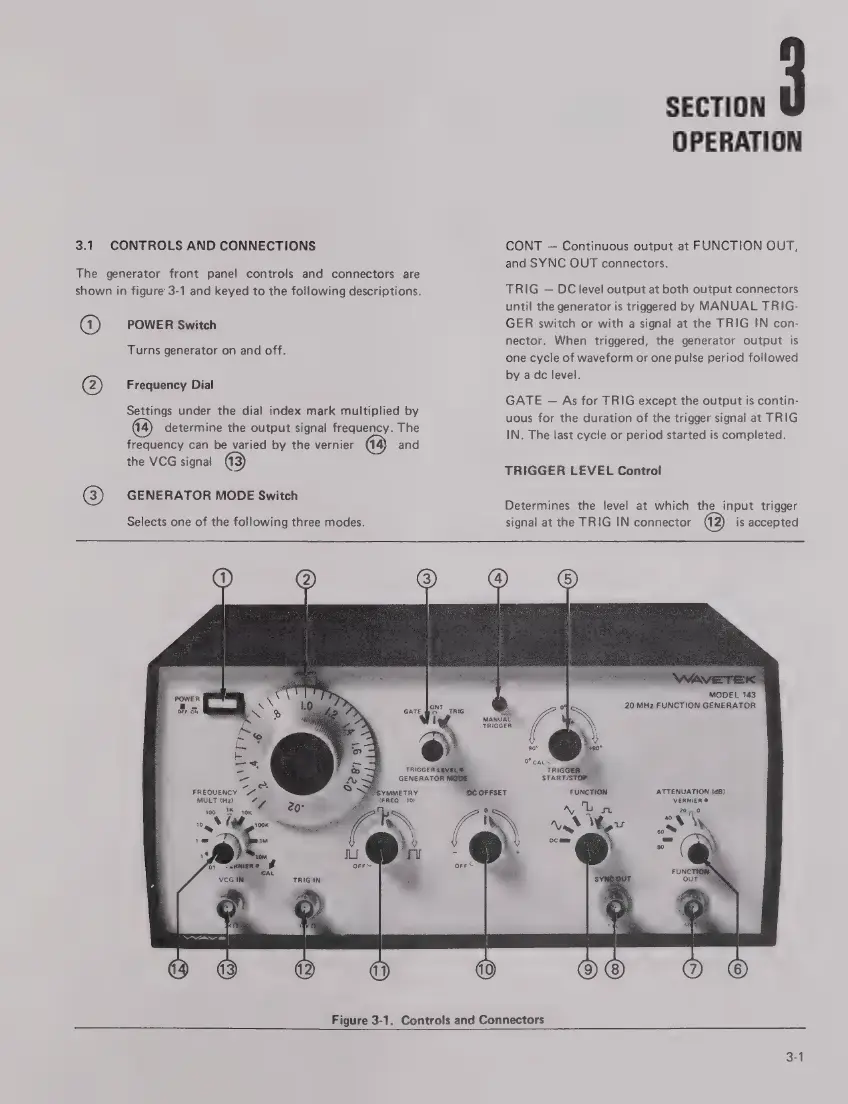
3.1
CONTROLS
AND
CONNECTIONS
The
generator
front
panel
controls
and
connectors
are
shown
in
figure
3-1
and
keyed
to
the
following
descriptions.
0
@
POWER
Switch
Turns
generator
on
and
off.
Frequency
Dial
Settings
under
the
dial
index
mark
multiplied
by
determine
the
output
signal
frequency.
The
frequency
can
be
varied
by
the
vernier
(14)
and
the
VCG
signal
(3
GENERATOR
MODE
Switch
Selects
one
of
the
following
three
modes.
SECTION
OPERATION
CONT
Continuous
output
at
FUNCTION
OUT,
and
SYNC
OUT
connectors.
TRIG
DC
level
output
at
both
output
connectors
until
the
generator
is
triggered
by
MANUAL
TRIG-
GER
switch
or
with
a
signal
at
the
TRIG
IN
con-
nector.
When
triggered,
the
generator
output
is
one
cycle
of
waveform
or
one
pulse
period
followed
by
a
dc
level.
GATE
-
As
for
TRIG
except
the
output
is
contin-
uous
for
the
duration
of
the
trigger
signal
at
TRIG
IN.
The
last
cycle
or
period
started
is
completed.
TRIGGER
LEVEL
Control
Determines
the
level
at
which
the
input
trigger
signal
at
the
TRIG
IN
connector
is
accepted
O @
FREQUENCY
MULT
(Hz)
MANUAL
MODEL
143
20
MHz
FUNCTION
GENERATOR
TRIGGER
(9
ATTENUATION
(dB)
VERNIER
©
Figure
3-1.
Controls
and
Connectors
3-1

Related product manuals