EasyManua.ls Logo

Wavetek 143 - Page 25

Wavetek 143
62 pages
Print Icon
To Next Page IconTo Next Page
To Previous Page IconTo Previous Page
Loading...
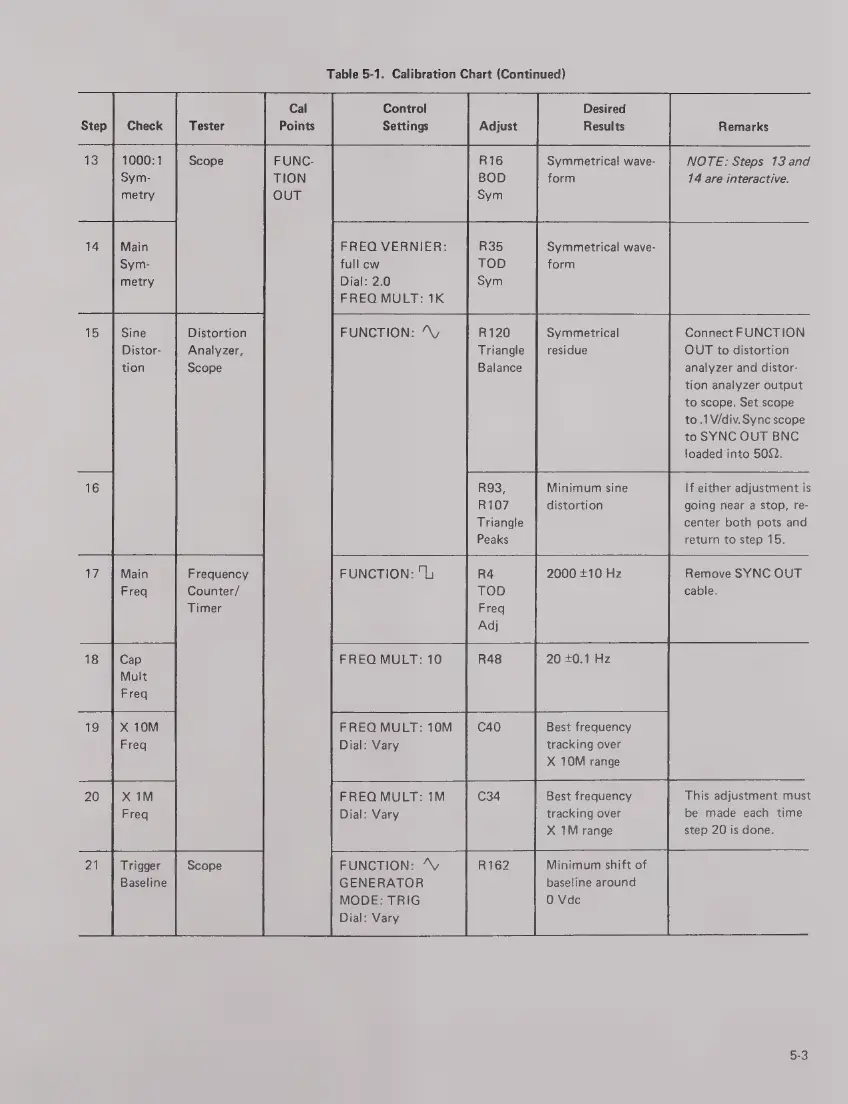
Step
Table
5-1.
Calibration
Chart
(Continued)
Tester
ТЕ)
14
15
16
Scope
Main
Sym-
metry
Distortion
Analyzer,
Scope
Sine
Distor-
tion
17
19
20
21
Frequency
Counter/
Timer
Trigger
Scope
Baseline
Cal
Points
Desired
Results
Control
Settings
Adjust
FUNC-
TION
OUT
Symmetrical
wave-
form
FREQ
VERNIER:
full
cw
Dial:
2.0
FREQ
MULT:
1K
Symmetrical
wave-
form
Remarks
NOTE:
Steps
13
and
14
are
interactive.
FUNCTION:
^V
R120
Triangle
Balance
Symmetrical
residue
Connect
FUNCTION
OUT
to
distortion
analyzer
and
distor-
tion
analyzer
output
to
scope.
Set
scope
to.
V/div.
Sync
scope
to
SYNC
OUT
BNC
loaded
into
502.
Minimum
sine
distortion
R93,
R107
Triangle
Peaks
If
either
adjustment
is
going
near
a
stop,
re-
center
both
pots
and
return
to
step
15.
FUNCTION:
"U
R4
2000
+10
Hz
TOD
Freq
Adj
FREQ
MULT:
10
R48
20
+0.1
Hz
FREQ
MULT:
10M
Dial:
Vary
Best
frequency
tracking
over
X
10M
range
Best
frequency
tracking
over
X
1M
range
FREQ
MULT:
1M
Dial:
Vary
Minimum
shift
of
baseline
around
0
Уас
FUNCTION:
^y
GENERATOR
MODE:
TRIG
Dial:
Vary
Remove
SYNC
OUT
cable.
This
adjustment
must
be
made
each
time
step
20
is
done.
5-3

Related product manuals