176 CHAPTER 20 CLICK 223
Physical Features
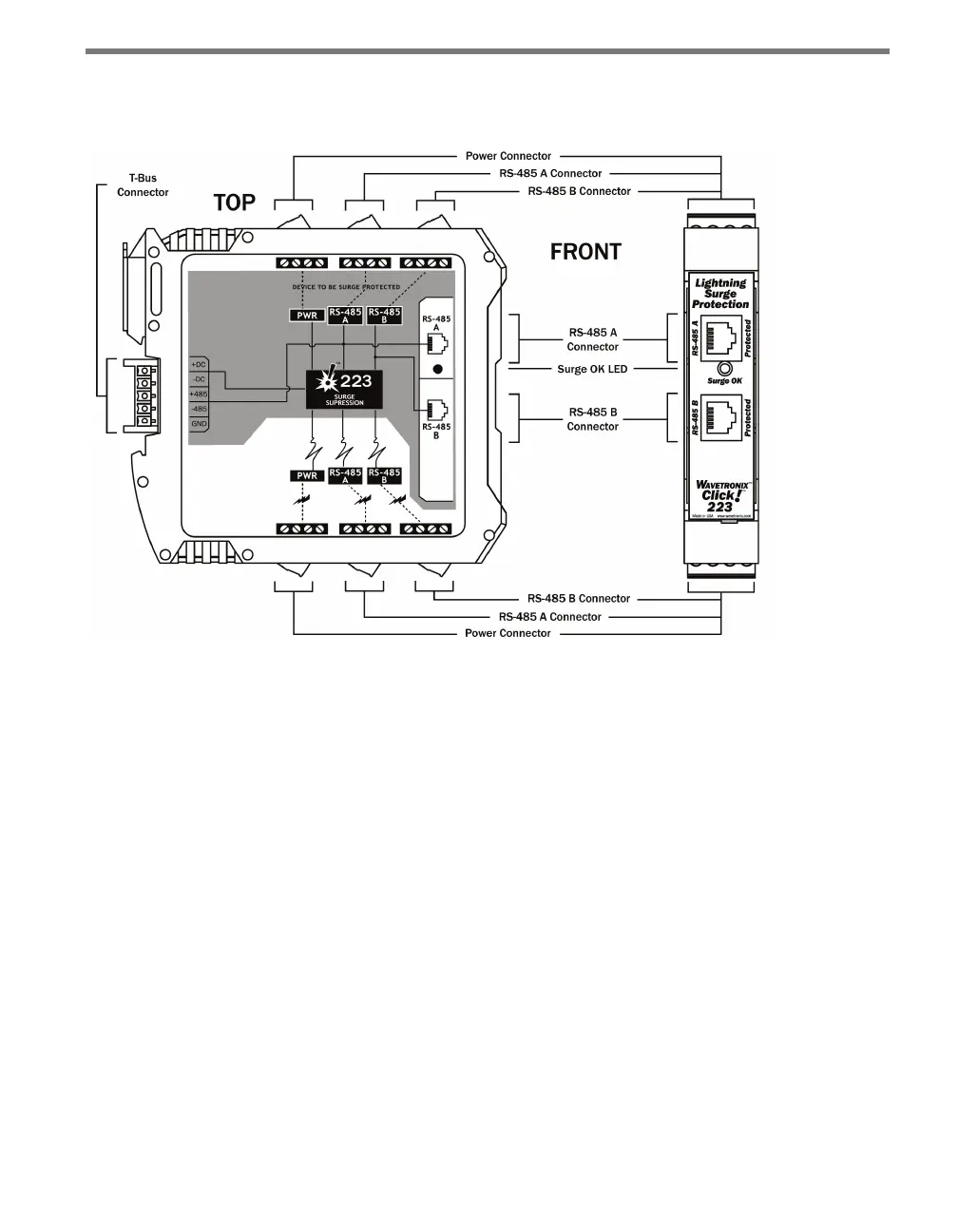
Figure 20.2 – Diagram of the Click 223
e faceplate of the Click 223 has two RJ-11 jacks, which provide two independent serial
connections:
RS-485A (upper jack) – passes RS-485 between the jack, the 485A screw terminals on
the top and bottom of the device, and the T-bus 5-position connector.
RS-485B (lower jack) – passes RS-485 between the jack and the 485B screw terminals
on the top and bottom of the device.
As mentioned above, the back of the Click 223 features a 5-position connector that plugs
into a T-bus connector and passes power and communication from the Click 223 to the rest
of the T-bus and vice versa. is connector is only connected to the RS-485A bus; any data
on the RS-485B bus will not be transmitted on the T-bus.
e top and bottom of the Click 223 each have three pluggable screw terminal blocks with
four terminals each, for a total of twelve connections. ese terminals are used for wiring
in the cable from the SmartSensor Advance or other external device. Each set of twelve
terminals is made up of the following:
+DC and -DC for power
Four ground terminals for drains
Two PE (protective earth) terminals for earth ground



 To Next Page