Need help?
Do you have a question about the Wavlink I-WL2-AC12 and is the answer not in the manual?
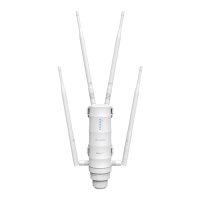
This document describes the AC1200 Dual Band High-Power Outdoor Router/AP/Extender, detailing its features, installation, configuration, and maintenance.
The device serves as a versatile outdoor networking solution, functioning as an AP, Router, Repeater, or EasyMesh agent. It is designed to provide robust and extended Wi-Fi coverage, particularly in outdoor environments, thanks to its weatherproof and lightning-arrested construction. The device supports dual-band operation, offering high speeds on both 5G (up to 867Mbps) and 2.4G (up to 300Mbps) bands. Its primary goal is to eliminate Wi-Fi dead zones and deliver stronger signal transmission over a wider area.
Wireless Performance:
Hardware:
Default Parameters:
PoE Converter Specifications:
Installation: The installation process involves assembling the device by connecting RJ45 cables and antennas, then securely fastening it to a firm location using the provided holder. A grounding connection is recommended in lightning-prone areas to strengthen lightning resistance.
Connection:
Configuration (Web UI):
Access to the web UI is typically automatic upon first connection. If not, users can manually enter 192.168.10.1 or wifi.wavlink.com in a browser. The default login password is admin.
Initial Setup:
Mode Selection: The device supports four operational modes:
Wi-Fi Password Management: Users can change their Wi-Fi password by navigating to the "Wireless" section in the web UI.
LED Indicators:
Bandwidth Usage Limitations (ETSI): In Europe, there are restrictions on 5G band frequencies for indoor and outdoor use. Users must select the correct bands based on their installation type (indoor/outdoor) to comply with regulations. Specific channels are designated for "INDOOR USE ONLY," "INDOOR USE ONLY DFS ON," and "OUTDOOR USE ONLY DFS ON."
Firmware Upgrade: Firmware updates are crucial for bug fixes, new features, and improved product performance. There are two options for upgrading:
Option I (Manual Download):
wifi.wavlink.com or 192.168.10.1), navigate to "Advanced," then "Firmware Update."Option II (Automatic Check and Download):
192.168.10.1 or wifi.wavlink.com), navigate to "Advanced," then "Firmware Update."Important Notes for Firmware Upgrade:
Troubleshooting (FAQ):
admin).Product Disposal (WEEE Directive): At the end of its life, the product should not be treated as general waste. It must be handed over to an applicable collection point for recycling electrical and electronic equipment or returned to the supplier.
 General
| Brand | Wavlink |
|---|---|
| Model | I-WL2-AC12 |
| Category | Network Router |
| Language | English |

 To Next Page