7
➁
➂
➀
➃
➅
➄
➇
➆
➈
➉
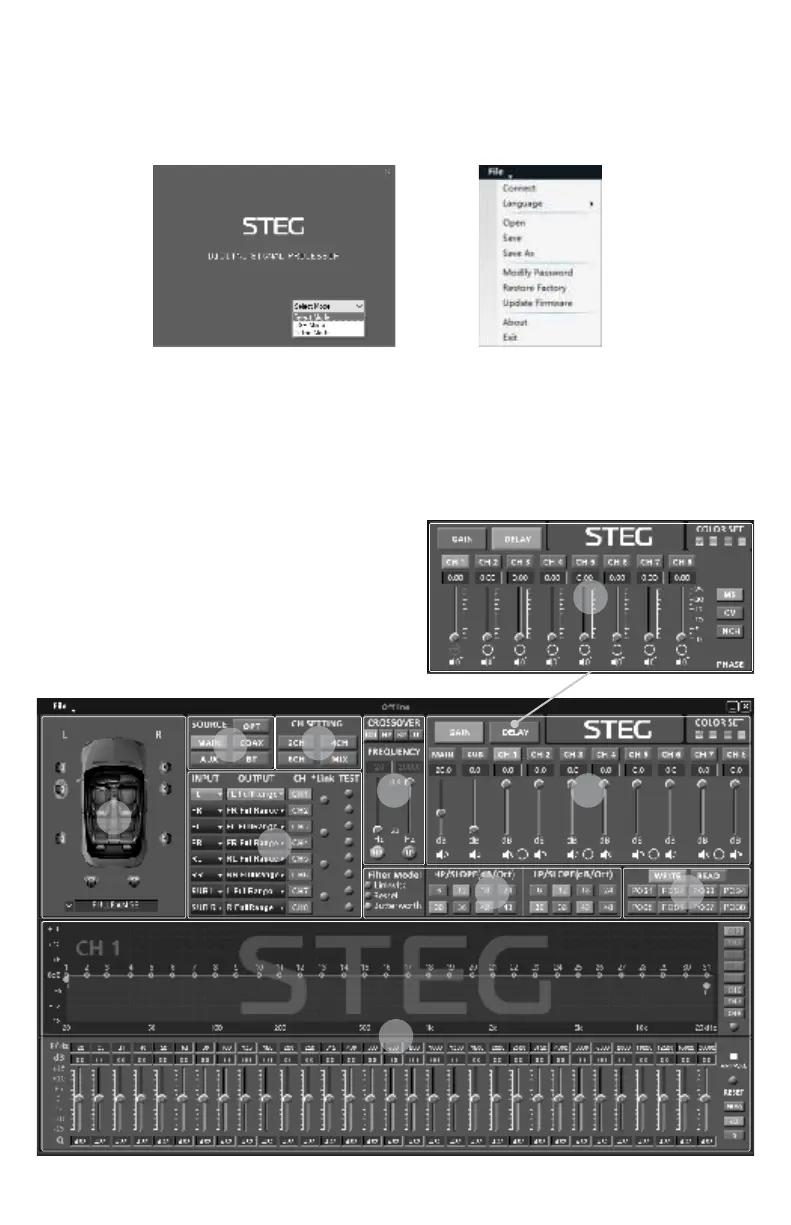
1.Install the PC software file “STEG DSP SETUP v1.0.1_EN-.exe” from the included USB flash drive.
2.Launch the program from the desktop icon and select “Offline-Mode” from the opening window.
3.Power on the source and main DSP unit. For additional speaker protection, turn the source unit volume all
the way down until initial crossover and channel configuration settings are made.
4.Connect the supplied USB cable from the main unit to the PC and select “CONNECT” from the file menu.
SOFTWARE INSTALLATION
Once the DSP tuning software is open and is connected to the main unit, any adjustments will be made to
the DSP in real time. It is recommended to periodically save your settings to a preset (POS1-POS8) and save
the *.DSP6-8Set setup file to PC via the file menu as backup once all settings and presets have been written.
Please familiarize yourself with the available settings in the following section and carefully consider each
adjustment for your source and connected speakers. If your system is different than the factory default
settings, it is recommended to first select a speaker configuration or choose speaker OUTPUT type by ①
channel to automatically apply pre-set crossovers to ④
protect sensitive speakers such as tweeters. Next choose
the input CH SETTING ③ or the appropriate INPUT
routing by channel for your high level source All of ④ .
these settings can be manually changed later as needed.
Note that it is not recommended to make any adjustments
from the optional DRC remote (if also connected) while
making changes from the PC software.
DSP SOFTWARE & SETTINGS


 To Next Page
 Loading...