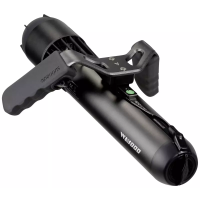
The Waydoo Flyer ONE Plus series comprises upgraded EFOIL products, designed to offer a tailored riding experience. This series includes a power kit, board, battery, and wings, which combine to form a complete EFOIL system. Users can select various parts and components to customize their ride. It's recommended to use Waydoo Flyer ONE Plus sub-products together, with the exception of the Waydoo Lithium Battery Charger, PowerFlight battery, and wings, which can be mixed with Flyer ONE products. This manual specifically focuses on the Plus Power Kit.
The Controller Plus is ergonomically designed with an LCD display interface. It shows the power level of both the PowerFlight Battery and the Controller Plus, along with Bluetooth connection status and flight speed. It offers 24 speed gears. To power on, press and hold the power button for 5 seconds until the screen fully lights up. If the Controller Plus is not connected, the Bluetooth icon on the display will flash continuously. When the battery power of the Controller Plus drops below 20%, a low-battery warning box will appear, prompting the user to charge it. If the Controller Plus remains on standby for more than 8 seconds, the throttle will lock, requiring a 1-second press and hold of the unlock button.
The Controller Plus offers 24 speed gear options. In speed limit mode, speed options can be restricted to 10 gears, and the highest gear can be adjusted. To enter settings, short press "+" and "-" simultaneously when the Controller Plus is powered on. Navigate the menu using "+" or "-" and confirm selections with the Power Button.
The PowerFlight Battery is a smart battery specifically designed for Waydoo Flyer ONE and Flyer ONE Plus Efoil products. It features a plug-in-free, fully waterproof design, making it easy to install and protecting it from seawater erosion. This battery is not included in the Plus Power Kit and must be purchased separately. The battery status indicator uses a half grid to represent a flashing light. When the battery fails to charge, short press the power button six times to diagnose the cause. A self-discharge feature allows the battery's charge to gradually reduce over time during storage, extending battery life. The LED light indicates capacity, with one grid representing 25% power and a flashing blue light representing 12.5% power. Battery fault indicators, such as red light flashes, signal issues like undervoltage, over-temperature, overcurrent, or short circuit protection.
The Waydoo Lithium Battery Charger features an aluminum alloy die-casting, with an input voltage of 100-240V, output voltage of 58.6V-58.8V, and a charging current of 16-17A. It has an IPX6 protection level. To charge the PowerFlight Battery, place both the battery and charger in a cool, dry location away from flammable or hot items. Connect the charger's DC cable to the battery's DC port, ensuring a firm connection. Plug the AC cord into a wall outlet. The charger's power indicator will show a steady blue light for standby mode. Short press the linking button on the PowerFlight battery, and the indicator will flash blue, waiting for communication. When the light turns flashing green, the battery is charging. A steady green light indicates a full charge, which typically takes 2 hours. A flashing red light indicates a malfunction. For healthy charging, if the battery won't be used for a short time, press the battery power button four times during charging to activate healthy charging mode, which stops charging at 80% to extend battery life.
The Plus Power Kit is designed for Waydoo Efoil products, integrating a brushless motor, motor driver, propeller, main control board, and Bluetooth communication modules. Its waterproof and quick-installation design allows for easy installation on Waydoo Efoil products using L-shaped bolts. The front and stabilizer wings can be installed with special screws. Standard combinations include a 25.6-inch mast with an explorer wing or a 31.5-inch mast with a patroller wing, but users can select different front wings and masts as needed.
The mast consists of a DC port, front wing mount, mast head, support rod, propeller guard, and stabilizer wing mount. To replace the propeller, remove the propeller protective cover by turning it clockwise. Unscrew the bullet from the motor shaft using an M4 Allen screwdriver and remove the old propeller. Replace the propeller pin and insert a new one into the cross hole on the propeller shaft, ensuring it is centered. Reassemble the new propeller, bullet, and protective cover, ensuring the propeller groove direction is consistent.
Assembly Steps:
- Assembling the Mast: Turn the board over and insert the Plus power kit vertically into the mast installation hub. Ensure it fits, then fix and tighten it with L-shaped bolts. Before installation, ensure the mast DC port is clean and dry.
- Assembling the Wings: Attach the Stabilizer Wing to the stabilizer mount and tighten the two M615 bolts clockwise with a 4mm Hexagon Wrench. Place the Front Wing on the front mount and tighten the two M624 bolts clockwise with a 4mm Hexagon Wrench. Flip the board over.
- Installing the PowerFlight Battery: Face the PowerFlight battery compartment upward and reset both Rotary Locks. Insert the PowerFlight Battery into the compartment. Turn both Rotary Locks 180 degrees to secure the battery. Ensure the battery DC port is clean and dry before installation.
- Connecting the Controller Plus: Power on the Controller Plus by pressing the Power Button for 5 seconds. The battery uses magnetic buttons to simulate physical button presses. Short press involves moving the magnet close for 1 second, then away. Long press involves holding the magnet close for about 5 seconds. Within 1 minute of turning on the battery, short press and long press the linking button until a long beep confirms entry into linking mode. For Bluetooth pairing, simultaneously press and hold the Power Button and "-" Button on the Controller Plus until the Bluetooth icon disappears, indicating successful pairing.
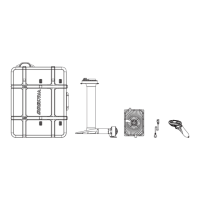
The Carrying Case serves as a wheeled carrying case with a handle, designed for Waydoo Efoil products. It allows users to transport the power kit, PowerFlight battery, controller plus, wings, and other components. Made of EPP material, it protects against collision and friction. To use, press the flash lock to release the buckles and open the case. Place the charger and battery in their compartments. Position the stabilizer wing under the plus power kit and the front wing on the upper cover, ensuring they fit and are fastened. Take out the two wheels. Close the case, connect the webbing buckles, and fasten the board onto the carrying case using the quick-release spring lever. Ensure the rubber cover contacts the board's edge. Pull the handle to carry the product.
How to Use:
Select a suitable riding location with a water depth of at least 1.2 meters (4 feet), free of obstacles, and away from swimmers and other water users. Always wear a life jacket and helmet. If losing balance, fall on the side the board tends to flip to, to avoid being hit.
Riding the Efoil:
- Familiarization: Climb onto the board from the backside, avoiding kicking the wings, propeller, or mast. A "spotter" is recommended.
- Unlock Controller: Long press "-" to unlock the Controller Plus.
- On-board Practice: Set a suitable gear (beginners should start with a gear lower than 5). Slowly pull the trigger to start the propeller.
- Slow Gliding: Adjust speed through the gear. When flight speed reaches about 15kph, slightly tilt the front of the board to take off.
- Flight Adjustment: After taking off, adjust flight height and direction by shifting weight. For better wireless signal, keep the front of the board exposed to the water. Beginners need practice to master these skills.
Maintenance:
Regularly check waterproof components (Controller Plus, PowerFlight Battery, mast head) for damage and the status of the power and control systems.
- After Use: Turn off the Controller Plus and PowerFlight Battery.
- Cleaning Plus Power Kit: Flush the mast body with fresh water for 1 minute to remove seawater residue. Rinse the mast head, motor shroud, propeller, and propeller protective cover with fresh water, removing salt, sand, or debris. Rinse the board body, battery compartment, and mast mounting hub with fresh water for 1 minute. Wipe dry with a towel and let air dry.
- Cleaning Battery: Rinse the battery's appearance with fresh water. Use a cotton swab with alcohol to clean the battery DC port and buttons. Wipe dry and let air dry.
- Cleaning Controller Plus: Pay attention to the trigger area. If the trigger jams, check for gravel and rinse with clean water.
- Storage: Wait for all parts to dry before packaging. Avoid direct sunlight and high temperatures, which can cause permanent damage.
- Safety: Turn off the remote control and battery. Do not install the battery on the board during transport.
Troubleshooting:
If problems occur during use, stop operating, lay on the board, and paddle to land. Contact after-sales service if issues persist.
- Battery Fault Light Red: Check battery temperature and level. If too high, wait for it to cool. If too low, charge immediately.
- Battery No Output: Check if the plus power kit and battery are properly connected. Tighten L-shaped bolts if loose. The output indicator on the display should be blue.
- Battery Cannot Be Charged: Check the battery's fault indicator. If red, contact after-sales service. Check if the charger indicator is flashing red. Ensure the AC plug and DC battery port are connected. Tighten if loose. Turn the charger over and ensure the rocker switch of the electrical appliance is ON.
- Motor Abnormal Noises: Release the trigger, turn off the remote control, and paddle to land. Remove the battery and check for foreign matter in the propeller. Clean the propeller after removing the protective cover.
Restrictions and Local Regulations:
Do not use in waters with swimmers or divers, or in restricted traffic areas. Abide by local laws. Stay away from people, boats, floating objects, animals, plants, obstacles, and hazardous waters. Refrain from flying in rain, thunder, snow, heavy fog, strong wind, and storms.
Safety Guidelines:
Always refer to the user manual and instructional videos. Use only on water, wearing a life jacket and helmet. Ensure water depth is at least 1.2 meters (4 feet), free of gravel, plants, or wild animals. Pay attention to surroundings, stay away from shore, ships, and other watercraft. Do not use in areas with swimmers, divers, floating objects, or many wild animals/plants. Do not use damaged or malfunctioning products. Do not place the product on a car roof for transport. Fully understand operation steps and inherent risks before use. Do not allow others to use it without full understanding. Do not remove the propeller guard or attempt to fix/touch the propeller in water. Do not remove the battery when wet or in water. Do not power on the Controller until in water and ready for use. Keep the propeller away from body, fingers, and toes. Any contact with mast, front wing, or stabilizer wing can cause serious injury. Do not use in bad weather or hazardous waters. Use steadily and safely; avoid dangerous operations like overspeeding or sharp turns. The deadweight of the product should not exceed 100kg (220 lbs).
Before Use:
Check waterproof components (Controller Plus, PowerFlight Battery, mast head) for damage. Ensure power and control systems work normally, battery power is sufficient, and all bolts are tightened.
- Check that the plus power kit connection is firm and bolts are tightened.
- Ensure propeller and protective cover are undamaged and clean of sand/debris.
- Install the PowerFlight Battery in its designated location.
- Ensure the PowerFlight Battery is firmly installed and locked.
- Ensure the product is free of damage and working properly.
Special Warning:
Using non-original or uncertified accessories can be dangerous.
Motor Attention:
Before use, ensure propeller and protective cover are undamaged, and remove any sand or debris.
Motor Danger:
Do not remove the propeller guard. Do not attempt to fix or touch the propeller in water. When powered on, keep the propeller away from body, fingers, and toes. The rotating propeller can cause serious, life-threatening injury.
Support Rod Attention:
Requires water depth of at least 1.2 meters (4 feet). Be careful of gravel, plants, or wild animals. Pay attention to surroundings, stay away from shore, ships, and others.
Support Rod Warning:
Contact with wings and Support Rod in water can cause serious, life-threatening injury.
PowerFlight Battery Warning:
Risk of fire, explosion, burns. Inspect for damage before charging. Do not disassemble or modify. Do not disassemble, puncture, impact, or drop. Do not handle with wet hands. Do not install or remove in water. Dispose of lithium-ion batteries according to local laws. Do not expose to direct sunlight, fire, or temperatures exceeding 60°C (140°F). Use only the standard charger. Place in a safe place, away from children or animals. Check for normal condition before use. Abnormal batteries can cause damage, electric shock, fire. For storage longer than one month, maintain the battery.


 To Next Page
 General