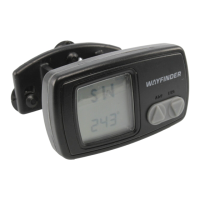
1
CONGRATULATIONS!
Now you have a new navigational part-
ner when you drive — one of the most
modern and accurate compasses avail-
able for use in all types of vehicles. To
get the most from your compass, please
read this manual thoroughly, and keep
it in a safe place for future reference.
Features
• Three compass displays.
• Memory stores your compass head-
ing to help you stay on course.
• Interior or exterior thermometer
for accurate comfort monitoring.
• ICE alert warns of hazardous road
conditions.
• Alert for magnetic interference.
• Auto power off conserves battery.
• Bright backlight with auto on/off
for night use.
• Two power modes: 12-volt and/or
internal battery for cord-free use.
EASY INSTALLATION
Note: Remove the protective overlay
lm from the LCD screen.
Step 1: Install the battery.
Slide open the battery cover on the
rear of the unit and insert the battery
straight down (not at an angle), observ-
ing the correct polarity. Replace the
cover. The screen should come on
with a quick quality test. If the dis-
play becomes stuck, remove the bat-
tery, wait about a minute, then reinsert
the battery.
Step 2: Plug in the 12-volt adapter.
Insert the small end into the jack
marked “Power” on the back of the
unit, and plug the large end into your
vehicle lighter receptacle.
Power notes
• Use of the 12-volt adapter or hard-
wire kit (see Optional Accessories
on page 8) is highly recommended
to avoid draining the unit’s battery


 To Next Page