4
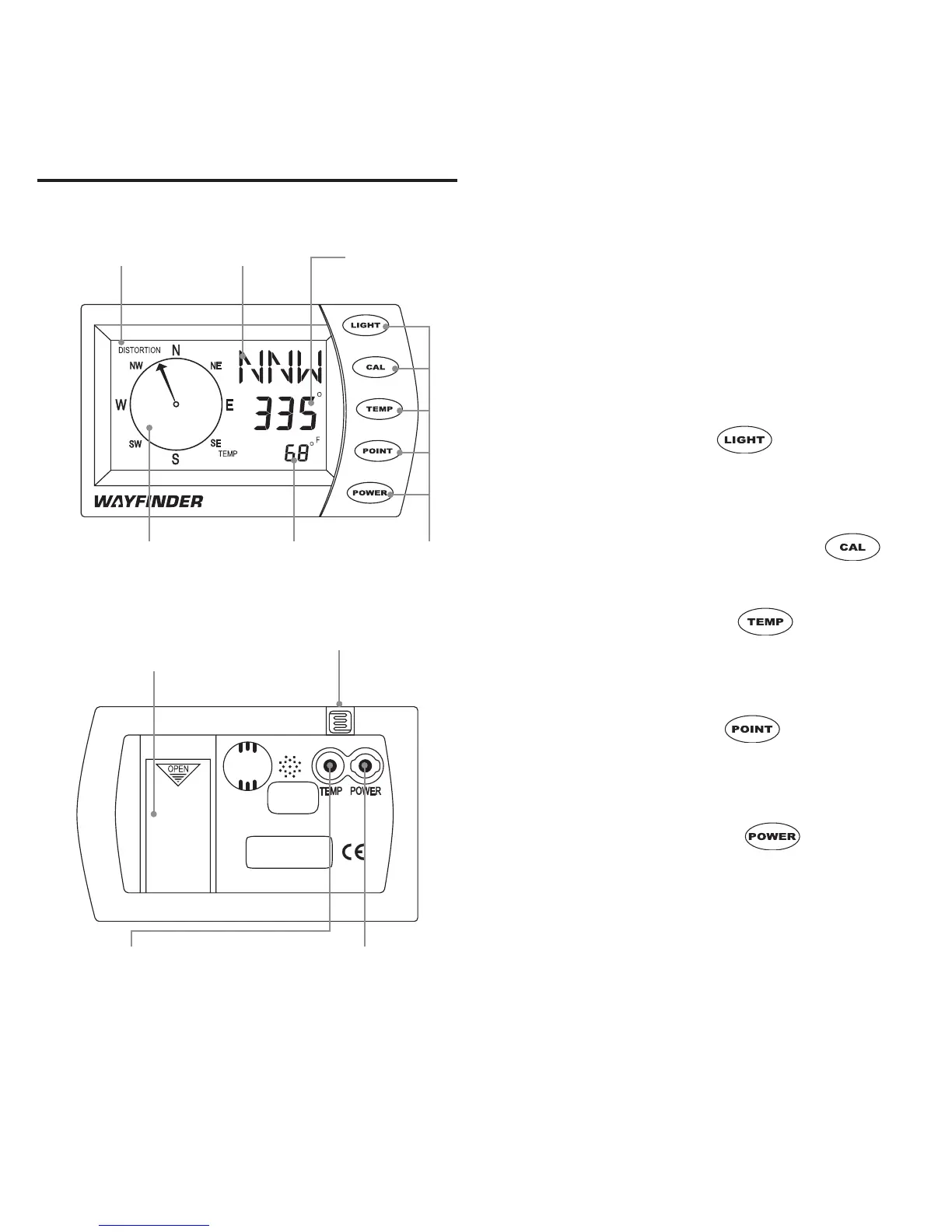
CONTROLS AT A GLANCE The screen shows your heading in
one of 16 cardinal points (N, NNE,
NE, etc.), and an arrow on the com-
pass rose points toward that direction.
Plus, your precise heading is shown
numerically in increments of 5°.
Buttons and icons
Light button: Press to switch the
backlight on or off, or hold for two sec-
onds to adjust the auto shut-off interval.
Cal button: Press or hold to
begin calibration.
Temp button: Press to display
the temperature, or hold to select
Fahrenheit or Celsius.
Point button: Press to display a
stored bearing point, or hold to store a
new bearing.
Power button: Press to switch
the Waynder V2000 on or off.
“Distortion” icon: Indicates that mag-
netic interference is compromising com-
pass accuracy, or that the battery has been
changed and calibration is required.
Battery Photo Diode
Compartment
Temperature 12-Volt Power
Sensor Jack AdapterJack
Compass Back
“DISTORTION” Cardinal Point Numeric Heading
Icon Readout Readout
Compass Rose Temperature and Buttons
Bearing Point Readout
Compass Front


 To Next Page