MP3 PLAYER
8
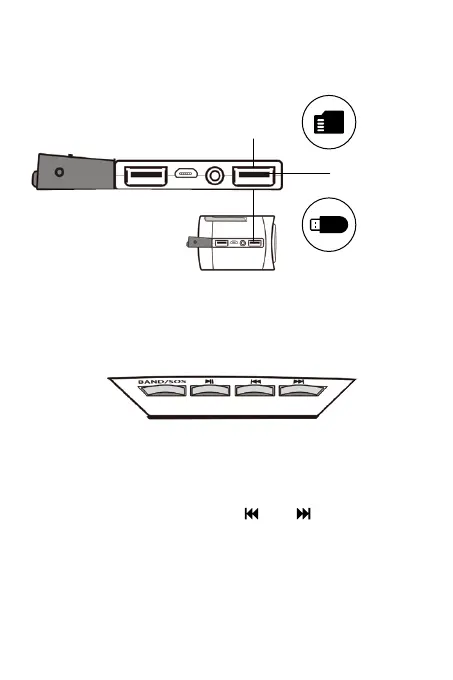
TF Card Port
With the radio on, insert an MP3 USB Flash Drive to the USB
MP3 Port or a TF card (Class 10) to the TF card port.
USB MP3 Port
• Press the BAND/SOS button to switch to MP3 mode which
will play the first MP3 file (press the button again to
switch to a band - WB/FM/AM).
• To play other MP3 files, press ( ) or ( ) which will start
playing the next MP3 after a 1 second delay.
Note: If the USB flash drive or TF card (Class 10) is not
formatted properly, nothing will happen when pressing the
MP3 controls. Make sure there are only .mp3 files on the
root of the drive or card with no other folders or files.


 To Next Page