ACCESS ONLINE SUPPORT
Visit our product support website at support.wdc.com and choose from these topics:
• Registration – Register your WD product to get the latest updates and special offers at: register.wdc.com
• Downloads – Download software and updates for your WD product at: support.wdc.com/downloads
• Email Support – Get technical and other support through email at: support.wdc.com/support
• Warranty & RMA Services – Get warranty, product replacement (RMA), RMA status, accessories, and data recovery information at: support.wdc.com/
warranty
• Knowledge Base – Search by keyword, phrase, or answer ID at: support.wdc.com/knowledgebase
KIT CONTENTS
The retail box includes the following items:
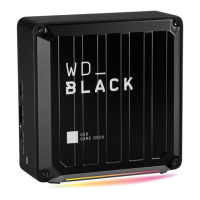
• WD_BLACK D50 Game Dock with NVMe SSD storage capability or WD_BLACK D50 Game Dock, depending on model purchased.
• Thunderbolt™ 3 Cable
• AC to DC Power Adapter
• Quick Install Guide
HANDLING PRECAUTIONS
WD_BLACK products are precision instruments and must be handled with care. It may be damaged by rough handling, shock, or vibration.
Always observe the following precautions:
• Do not drop or jolt the device.
• Do not use this product as a portable device.
• Do not block any of the enclosure’s air slots.
• Always use this device with the specified power supply unit.
OPERATING SYSTEM COMPATIBILITY
2
The WD_BLACK D50 Game Dock and WD_BLACK Game Dock with NVMe SSD Storage are compatible with Windows 10TM (64-bit) and macOS
10.13+.
FRONT LED
When active, the front LED on the device will illuminate as a white light. The LED is either on, off or blinks with a certain rhythm to indicate a
specific "System Condition". A "System Condition" list is outlined below.
LED BEHAVIOR LED COLOR SYSTEM CONDITION
No LED Light Illuminated Off Power is off or disconnected, or Thunderbolt 3
host is not connected.
Solid Light - no blinking White Device is on and ready - device is connected
to a Thunderbolt 3 host.
Fast Breathing Rhythm White Transferring data to internal storage -
available only on WD_BLACK Game Dock with
NVMe SSD storage
POWER CONNECTOR & POWER ADAPTER
The WD_BLACK D50 Game Dock and the WD_BLACK D50 Game Dock with NVMe SSD storage device include a power adapter that is rated for
180 watts (19.5VDC/ 9.23ADC), and includes the power cord applicable to your region.
NOTE: The included 180-watt power supply unit is designed to supply DC electrical power to the device and up to 87-watts of pass-through
power to computers that support charging over Thunderbolt 3.
- 3 -


 To Next Page
 Loading...