1.0 Introduction
2.0 Buttons and Its Functions -Model A and Model B
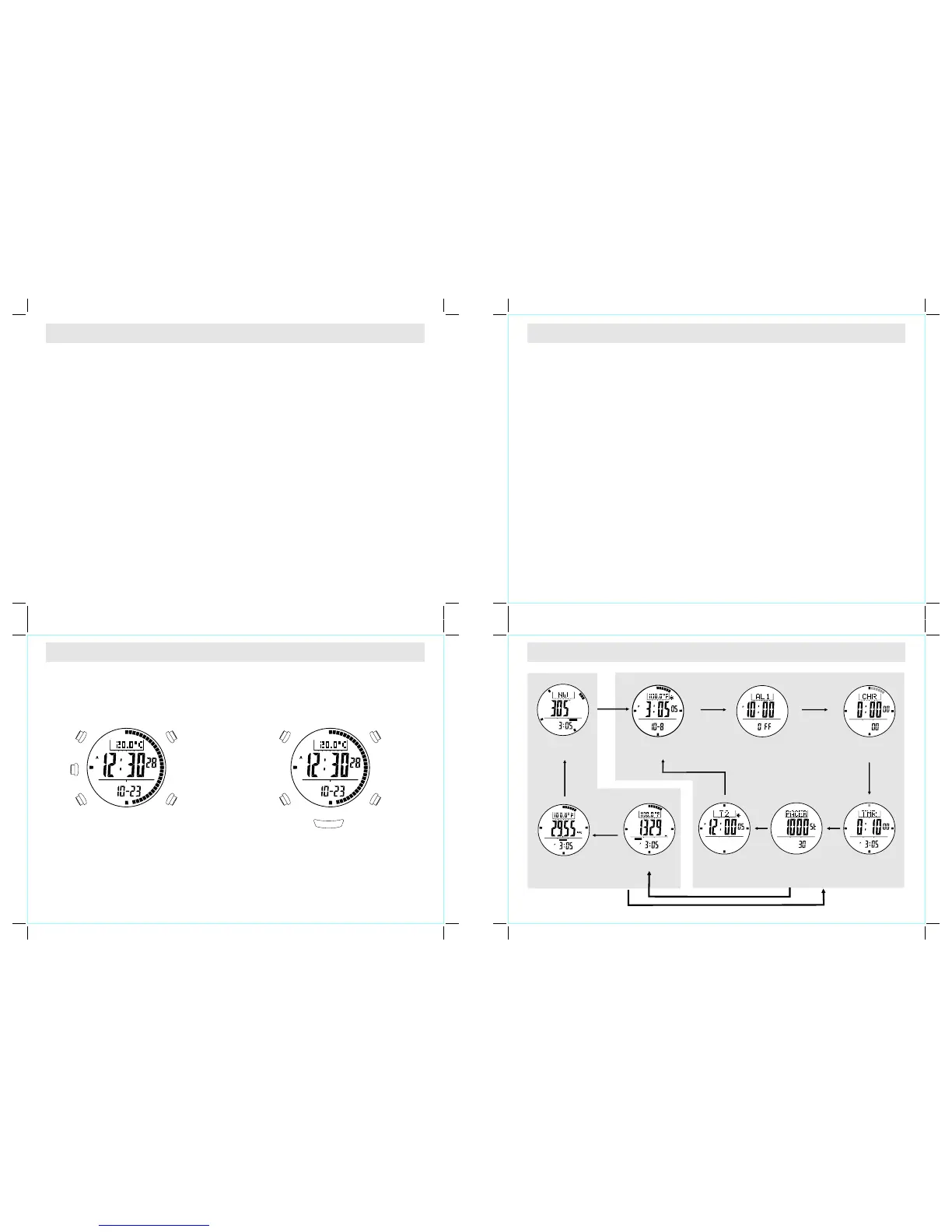
3.0 Major Function Modes - Timekeeping Mode and Sensor Mode
2.0 Buttons and Its Functions -Model A and Model B
Model A
Model B
! Thank you for purchasing this Watch. Your Watch
features electronic sensors, which measures and
shows the outdoor conditions: weather forecast,
te mperature, pr essure, altit ude and compas s
directions.
Your Watch provides the essential information
you need you hiking, wild camping and
other
also includes current time, daily
alarm, chronograph, timer, pacer and
!
!
when go
outdoor activities especially for a prolonged
period.
Your Watch
dual time
functions.
! Your Watch is carefully designed and produced
for outdoor activities. In order to utilize the
features, it is advisable to read the following
instructions before using the Watch.:
! Avoid exposing your Watch to extreme
conditions for an unreasonable time.
! Avoid rough usage or severe impact on
your Watch.
! Do not open the Watch's case unless by
a certified service agency because your
W e a t h e r M a s t e r c o n t a i n s d e l i c a t e
electronic sensors and components.
! Cl e an y our W a tch wi t h a s o ft c lot h
occasionally for a longer useful life.
! Keep your Watch away from magnets or
any appliances which contain magnetic
objects such as mobile phones, speakers
and motors.
! Store your Watch in a dry place when it is
not in use.
Mode Button [M]
! To select among the Current Time, Daily Alarm, Chronograph, Timer, Pacer and Dual Time Modes.
! To select among the setting items in setting display.
Sensor Button [SR]
! To select among the Altimeter, Barometer and Compass Modes.
Start/Stop Button [S/S]
! To select between functional displays under the same mode.
! To activate the 'start' or 'stop' chronograph function in the chronograph mode.
! To toggle Yes/No.
! To increase the digits in setting display.
Lap/Reset Button [L/R]
! To activate the 'lap' or 'reset' chronograph function in the chronograph mode.
! To move the cursor to the left by one in the History recalling display.
! To decrease the digits in setting display.
! To toggle Yes/No.
EL Button [EL]
! To turn on the EL back light for about 3 seconds.
Note
Press any button to activate the watch under Power Saving Mode. (For more information, please refer to
Chapter 14.0)
Sensor
[SR]
Lap/Reset
[L/R]
Mode
[M]
Start/Stop
[S/S]
ALTI/BARO/
COMP
[SR]
Light
[EL]
Lap/Reset
[L/R]
Mode
[M]
Start/Stop
[S/S]
Light
[EL]
BARO
ALT I
Current Time Mode
[SR]
[SR]
hold [SR]
[SR]
[SR]
Sensor Mode
Timekeeping Mode
Daily Alarm Mode
Chronograph Mode
Timer Mode Pacer ModeDual Time Mode
[M] [M]
[M] [M]
[M]
[M]
Compass Mo de
Altimete r Mode
Baromete r Mode
COM P



 To Next Page
 Loading...