4.0 Current Time Mode - Functional Display
4.1 Current Time Mode - Weather Forecast Feature
4.2 Current Time Mode - Setting the Current Time
Functional Display
!
Automatic Display Switching
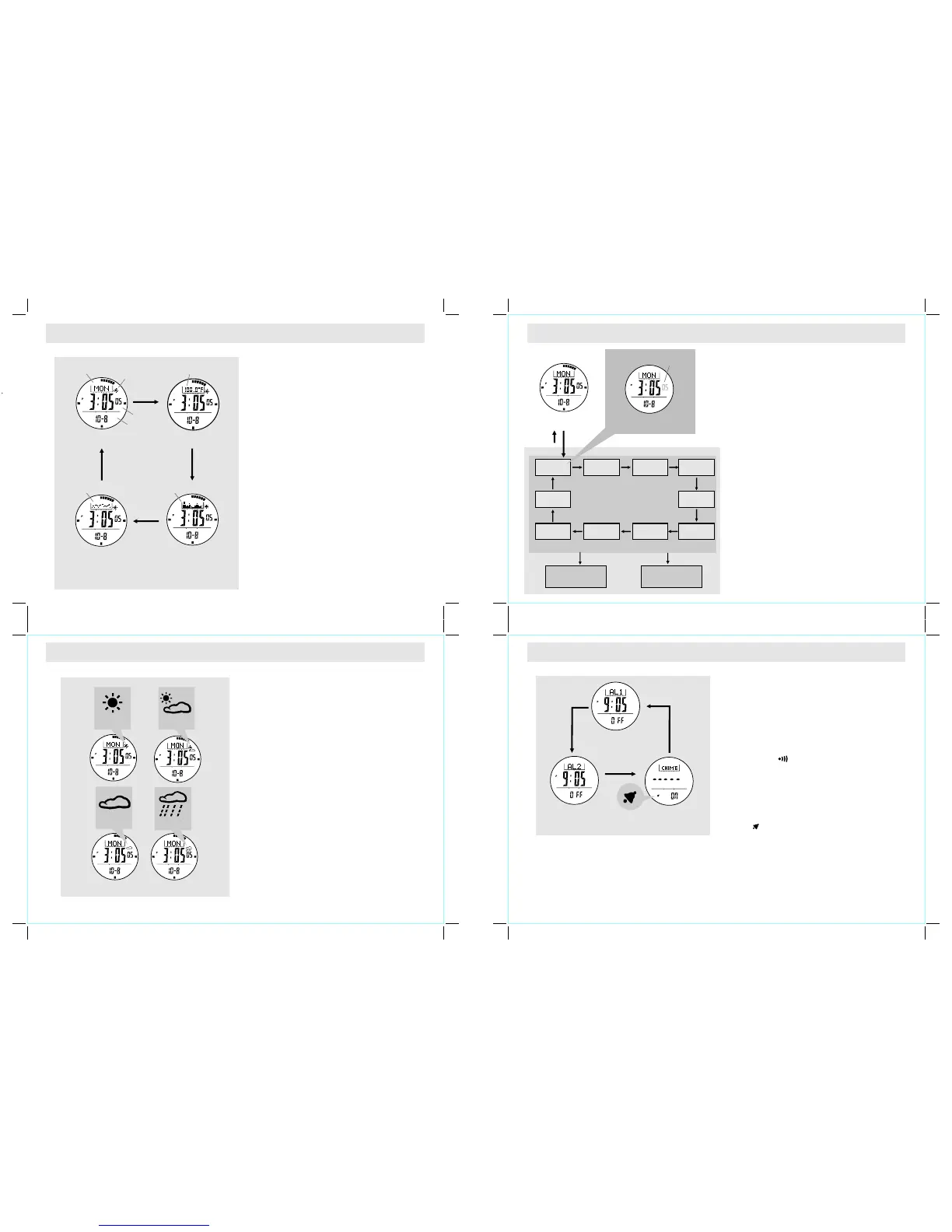
Th e Curren t Time Mod e includ es 4 kinds of
functional displays:
! Day of Week
! Temperature
! Altitude Tendency
! Sea Level Pressure Tendency
! To select among different functional displays,
press the [S/S] button following the adjacent
diagram.
! To activate the automatic switching feature, hold
the [S/S] button.
! As long as the button is held, one of the 4
functional displays appears on the screen one by
one.
Weather Forecast Feature
! A special feature of the Watch is the coming
weather predicting function. It works by analyzing
the changes of the past air pressure.
How to Indicate the Coming Weather
! The Watch provides 4 different symbols to indicate
the forecast weather, which are:
! Sunny
! Cloudy with Sun
! Cloudy
! Raining
! The symbols will only be shown in Current Time
and Dual Time Modes.
IMPORTANT: Since the Watch predicts the coming
weather by using the data of the changes in the air
pressure, a higher accuracy may result when the
user stays at the same altitude for at least 24 hours.
IMPORTANT: The Watch predicts the weather by
adopting general weather prediction principles, it is
NOT capable to reflect the dramatic changes of
weather within a very short period of time.
How to Set the Current Time
! To select the setting display, press and hold the
[M] button for about 2 seconds in the Current
Time Mode. In setting display, the flashing "SET"
icon will appear.
! In the setting display, press the [M] button to
chang e t h e selection following t h e a djacent
Current Time Setting Sequence.
! When the second digits are flashing (selected),
press the [S/S] or [L/R] button to reset the digits
to "00".
! When the digits are flashing (selected), press
the [S/S] or [L/R] button to increase / decrease
the number. (Hold down the button to change
the number at a higher speed).
! When month-day order setting is selected, press
the [S/S] or [L/R] button to select either month-
day or day-month format. When 12/24 hour
format setting is selected, press the [S/S] button
to select either 12 or 24 hour format.
! When the LCD contrast is selected, press the
[S/S] or [L/R] button to increase / decrease the
contrast level (1 to 10). When key beep setting is
selected, press the [S/S] or [L/R] button to turn
ON or OFF the beep.
! When the setting is completed, press and hold
the [M] button to exit the setting display.
Current Time Display
Current Time Setting Se quence
Hold
[M]
Increase /Decrease
the number a t
a highe r spe ed
Increase /Decrease
the number
12/24
hour forma t
minute hour
day
year
month
Curre nt Time Setting Di splay
digits hav e been
selected ( flashing)
secon d
[S/S] / [L/R ]
Hold
[M]
[M]
Month/Da y
LCD
Contrast
Key
Beep
[M] [M]
[M]
[M]
[M]
[M]
[M]
[M]
[M]
hold
[S/S] / [L/R ]
Current Time Mode
Weather Forecast Symbols
day of week
sea level
pressure
tendency
temperature
date
current time
weather forecast
altitude
tendency
[S/S]
[S/S]
[S/S]
[S/S]
Day of Week Display
Tempe rature Display
Altitude Tendency
Display
Sea Level
Press ure Tendency
Display
Cloudy
Sunny
Cloudy
with sun
Raining
5.0 Daily Alarm Mode - Daily Alarm 1, Daily Alarm 2 and Chime Display
Daily Alarm 1 and Daily Alarm 2
! The Watch includes two daily alarms: Daily Alarm
1 and Daily Alarm 2. The Daily Alarm 1 and Daily
Alarm 2 are working independently.
! Press the [S/S] button to switch among the Daily
Ala rm 1, Dail y A larm 2 and Chime Dis play
following the adjacent diagram.
How to Turn ON/OFF the Daily Alarm
! To turn ON/OFF the Daily Alarm 1 (2), press the
[L/R] button in Daily Alarm 1 (2) Display.
! When the Daily Alarm 1 (2) is ON, the alarm
indicator ' ' will appear.
! If the alarm indicator appears, the Watch will
sound at the preset alarm time every day. When
the alarm sounds, press any button to stop the
beep.
How to Turn ON/OFF the Hourly Chime
! To turn ON/OFF the Hourly Chime, press the
[L/R] button in the Chime Display.
! When the chime is ON, the chime indicator
' ' will appear. If the Chime indicator
appears, the Watch will beep on the hour.
Daily Alarm 2 Displ ay
Daily Alarm 1 Displ ay
Hourly Chi me Display
[S/S]
[S/S]
[S/S]
Daily Alarm Mode



 To Next Page
 Loading...