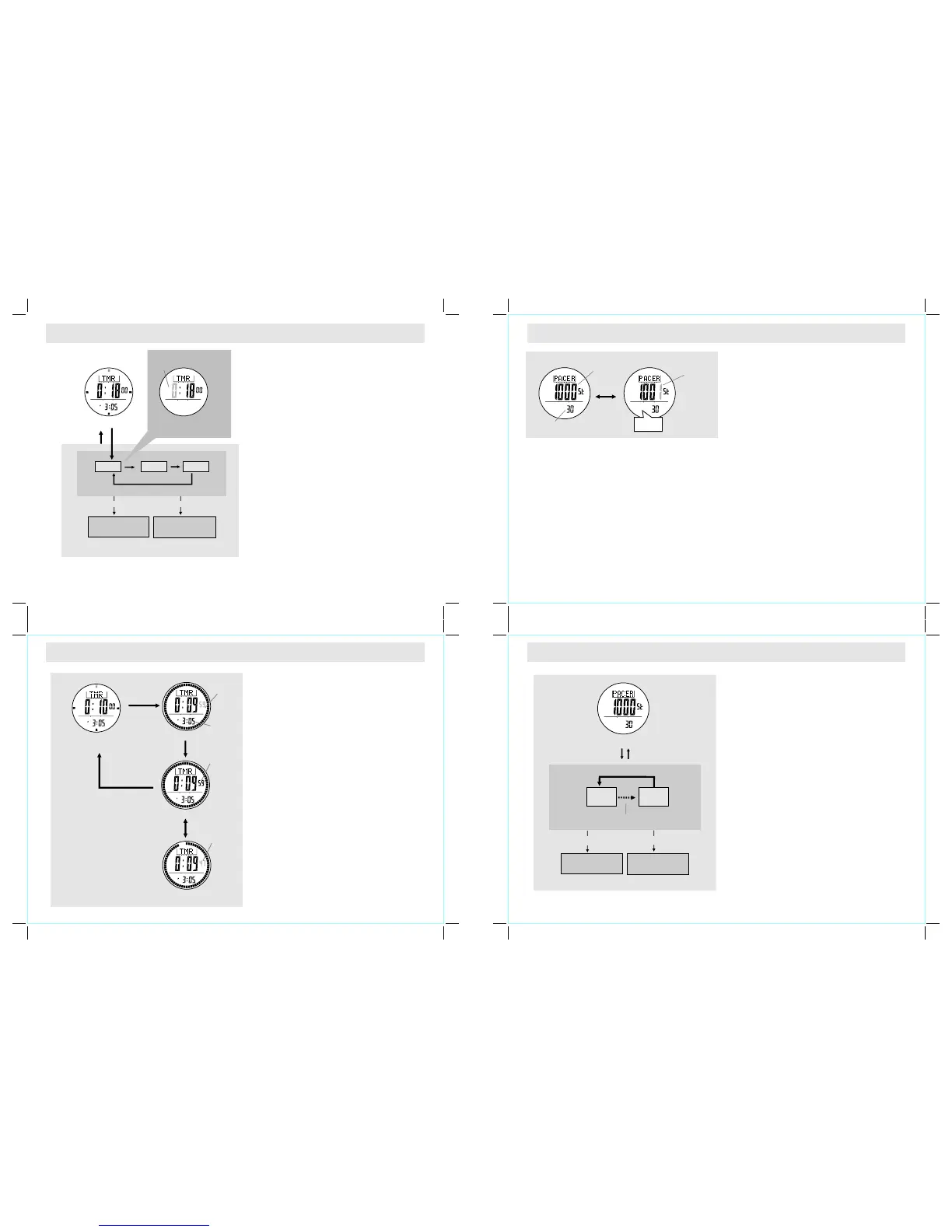
7.1 Timer Mode - Setting the User Preset Value
7.2 Timer Mode - Using the Timer
How to Set the User Preset Value
! To select the setting display, hold the [M] button
for 2 seconds, and the flashing "SET" icon will
appear.
! In the setting display, press the [M] button to
change the selection among hour, minute and
second.
! When the digits are flashing (selected), press the
[S/S] or [L/R] button to increase / decrease the
number. (Hold down the button to change the
number at a higher speed).
! When the setting is completed, hold the [M]
button to exit the setting display.
How to Use the Timer
! When the Timer is set, press the [S/S] button to
start the timer. Press the [S/S] button once
again to stop the timer.
Timer Alarm Sound
! In the last 10 minutes, the Watch will beep
for every minute.
! In the last minute, the Watch will beep for
every 10 seconds. In the last 5 seconds,
the Watch will beep for every second.
! When it reaches 0, a beep sound will last for
30 seconds. Pressing any button can stop
the beep sound.
How to Reload the Timer
! T he l a st t ar ge t t im e wil l be r e lo ad ed
automatically at the end of the 30-second
beep sound.
! Press the [L/R] button when the timer is
stopped.
! To start a new counting by using a new
target time, set the timer again either by
QSV or UPV.
Increase / decrease
the number
Increase /decrease
the number a t
a higher spe ed
hold [S/S] / [ L/R][S/S] / [L/R ]
User Pr ese t Value Setting Sequ ence
Time r Display
Time r Display
(Tim er is set at 10 minutes )
Counting D isplay
Stop Count ing Display
Counting D isplay
digits sta rt
counting
digits sto p
counting
digits sta rt
counting
again
[S/S]
[L/R]
hold
[M]
Setting Di splay
minute
Second
hour
hold
[M]
[M]
[M]
[M]
Real Tim e
Clock
[S/S]
[S/S]
8.0 Pacer Mode - Using the Pacer
Pacer Mode
! When the pacer is activated, it will generate beeps at
a pre-defined beeping rate.
! The beeping rate can be set from 30 to 180 beats per
minute (BPM) in an increment of 5.
How to Use the Pacer
! When the beeping rate is set (for example 30 BPM),
press the [S/S] button to start the beeping.
! When the watch is beeping, press the [S/S] button to
stop the beeping.
Step Counter
! In supplementary to the Pacer Function, when the
Pacer beeps once, the step counter will advance one.
! When the pacer is activated and the step counter
starts counting, pressing the [S/S] button stops the
pacer and step counter.
! The maximum counting limit of the step counter is
99999 steps.
! To reset the step counter to 0, hold the [L/R] button
when the pacer is stopped.
N OT E : W h e n t h e p a c e r h a s b e e n r u nn i n g
continuously for 8 hours, it will stop automatically.
step counter
stop counting
pacer beeping rate
(in beats per minute)
step counter
is counting
8.1 Pacer Mode - Setting the Pacer value
How to Set the Beeping Rate
! To select the setting display, hold the [M] button for 2
seconds in the Pacer Mode.
! When the beeping rate digits start flashing, press the
[S/S] or [L/R] button to increase / decrease the
number. (Hold down the button to change the number
at a higher speed).
! When the setting is completed, press and hold
the [M] button to exit the setting display.
Pacer Mode
30 180
In an increm ent of
5 BPM
Increase / decrease
the number
Increase /decrease
the number a t
a highe r spe ed
[S/S]
hold [M]
hold [M]
[S/S]/[L /R]
hold [S/S] / [L/R]
SET
digits hav e been
selected ( flashing)
beep-beep



 To Next Page
 Loading...