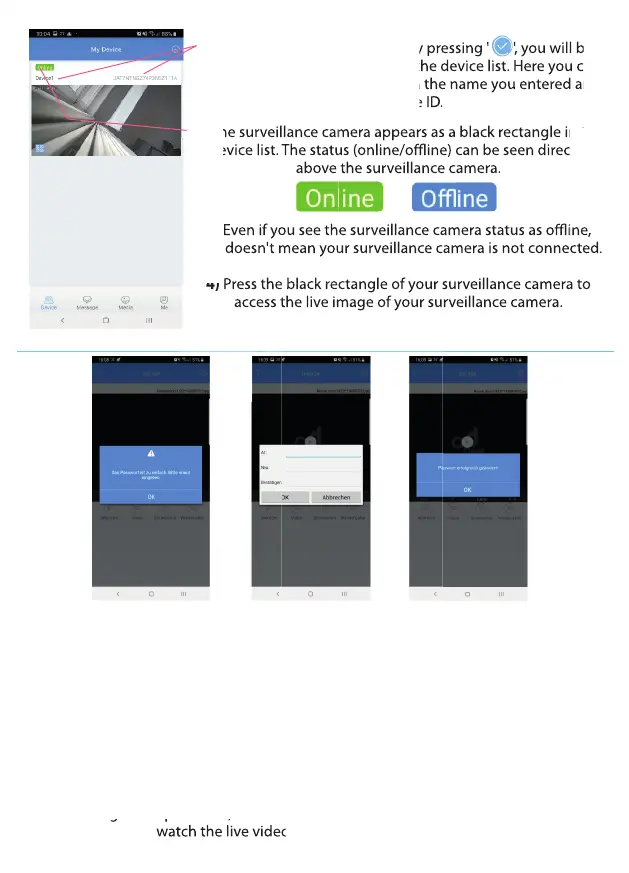
1) After conrming your entry by pressing ' ', you will be
automatically redirected back to the device list. Here you can
see your surveillance camera with the name you entered and
the device ID.
2) The surveillance camera appears as a black rectangle in the
device list. The status (online/oine) can be seen directly
above the surveillance camera.
3) Even if you see the surveillance camera status as oine,
that doesn't mean your surveillance camera is not connected.
4) Press the black rectangle of your surveillance camera to
access the live image of your surveillance camera.
Even if you see the surveillance camera status as oine,
that doesn't mean your surveillance camera is not connected.
Press the black rectangle of your surveillance camera to
access the live image of your surveillance camera.
The surveillance camera appears as a black rectangle in the
device list. The status (online/oine) can be seen directly
above the surveillance camera.
Even if you see the surveillance camera status as oine,
that doesn't mean your surveillance camera is not connected.
Press the black rectangle of your surveillance camera to
After conrming your entry by pressing ' ', you will be
automatically redirected back to the device list. Here you can
see your surveillance camera with the name you entered and
The surveillance camera appears as a black rectangle in the
The surveillance camera appears as a black rectangle in the
The surveillance camera appears as a black rectangle in the
The surveillance camera appears as a black rectangle in the
device list. The status (online/oine) can be seen directly
device list. The status (online/oine) can be seen directly
above the surveillance camera.
Even if you see the surveillance camera status as oine,
Even if you see the surveillance camera status as oine,
that doesn't mean your surveillance camera is not connected.
that doesn't mean your surveillance camera is not connected.
Press the black rectangle of your surveillance camera to
Press the black rectangle of your surveillance camera to
Even if you see the surveillance camera status as oine,
that doesn't mean your surveillance camera is not connected.
Press the black rectangle of your surveillance camera to
The surveillance camera appears as a black rectangle in the
device list. The status (online/oine) can be seen directly
above the surveillance camera.
Even if you see the surveillance camera status as oine,
that doesn't mean your surveillance camera is not connected.
Press the black rectangle of your surveillance camera to
The surveillance camera appears as a black rectangle in the
Press the black rectangle of your surveillance camera to
access the live image of your surveillance camera.
Press the black rectangle of your surveillance camera to
Press the black rectangle of your surveillance camera to
access the live image of your surveillance camera.
access the live image of your surveillance camera.
Press the black rectangle of your surveillance camera to
access the live image of your surveillance camera.
Press the black rectangle of your surveillance camera to
Press the black rectangle of your surveillance camera to
Press the black rectangle of your surveillance camera to
Press the black rectangle of your surveillance camera to
Press the black rectangle of your surveillance camera to
Press the black rectangle of your surveillance camera to
Press the black rectangle of your surveillance camera to
1) After pressing the black rectangle of your surveillance camera in the device list, you
will be redirected to your surveillance camera's live video.
2) Before you can access the live video of your surveillance camera, you must rst
change the password. The preset password of the surveillance camera is: admin
For privacy and security reasons, you now need to set your own password so that only
you have access to your surveillance cameras.
3) A blue box is displayed during initial commissioning. This indicates that your
password is too weak, and you need to set a new one. First, enter the default password
(admin). Enter your new password and repeat it in the box below. As soon as you
have changed the password, the surveillance camera is ready for use. You can now
watch the live video of the surveillance camera.
have changed the password, the surveillance camera is ready for use. You can now
watch the live video of the surveillance camera.
9


 To Next Page
 Loading...