Android Apple
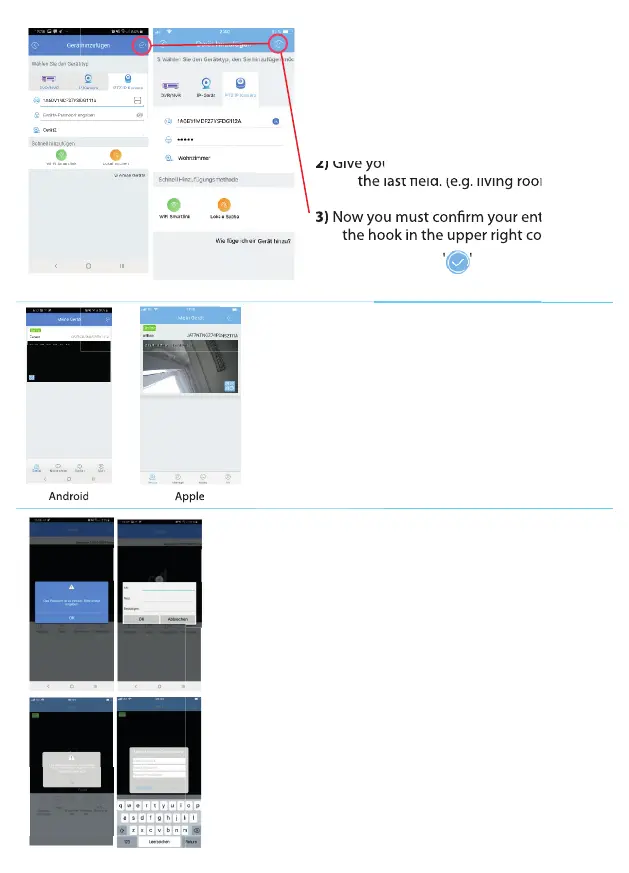
After the QR code has been scanned
successfully, you will be redirected to the 'Add
Device' screen. The scanned QR code is now
displayed in the top eld (enter device ID).
1) Enter the default password: admin
2) Give your surveillance camera a name in
the last eld. (e.g. living room)
3) Now you must conrm your entries with
the hook in the upper right corner:
' '
the last eld. (e.g. living room)
Now you must conrm your entries with
the hook in the upper right corner:
Give your surveillance camera a name in
Give your surveillance camera a name in
the last eld. (e.g. living room)
the last eld. (e.g. living room)
Now you must conrm your entries with
Now you must conrm your entries with
the hook in the upper right corner:
the hook in the upper right corner:
the last eld. (e.g. living room)
Now you must conrm your entries with
the hook in the upper right corner:
After you conrm your entries with the check
box, you will be redirected to your device list
and your surveillance camera will be displayed.
The device ID and the name you entered is also
displayed above the surveillance camera.
Now click on your surveillance camera to go
to the live video of your surveillance camera.
Before you can access the live video, you need to change the
password of your surveillance camera. For security reasons,
you must change the default password '
admin' to a new
customized password.
1) After you select your newly added surveillance camera
for the rst time in your device list, a window is portrait
stating that the password is too simple and needs to be
changed. Click 'ok' to change your password.
2) In the next window, you must rst enter the old default
password (admin). After that, you will need to enter your
new individual password and conrm it again in the next
eld.
3) Once you have changed the password, the surveillance
camera is operational and ready for use. You will be
automatically redirected to the live video of the
surveillance camera.
19


 To Next Page
 Loading...