Help! My surveillance camera does not connect.
Your surveillance camera does not connect to your WiFi or App account? Don't
worry, we will be happy to help you. Follow the steps below or contact us to
arrange an individual consultation:
info@weberprotect.com
If your surveillance camera does not connect properly to your app or is displayed as
' ', please follow the steps below:
- Make sure your 5Ghz WiFi is disabled in the router settings.
- Go back to the device list and reopen the live video. Sometimes there are connection
malfunctions that can be xed with reloading the live video.
- If the surveillance camera does not connect even after reloading, reset the
surveillance camera to the factory setting and reconnect it. (See page: 20)
Your surveillance camera does not connect to your WiFi or App account? Don't
worry, we will be happy to help you. Follow the steps below or contact us to
arrange an individual consultation:
If your surveillance camera does not connect properly to your app or is displayed as
' ', please follow the steps below:
- Make sure your 5Ghz WiFi is disabled in the router settings.
- Go back to the device list and reopen the live video. Sometimes there are connection
malfunctions that can be xed with reloading the live video.
- If the surveillance camera does not connect even after reloading, reset the
surveillance camera to the factory setting and reconnect it. (See page: 20)
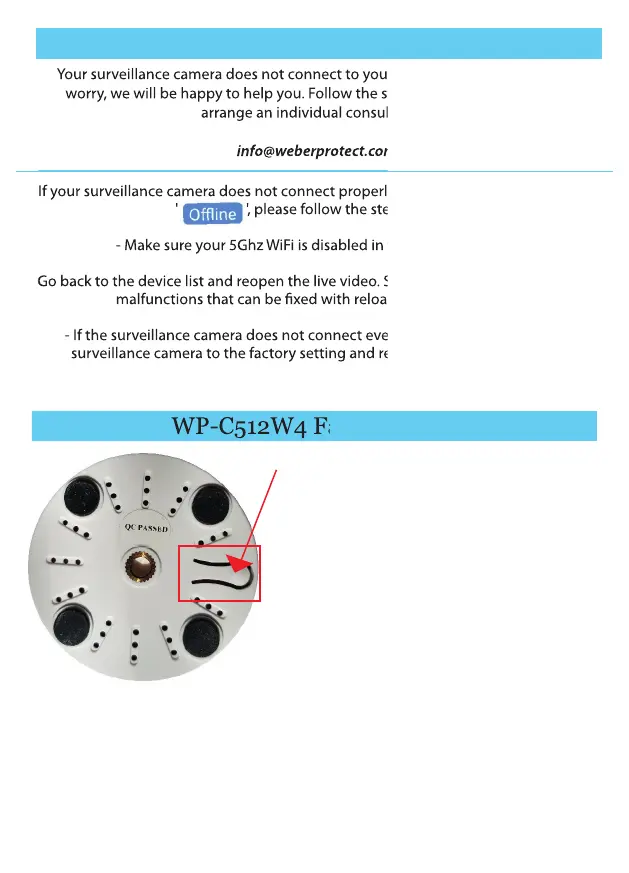
WP-C512W4 Factory Reset
20
1) Make sure the surveillance camera is connected to a power outlet.
2) Press and hold the reset button (see gure) for about 8-10 seconds.
3) After you successfully reset the surveillance camera to the factory setting, the
following voice prompts: 'Reset Succeed'.
4) The surveillance camera, as well as all settings and passwords, are now back to the
factory setting.
Forgot your password? Something went
wrong during the initial commissioning? The
surveillance camera no longer connects to
your internet? No problem! You can reset
your surveillance camera to the factory state
at any time.
Follow these steps to return the WP-C512W4
interior surveillance camera to factory
settings:


 To Next Page
 Loading...