underwater
cleaning
technology
B600 Service Manual
7. Adjustments
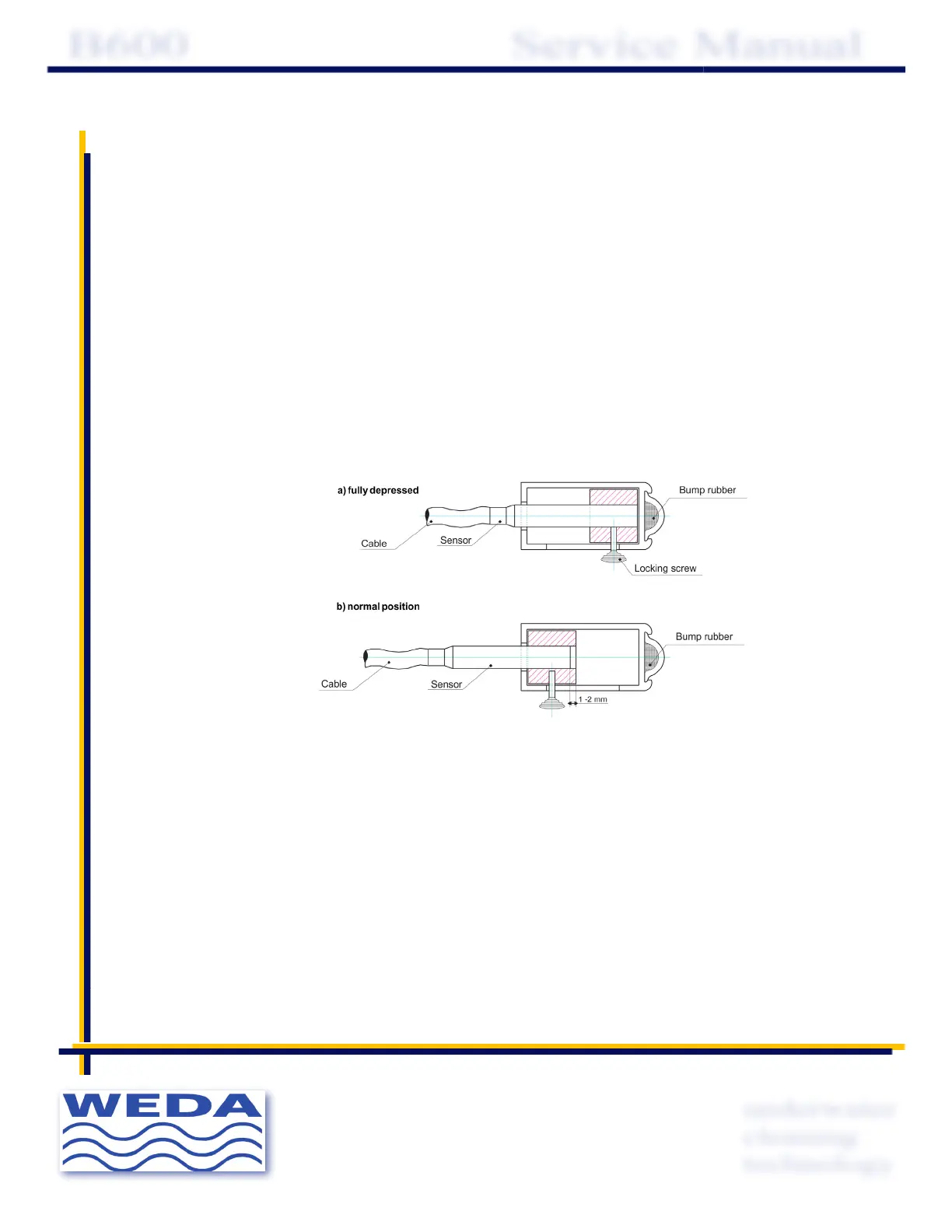
7. 1 Bumper bar sensors
Release the screw that holds the sensor . Press the bumper bar all the way in.
Make sure that the sensor touches the bumper bar bottom when fully depressed.
Lock the sensor screw. Let the sensor bar go back to its resting position.
Release the sensor screw and move the sensor out 1-2 mm to ensure that it does not touch
the bumper bar.
Lock the sensor screw again, by hand.
Important ! Do not tighten too hard . This may damage the sensor.
7.2 Bumper bar angle
To make sure that the whole pool is covered in automatic mode, the bumper bar
should be set at the correct angle.
Release the four screws holding the adjustable supports.
Release the two nuts holding the bumper bar.
Set the bumper bar in the desired angle.
Tighten the nuts.
Check that the bumper bar moves in and out without jamming.


 To Next Page
 Loading...