WHC740 USER MANUAL │ 5
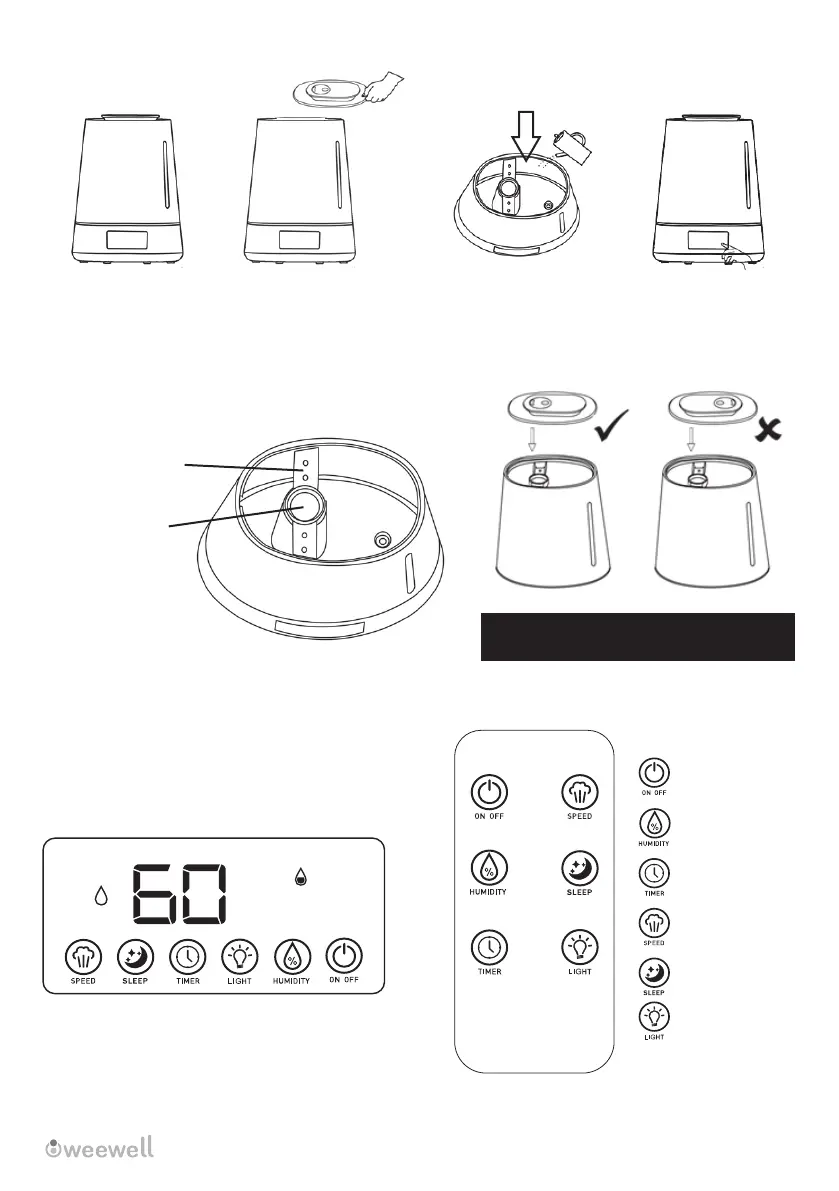
Put back the water tank cover at r�ght
pos�t�on l�ke p�cture above.
You can set the mach�ne by LCD d�splay on the base or by remote control. If remote control fa�ls
to work, make sure a battery �s �nstalled and the plast�c �s removed to act�vate the battery.
OPERATING THE MACHINE
/
/
On / Off
Humidity Level (%)
Timer
Steam Speed
Sleep Mode
Night Light
Place the appl�ance
on the level and
f�rm surface.
Water level must
not over th�s p�llar
Water
To f�ll the tank,
remove the water
tank cover
Pour water �nto tank
as shoved above.
Put back the water tank
cover at r�ght pos�t�on
l�ke p�cture above.
Proh�b�t add�ng
water from
th�s p�llar.
/
MIST
%RH
WATER
SHORTAGE
ATTENTION: After add�ng water to the mach�ne, wa�t 2 m�nutes for �t to become ready.


 To Next Page