WTE250 USER MANUAL │ 9
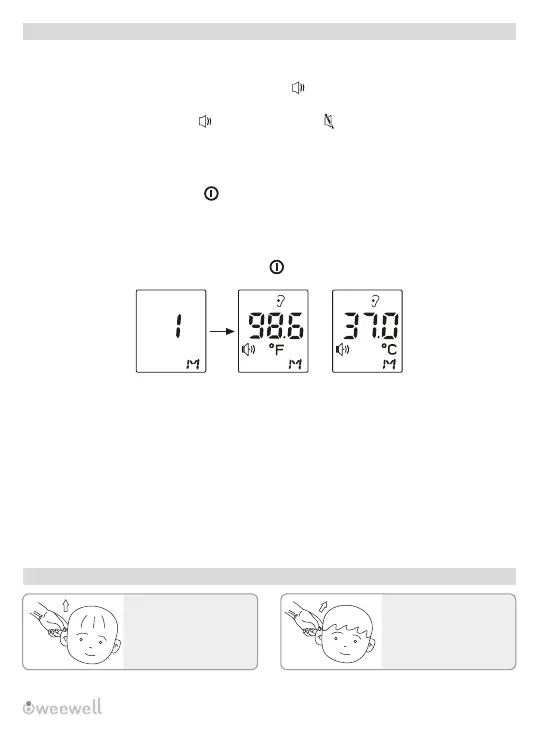
Please pull these
persons' ears back
above. (overone year old
kids and adults)
Introduction of Measurement Methods
Please pull back ears of
your kid who is within
one year old.
Ear temperature Ear temperature
Basic Parameter Instructions
1. Sound function: turn on/off
1) In the power-on state, press “mem” key to set the sound on or off.
2) Press “mem” button, LCD screen will show “ ” it means the sound works,
meanwhile we will hear a short beep sound.
3) Press “mem” button again, “ ” will change into, “ ” it means the sound will be off.
4. Back light status instructions
When measured temperature is < 34°C, it shows LO with red backlight.
When measured temperature value is 34°C~ 37.1°C, it means normal body
temperature and shows green backlight.
When measured temperature value is 37.2°C~ 38.1°C, it means that you have a bit of
fever and shows orange backlight.
When measured temperature value is 38.2°C~43.0°C, it means that you are in fever
stage and shows red backlight.
When measured temperature value is > 43.0°C, it shows red backlight and shows HI.
2. The switch of °F or °C
In off status , long press “mem” button for six seconds, it can switch between
Fahrenheit degree (°F) and Celsius degree (°C). Wait for 8 seconds to turn on the
product automatically or press “ ” to turn off the product directly.
3. Memory storage function
In off status, press “mem” button, the product can read and save 9 sets of
measurement values in order (as below picture shows). It will turn off automatically
without operating for 30 seconds or press “ ” button to turn off this product with your
hands.
Warm prompts: This function is for reference only.


 To Next Page