EasyManua.ls Logo

Wega P700 - Page 10

Wega P700
16 pages
Print Icon
To Next Page IconTo Next Page
To Previous Page IconTo Previous Page
Loading...
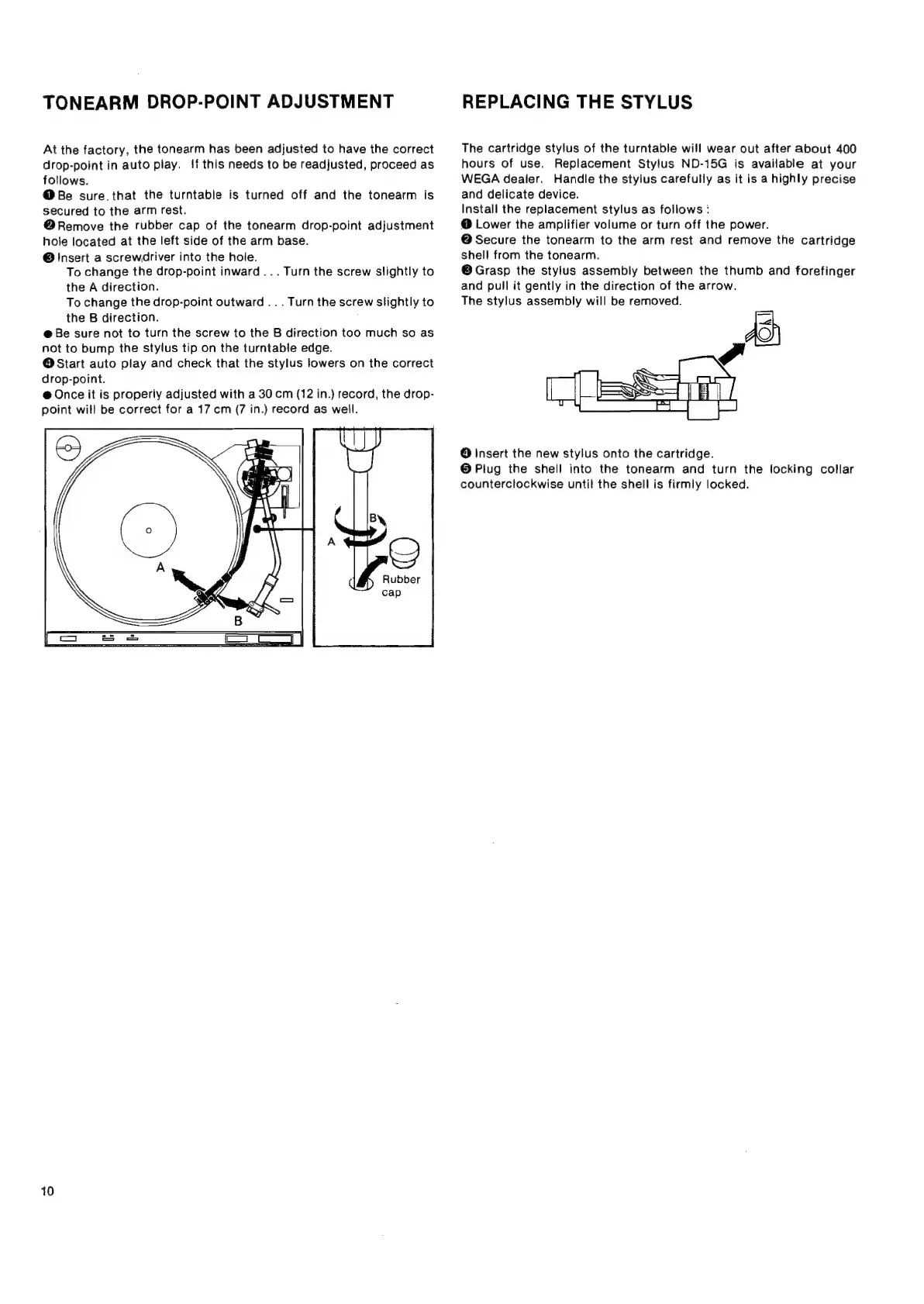
TONEARM
DROP-POINT
ADJUSTMENT
At
the
factory,
the
tonearm
has
been
adjusted
to
have
the
correct
drop-point
in
auto
play.
!f
this
needs
to
be
readjusted,
proceed
as
fotlows.
@
Be
sure.that
the
turntable
is
turned
off
and
the
tonearm
is
secured
to
the
arm
rest.
@
Remove
the
rubber
cap
of
the
tonearm
drop-point
adjustment
hole
located
at
the
left
side
of
the
arm
base.
@
Insert
a
screwdriver
into
the
hole.
To
change
the
drop-point
inward
...
Turn
the
screw
slightly
to
the
A
direction.
To
change
the
drop-point
outward
..
.
Turn
the
screw
slightly
to
the
B
direction.
@
Be
sure
not
to
turn
the
screw
to
the
B
direction
too
much
so as
not
to
bump
the
stylus
tip
on
the
turntable
edge.
O
Start
auto
play
and
check
that
the
stylus
lowers
on
the
correct
drop-point.
@
Once
it
is
properly
adjusted
with
a
30
cm
(12
in.)
record,
the
drop-
point
will
be
correct
for
a
17
cm
(7
in.)
record
as
well.
Rubber
10
REPLACING
THE
STYLUS
The
cartridge
stylus
of
the
turntable
will
wear
out
after
about
400
hours
of
use.
Replacement
Stylus
ND-15G
is
available
at
your
WEGA
dealer.
Handle
the
stylus
carefully
as
it
is
a
highly
precise
and
delicate
device.
Install
the
replacement
stylus
as
follows:
@
Lower
the
amplifier
volume
or
turn
off
the
power.
@
Secure
the
tonearm
to
the
arm
rest
and
remove
the
cartridge
shell
from
the
tonearm.
©Grasp
the
stylus
assembly
between
the
thumb
and
forefinger
and
puil
it
gently
in
the
direction
of
the
arrow.
The
stylus
assembly
will
be
removed.
AD)
7
O
Insert
the
new
stylus
onto
the
cartridge.
©
Plug
the
shell
into
the
tonearm
and
turn
the
locking
collar
counterclockwise
until
the
shell
is
firmly
locked.