EasyManua.ls Logo

Wega P700 - Page 11

Wega P700
16 pages
Print Icon
To Next Page IconTo Next Page
To Previous Page IconTo Previous Page
Loading...
USING
A
DIFFERENT
CARTRIDGE
A
cartridge
weighing
from
1.5
to
9g
can
be
mounted
with
the
sup-
plied
cartridge
shell
(15g).
Heavier
cartridges
from
7.5
to
15g
can
be
mounted
using
the
supplied
extra
weight.
Removal
of
the
old
cartridge
@
Lower
the
amplifier
volume
or
turn
off
the
power.
@
Secure
the
tonearm
to
the
arm
rest,
then
remove
the
shell
from
the
tonearm
by
turning
the
locking
collar.
@
Disconnect
the
lead
wires
of
the
shell
from
the
four
output
ter-
minals
of
the
cartridge.
@
Remove
the
old
cartridge
by
loosening
the
two
mounting
screws.
Tweezers
Lead
wire
Installation
of
a
new
cartrige
@
Install
the
cartridge
into
the
cartridge
shell
with
the
supplied
mounting
screws
temporarily.
Fasten
the
screws
lightly
so
that
the
cartridge
can
slide
for
overhang
adjustment.
@
Connect
the
lead
wires
of
the
shell
to
the
corresponding
pins
on
the
cartridge.
Wires
Cartridge
pins
WANE
24.44
20°56
34-4
White,
L
(left
channel
signal)
BlUens
ee
th
eG
be
Blue,
LE
or
G
(left
channel
ground)
Red
4:
jc
oe
SS
BS
Red,
R
(right
channel
signal)
Green.
...........
Green,
RE
or
G
(right
channel
ground)
©
Plug
the
shell
into
the
tonearm.
@
If
it
is
necessary,
insert
the
supplied
extra
weight
fully
to
the
end.
Extra
weight
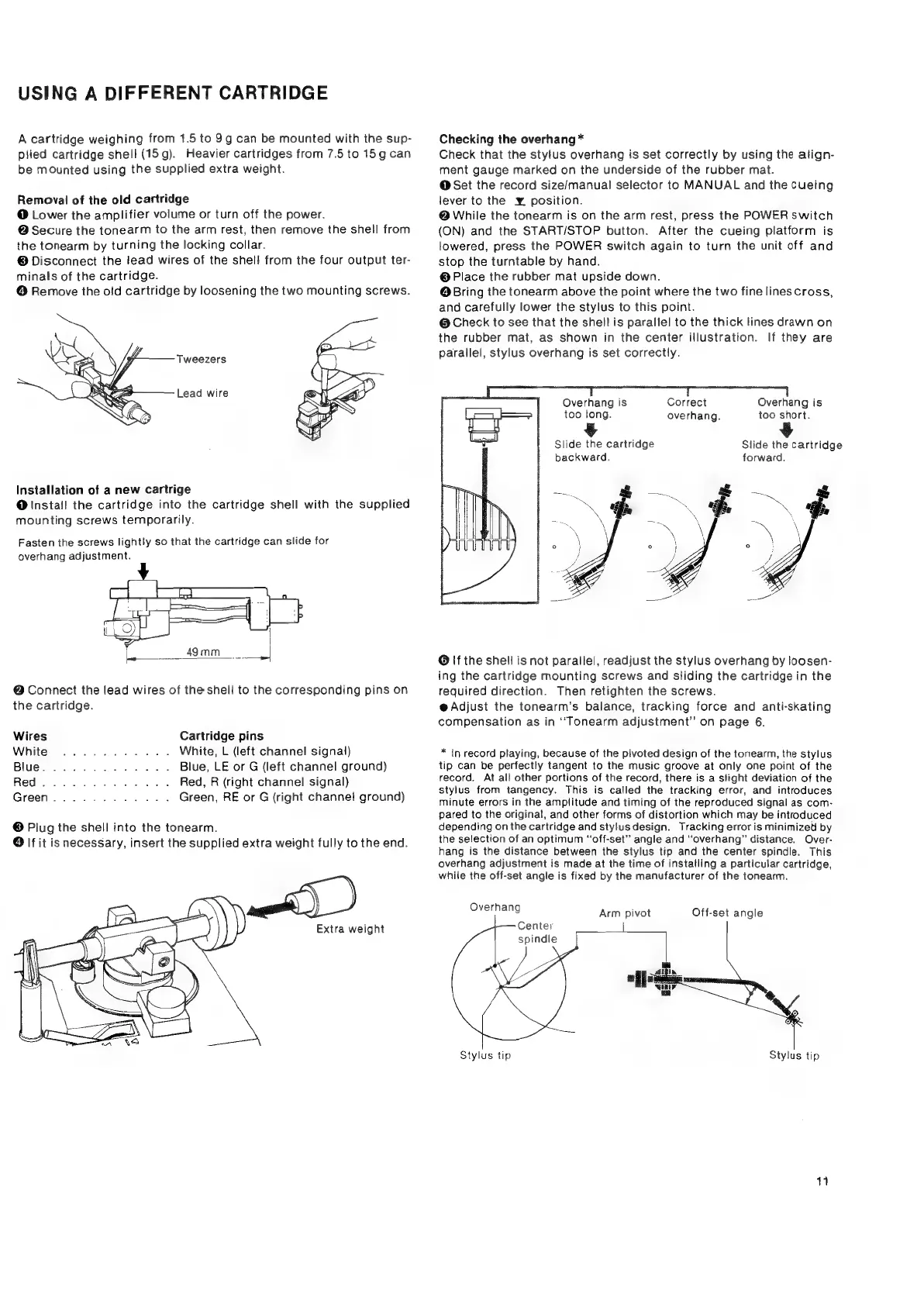
Checking
the
overhang
*
Check
that
the
stylus
overhang
is
set
correctly
by
using
the
align-
ment
gauge
marked
on
the
underside
of
the
rubber
mat.
@
Set
the
record
size/manual
selector
to
MANUAL
and
the
cueing
lever
to
the
¥
position.
@
While
the
tonearm
is
on the
arm
rest,
press
the
POWER
switch
(ON)
and
the
START/STOP
button.
After
the
cueing
platform
is
lowered,
press
the
POWER
switch
again
to
turn
the
unit
off
and
stop
the
turntable
by
hand.
@
Place
the
rubber
mat
upside
down.
@
Bring
the
tonearm
above
the
point
where
the
two
fine
lines
cross,
and
carefully
lower
the
stylus
to
this
point.
@
Check
to
see
that
the
shell
is
parallel
to
the
thick
lines
drawn
on
the
rubber
mat,
as
shown
in
the
center
illustration.
If
they
are
parallel,
stylus
overhang
is
set
correctly.
Correct
overhang.
Overhang
is
too
short.
Overhang
is
too
long.
Slide
the
cartridge
Slide
the
cartridge
backward,
forward.
a
4
Sy
Oe
A
ae
‘-
a
-
~~
VN
VO
|
@
If
the
shell
is
not
parallel,
readjust
the
stylus
overhang
by
loosen-
ing
the
cartridge
mounting
screws
and
sliding
the
cartridge
in
the
required
direction.
Then
retighten
the
screws.
@
Adjust
the
tonearm’s
balance,
tracking
force
and
anti-skating
compensation
as
in
‘‘Tonearm
adjustment”
on
page
6.
*
in
record
playing,
because
of
the
pivoted
design
of
the
tonearm,
the
stylus
tip
can
be
perfectly
tangent
to
the
music
groove
at
only
one
point
of
the
record.
At
all
other
portions
of
the
record,
there
is
a
slight
deviation
of
the
stylus
from
tangency.
This
is
called
the
tracking
error,
and
introduces
minute
errors
in
the
amplitude
and
timing
of
the
reproduced
signal
as
com-
pared
to
the
original,
and
other
forms
of
distortion
which
may
be
introduced
depending
on
the
cartridge
and
stylus
design.
Tracking
error
is
minimized
by
the
selection
of
an
optimum
“off-set”
angle
and
“overhang”
distance,
Over-
hang
is
the
distance
between
the
stylus
tip
and
the
center
spindle.
This
overhang
adjustment
is
made
at
the
time
of
installing
a
particular
cartridge,
while
the
off-set
angle
is
fixed
by
the
manufacturer
of
the
tonearm.
Overhang
Off-set
angle
Arm
pivot
Center
spindle
Stylus
tip
Stylus
tip
my