EasyManua.ls Logo

Wega P700 - Page 9

Wega P700
16 pages
Print Icon
To Next Page IconTo Next Page
To Previous Page IconTo Previous Page
Loading...
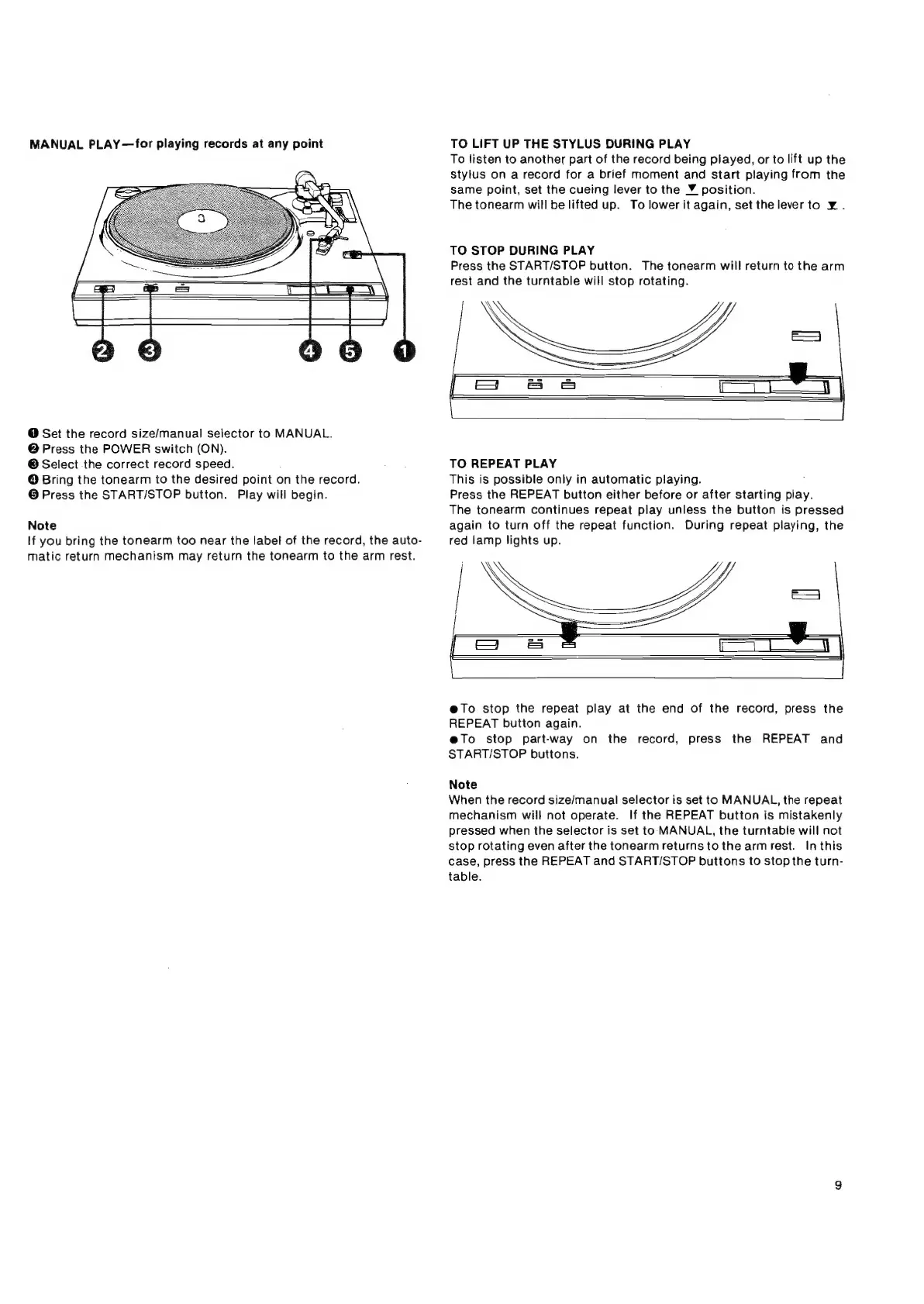
MANUAL
PLAY—for
playing
records
at
any
point
@
Set
the
record
size/manual
selector
to
MANUAL.
@
Press
the
POWER
switch
(ON).
@
Select
the
correct
record
speed.
@
Bring
the
tonearm
to
the
desired
point
on
the
record.
®
Press
the
START/STOP
button.
Play
will
begin.
Note
If
you
bring
the
tonearm
too
near
the
labet
of
the
record,
the
auto-
matic
return
mechanism
may
return
the
tonearm
to
the
arm
rest.
TO
LIFT
UP
THE
STYLUS
DURING
PLAY
To
Jisten
to
another
part
of
the
record
being
played,
or
to
lift
up
the
stylus
on
a
record
for
a
brief
moment
and
start
playing
from
the
same
point,
set
the
cueing
lever
to
the
¥_
position.
The
tonearm
will
be
lifted
up.
To
lower
it
again,
set
the
leverto
¥..
TO
STOP
DURING
PLAY
Press
the
START/STOP
button.
The
tonearm
will
return
to
the
arm
rest
and
the
turntable
will
stop
rotating.
\
\
TO
REPEAT
PLAY
This
is
possible
only
in
automatic
playing.
Press
the
REPEAT
button
either
before
or
after
starting
play.
The
tonearm
continues
repeat
play
unless
the
button
is
pressed
again
to
turn
off
the
repeat
function.
During
repeat
playing,
the
red
lamp
lights
up.
e@To
stop
the
repeat
play
at
the
end
of
the
record,
press
the
REPEAT
button
again.
e@To
stop
part-way
on
the
record,
press
the
REPEAT
and
START/STOP
buttons.
Note
When
the
record
size/manual
selector
is
set
to
MANUAL,
the
repeat
mechanism
will
not
operate.
If
the
REPEAT
button
is
mistakenly
pressed
when
the
Selector
is
set
to
MANUAL,
the
turntabie
will
not
stop
rotating
even
after
the
tonearm
returns
to
the
arm
rest.
In
this
case,
press
the
REPEAT
and
START/STOP
buttons
to
stop
the
turn-
table.