EasyManua.ls Logo

Wega P700 - Page 8

Wega P700
16 pages
Print Icon
To Next Page IconTo Next Page
To Previous Page IconTo Previous Page
Loading...
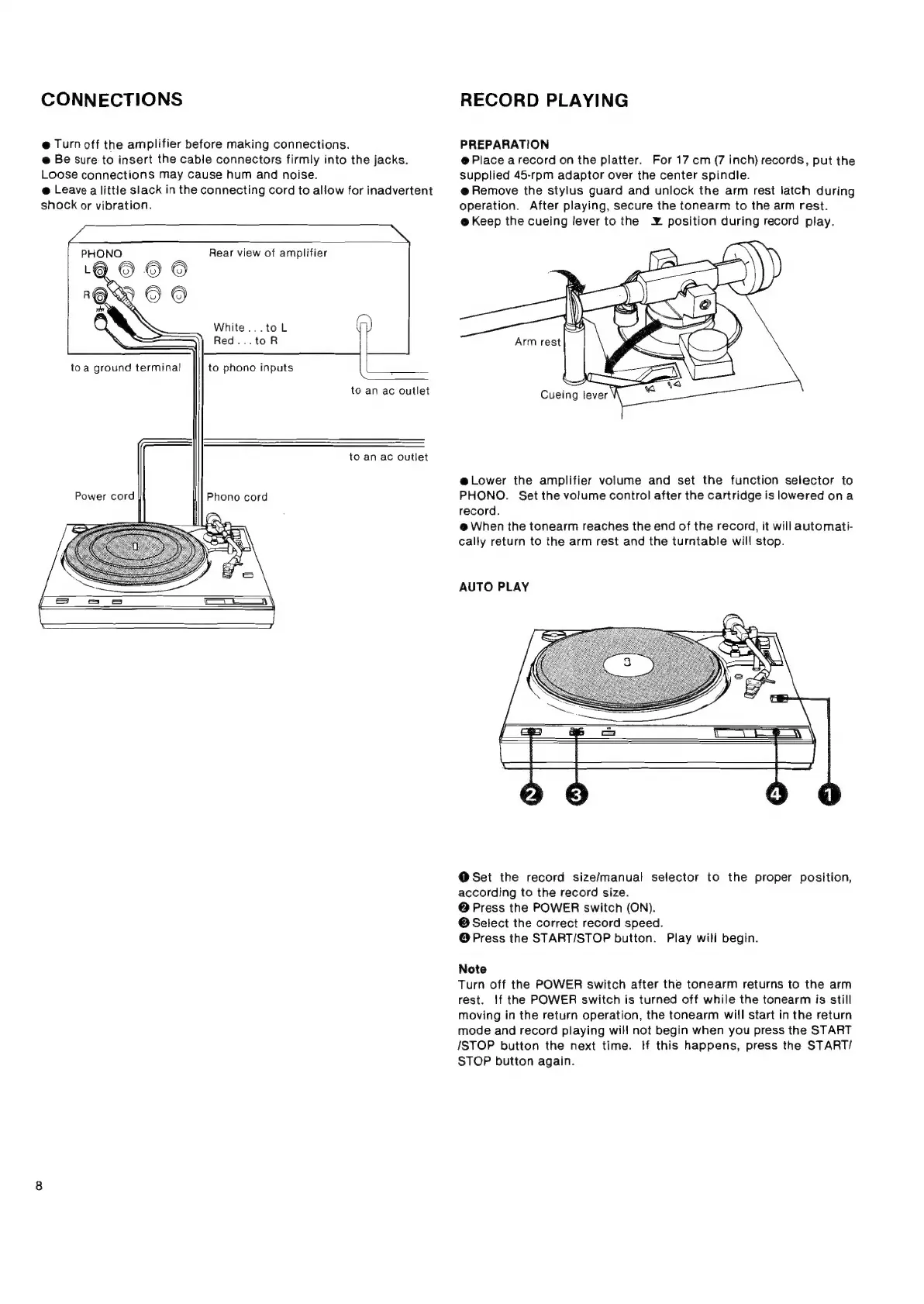
CONNECTIONS
@
Turn
off
the
amplifier
before
making
connections.
@
Be
sure
to
insert
the
cable
connectors
firmly
into
the
jacks.
Loose
connections
may
cause
hum
and
noise.
@
Leave
a
little
slack
in
the
connecting
cord
to
allow
for
inadvertent
shock
or
vibration.
Rear
view
of
amplifier
White...toL
Red...toR
toa
ground
termina!
to
phono
inputs
to
an
ac
outlet
to
an
ac
outlet
Power
cord
Phono
cord
RECORD
PLAYING
PREPARATION
@
Place
arecord
on
the
platter.
For
17
cm
(7
inch)
records,
put
the
supplied
45-rpm
adaptor
over
the
center
spindle.
@
Remove
the
stylus
guard
and
unlock
the
arm
rest
latch
during
operation.
After
playing,
secure
the
tonearm
to
the
arm
rest.
@
Keep
the
cueing
lever
to
the
¥
position
during
record
play.
@
Lower
the
amplifier
volume
and
set
the
function
selector
to
PHONO.
Set the
volume
control
after
the
cartridge
is
lowered
ona
record.
@
When
the
tonearm
reaches
the
end
of
the
record,
it
will
automati-
cally
return
to
the
arm
rest
and
the
turntable
will
stop.
AUTO
PLAY
@Set
the
record
size/manual
selector
to
the
proper
position,
according
to
the
record
size.
@
Press
the
POWER
switch
(ON).
@
Select
the
correct
record
speed.
@
Press
the
START/STOP
button.
Play
will
begin.
Note
Turn
off
the
POWER
switch
after
the
tonearm
returns
to
the
arm
rest.
If
the
POWER
switch
is
turned
off
while
the
tonearm
is
still
moving
in
the
return
operation,
the
tonearm
will
start
in
the
return
mode
and
record
playing
will
not
begin
when
you
press
the
START
ISTOP
button
the
next
time.
If
this
happens,
press
the
START/
STOP
button
again.