EasyManua.ls Logo

Wega P700 - Page 7

Wega P700
16 pages
Print Icon
To Next Page IconTo Next Page
To Previous Page IconTo Previous Page
Loading...
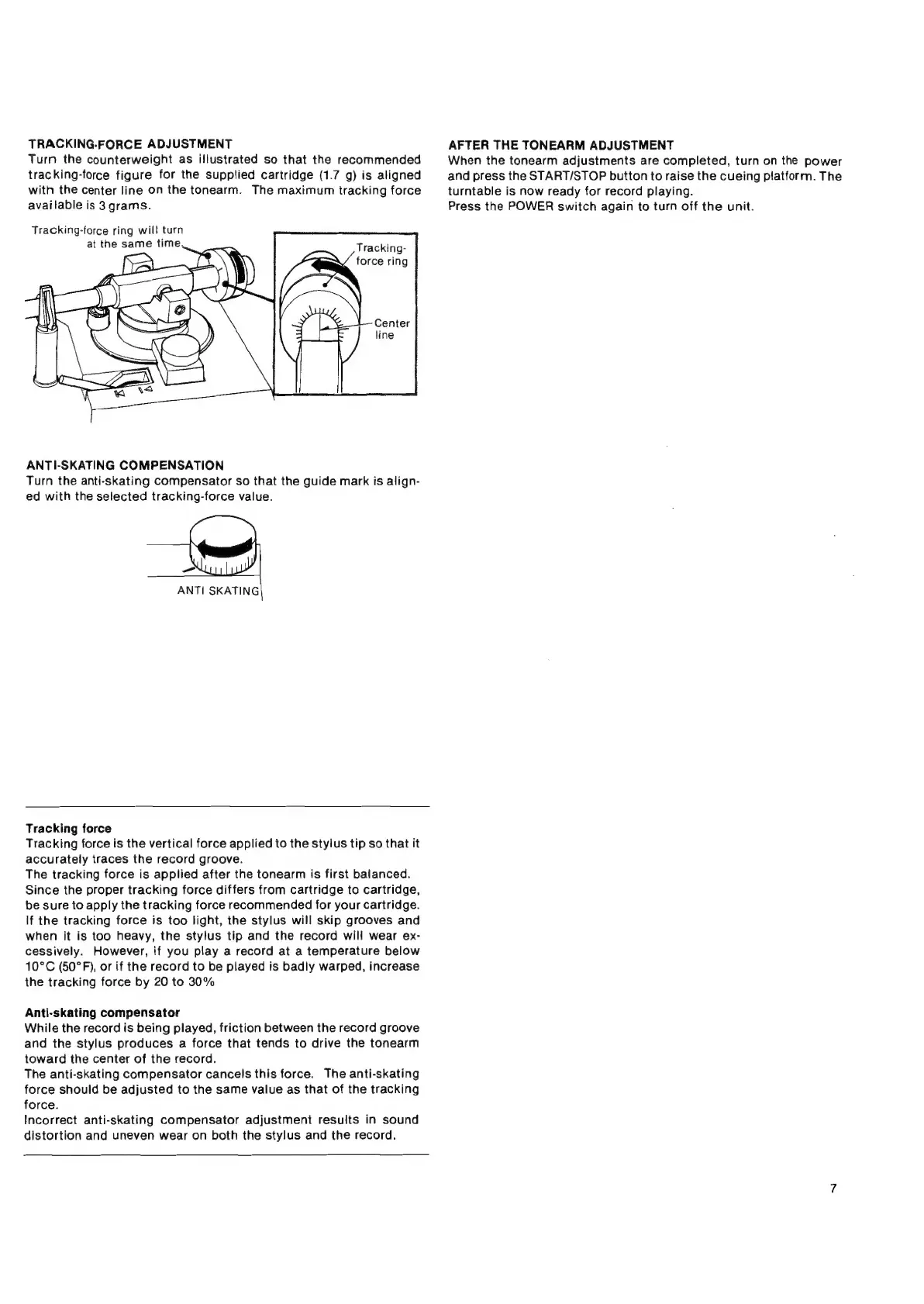
TRACKING-FORCE
ADJUSTMENT
Turn
the
counterweight
as
illustrated
so
that
the
recommended
tracking-force
figure
for
the
supplied
cartridge
(1.7
g)
is
aligned
with
the
center
line
on
the
tonearm.
The
maximum
tracking
force
available
is
3
grams.
Tracking-force
ring
wil!
turn
at
the
same
time
Tracking-
force
ring
ANTI-SKATING
COMPENSATION
Turn
the
anti-skating
compensator
so
that
the
guide
mark
is
align-
ed
with
the
selected
tracking-force
value.
>
\
ANTI
SKATING
Tracking
force
Tracking
force
is
the
vertical
force
applied
to
the
styius
tip
so
that
it
accurately
traces
the
record
groove.
The
tracking
force
is
applied
after
the
tonearm
is
first
balanced.
Since
the
proper
tracking
force
differs
from
cartridge
to
cartridge,
be
sure
to
apply
the
tracking
force
recommended
for
your
cartridge.
If
the
tracking
force
is
too
light,
the
stylus
will
skip
grooves
and
when
it
is
too
heavy,
the
stylus
tip
and
the
record
will
wear
ex-
cessively.
However,
if
you
play
a
record
at
a
temperature
below
10°C
(50°F),
or
if
the
record
to
be
played
is
badly
warped,
increase
the
tracking
force
by
20
to
30%
Anti-skating
compensator
While
the
record
is
being
played,
friction
between
the
record
groove
and
the
stylus
produces
a
force
that
tends
to
drive
the
tonearm
toward
the
center
of
the
record.
The
anti-skating
compensator
cancels
this
force.
The
anti-skating
force
should
be
adjusted
to
the
same
value
as
that
of
the
tracking
force.
Incorrect
anti-skating
compensator
adjustment
results
in
sound
distortion
and
uneven
wear
on
both
the
stylus
and
the
record.
AFTER
THE
TONEARM
ADJUSTMENT
When
the
tonearm
adjustments
are
completed,
turn
on
the
power
and
press
the
START/STOP
button
to
raise
the
cueing
platform.
The
turntable
is
now
ready
for
record
playing.
Press
the
POWER
switch
again
to
turn
off
the
unit.