EasyManua.ls Logo

Wegmatt dAISy HAT - User Manual

Wegmatt dAISy HAT
16 pages
Print Icon
To Next Page IconTo Next Page
Loading...
WEGMATTLLC dAISy HAT AIS Receiver
1 Contents
2 Disclaimer ..................................................................................................................................2
3 Configuring the Raspberry Pi for the dAISy HAT ...........................................................................2
3.1 Recent versions of Raspian ........................................................................................................... 2
3.2 Older versions of Raspian Raspberry Pi, Pi 2 and Pi Zero .......................................................... 3
3.3 Older versions of Raspian Raspberry Pi 3 .................................................................................. 4
3.4 Configuration in OpenCPN ............................................................................................................ 4
3.5 Connecting dAISy with other software ......................................................................................... 6
4 Using dAISy ................................................................................................................................7
4.1 Interpreting the status LEDs ......................................................................................................... 7
4.2 Configuration and debug menu .................................................................................................... 8
5 Using the breakout connections ................................................................................................ 10
5.1 Serial 1 header ............................................................................................................................ 10
5.2 Serial 2 header ............................................................................................................................ 10
5.3 I2C header ................................................................................................................................... 11
5.4 Debug header .............................................................................................................................. 11
5.5 RF connectors .............................................................................................................................. 11
6 Tips for good AIS reception ....................................................................................................... 12
6.1 Antenna ....................................................................................................................................... 12
6.2 Location, location, location ......................................................................................................... 12
6.3 Radio noise .................................................................................................................................. 13
7 Troubleshooting ....................................................................................................................... 14
8 Specifications ........................................................................................................................... 15
9 Source code and schematics...................................................................................................... 16
10 Contact ................................................................................................................................. 16

Other manuals for Wegmatt dAISy HAT

Question and Answer IconNeed help?

Do you have a question about the Wegmatt dAISy HAT and is the answer not in the manual?

Summary

dAISy HAT Disclaimer

Configuring Raspberry Pi for dAISy HAT

Recent Raspian Configuration

Configure serial ports on recent Raspian versions using a script for dAISy HAT.

Older Raspian Configuration (Pi 1;2;Zero)

Manual steps for older Raspian versions on Raspberry Pi, Pi 2, and Pi Zero.

Raspberry Pi 3 Older Raspian Configuration

Reconfiguring serial ports on Raspberry Pi 3 with older Raspian versions.

OpenCPN AIS Configuration

Setting up OpenCPN, a chart plotter, to use AIS data from dAISy.

Connecting dAISy with Other Software

Connecting dAISy to external software applications via its serial port.

Using the dAISy HAT

Interpreting dAISy Status LEDs

Understanding the meaning of dAISy's status LEDs for operational feedback.

dAISy Configuration and Debug Menu

Accessing and using the dAISy configuration and debug menu via a serial terminal.

dAISy Breakout Connections

dAISy Serial 1 Header Details

Details of the primary serial interface (Serial 1) on the dAISy HAT.

dAISy Serial 2 Header Details

Details of the secondary serial interface (Serial 2) on the dAISy HAT.

dAISy I2 C Header Interface

Information about the I2C interface breakout for sensors and communication.

dAISy Debug Header Interface

Access to the debug and programming interface for the dAISy MCU.

dAISy RF Connector Information

Description of the antenna connectors (SMA and MMCX) on the dAISy HAT.

Tips for Good AIS Reception

Antenna Selection and Placement

Recommendations for selecting and positioning antennas for optimal AIS reception.

Optimal Antenna Location for Reception

Guidance on antenna placement for maximizing AIS signal reception.

Managing Radio Noise for AIS

Understanding and mitigating the impact of radio noise on AIS reception.

dAISy Troubleshooting

dAISy Specifications

dAISy Source Code and Schematics

dAISy Contact Information

Overview

The dAISy HAT is a reliable, dual-channel AIS Receiver designed to communicate with a Raspberry Pi through its serial port. It is designed and assembled in the USA by Wegmatt LLC.

Function Description:

The dAISy HAT acts as an Automatic Identification System (AIS) receiver, capable of receiving AIS transmissions on two independent channels (161.975MHz and 162.025MHz). It processes these transmissions and makes the data available to a connected Raspberry Pi or other software via a serial port. The device is primarily intended for use with chart plotter and navigation software like OpenCPN to display the positions of ships on charts. While reliable, it should not be solely relied upon for collision avoidance or navigation.

Important Technical Specifications:

  • Power:
    • Input voltage (RPi / Serial 1 / Serial 2): 5V
    • Input voltage (Debug): 3.3V
    • Input current (RPi / Serial 1 / Serial 2 / Debug): < 35 mA
    • Output voltage (Serial 1 / Serial 2): 5V
    • Output voltage (Debug): 3.3V
    • Maximum output current (Serial 1 / Serial 2): Limited by external 5V supply
    • Maximum output current (Debug): 150mA
  • Radio:
    • Independent receivers: 2
    • Frequency bands: 161.975MHz and 162.025MHz
    • AIS channels: A/B, A/A, B/B, B/A configurable (A/B recommended)
    • Bandpass filter: SAW 156.3 - 162.025MHz pass band
    • RF connector: SMA (female, standard polarity)
    • Input impedance: 50Ω
  • Data I/O:
    • AIS message encoding: NMEA 0183 (!AIVDM)
    • Supported AIS message types: 1-27
    • Serial speed (RPi / Serial 1): 38400 Baud (fixed)
    • Serial speed (Serial 2): 4800, 9600, 38400 Baud (configurable)
    • Serial protocol: 8 data bits, no parity, 1 stop bit (8N1)
    • Serial mode (RPi / Serial 1): NMEA out (fixed)
    • Serial mode (Serial 2): NMEA out, NMEA in (configurable)
    • Serial signal voltage (RPi): 3.3V
    • Serial signal voltage (Serial 1 / Serial 2): 3.3V (5V tolerant)
  • Dimensions:
    • Circuit board without connectors: 65mm x 56mm
    • Circuit board with connectors: 65mm x 66mm x 14mm (6mm w/o RPi conn)
    • Mounting holes: 4x Size: 2.75mm (M2.5), Distance: 58mm x 49mm
  • Weight:
    • Product: 18g
    • w/o 40-pin Raspberry Pi header: 14g

Usage Features:

  • Raspberry Pi Integration: The dAISy HAT is designed to sit on top of a Raspberry Pi, utilizing its expansion header for communication via the serial port. Configuration steps are provided for recent and older versions of Raspbian to enable the serial port for dAISy.
  • Serial Port Configuration: The device presents itself as a serial port with parameters: Baud rate 38400, Data bits 8, Parity None, Stop bits 1, Flow control None. These parameters are crucial for connecting to software like OpenCPN.
  • Standalone Operation: The dAISy HAT can be powered and operated standalone without a Raspberry Pi, drawing a maximum current of 40mA in receive mode.
  • Status LEDs: Two two-color LEDs provide visual feedback on the device's status:
    • Short GREEN flash every 5 seconds: Device is alive and in receive mode.
    • Long GREEN flash: A valid AIS packet has been received and sent to the Raspberry Pi.
    • Long RED flash: An invalid packet was received (e.g., out of range, interference, noise).
    • RED turned on permanently: Radio IC failed to initialize.
    • Fast regular blinking RED: Unexpected system error.
    • No LED activity: Most likely in configuration menu; press ESC to return to receive mode.
  • Configuration and Debug Menu: Accessible via a serial terminal (e.g., screen) by pressing ESC, this menu offers various options:
    • Serial 2 Control (0-3): Enables/disables and sets the baud rate for the secondary serial port (4800, 9600, 38400 baud).
    • Serial 2 Function (S): Configures Serial 2 as either NMEA output (e.g., for Bluetooth, RS-422/NMEA0183 adapters, data loggers) or NMEA input (e.g., from a GPS module).
    • AIS Channel Configuration (C): Allows changing the receiving channel assignment of the two radios (A/A, B/B, A/B, B/A). A/B is the recommended setting.
    • CPU Low Power Mode (L): Toggles low power mode, reducing consumption by 10-15% when idle (OFF recommended for typical applications).
    • RSSI Detection (R): Toggles RSSI (Received Signal Strength Indicator) detection. When on, weak signals are ignored, potentially increasing local message count but reducing maximum range (OFF recommended).
    • Debug Messages (D): Toggles debug output, displaying signal strength and invalid packet information for reception analysis.
    • RSSI Reading (N): Displays current noise level (-120 to -100 dBm is normal).
    • Statistics (V): Shows a summary of signal strength for valid messages received (min, max, average).
    • Test Mode (T): Outputs a test message every 5 seconds, useful for testing without actual AIS reception.
    • Save Settings (#): Saves current settings (serial, C, L, R, D) as startup defaults.
    • Exit Menu (ESC): Returns to AIS receive mode.
  • Breakout Connections: Unpopulated footprints for 0.1" headers provide access to various interfaces, all digital interfaces are 3.3V only:
    • Serial 1 Header: Primary serial interface, connected in parallel with the Raspberry Pi's serial interface. Always active at 38400 baud. Can power the HAT standalone.
    • Serial 2 Header: Secondary serial interface, controlled by dAISy's MCU. Configurable speed and function (output or NMEA input) via the debug menu. Pinout compatible with Adafruit Ultimate GPS module.
    • I2C Header: Breaks out the Raspberry Pi's I2C interface for connecting I2C sensors (e.g., temperature, pressure, humidity, light).
    • Debug Header: Access to the MCU's debug and programming interface (Texas Instrument MSP430F5232). Also provides 3.3V power rail (150mA max, 50mA continuous recommended).
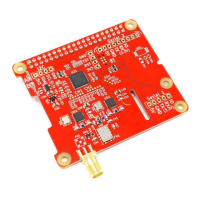
  • Antenna Connection: Uses a female SMA, standard polarity connector for antenna input. An unpopulated MMCX footprint is also available.

Maintenance Features:

  • Firmware Updates (B): The debug menu includes an option to launch the bootloader for firmware updates. Updates are performed by power-cycling the device or completing the upgrade.
  • Troubleshooting Guide: The manual provides a comprehensive troubleshooting section for common issues such as:
    • No activity of status LEDs.
    • Device in reception mode but no valid AIS messages received.
    • Valid AIS messages indicated by LEDs but not received on Raspberry Pi.
    • Software receives positions but with fewer than expected or worse range.
    • Device error indicated by fast blinking red LED.
  • Antenna Best Practices:
    • Use a marine VHF antenna tuned to 162 MHz for optimal reception.
    • Separate the AIS antenna from voice VHF antennas to avoid interference.
    • Mount the antenna at least 3 meters away from high-power transmitters like radars.
    • Ensure line-of-sight to targets for good reception; antenna height above sea-level is a critical factor.
    • Minimize radio noise by placing the antenna outdoors and away from electronic devices.
    • An integrated 12 MHz wide bandpass filter helps reduce noise, but a narrow-band antenna or external bandpass filter can further improve reception.
  • Support: Contact information (email, GitHub, 43oh, Tindie) is provided for assistance with issues or for those interested in custom firmware or building their own dAISy. Source code for the core functionality is partially open source and available on GitHub.

Wegmatt dAISy HAT Specifications

General IconGeneral
BrandWegmatt
ModeldAISy HAT
CategoryReceiver
LanguageEnglish

Related product manuals