Another possibility is, that dAISy failed to boot or crashed.
In this case, shut down the Raspberry Pi and remove power. Plug it in again and see if this resolves the
problem. If the condition persists, there might a hardware issue with your device. Please contact me.
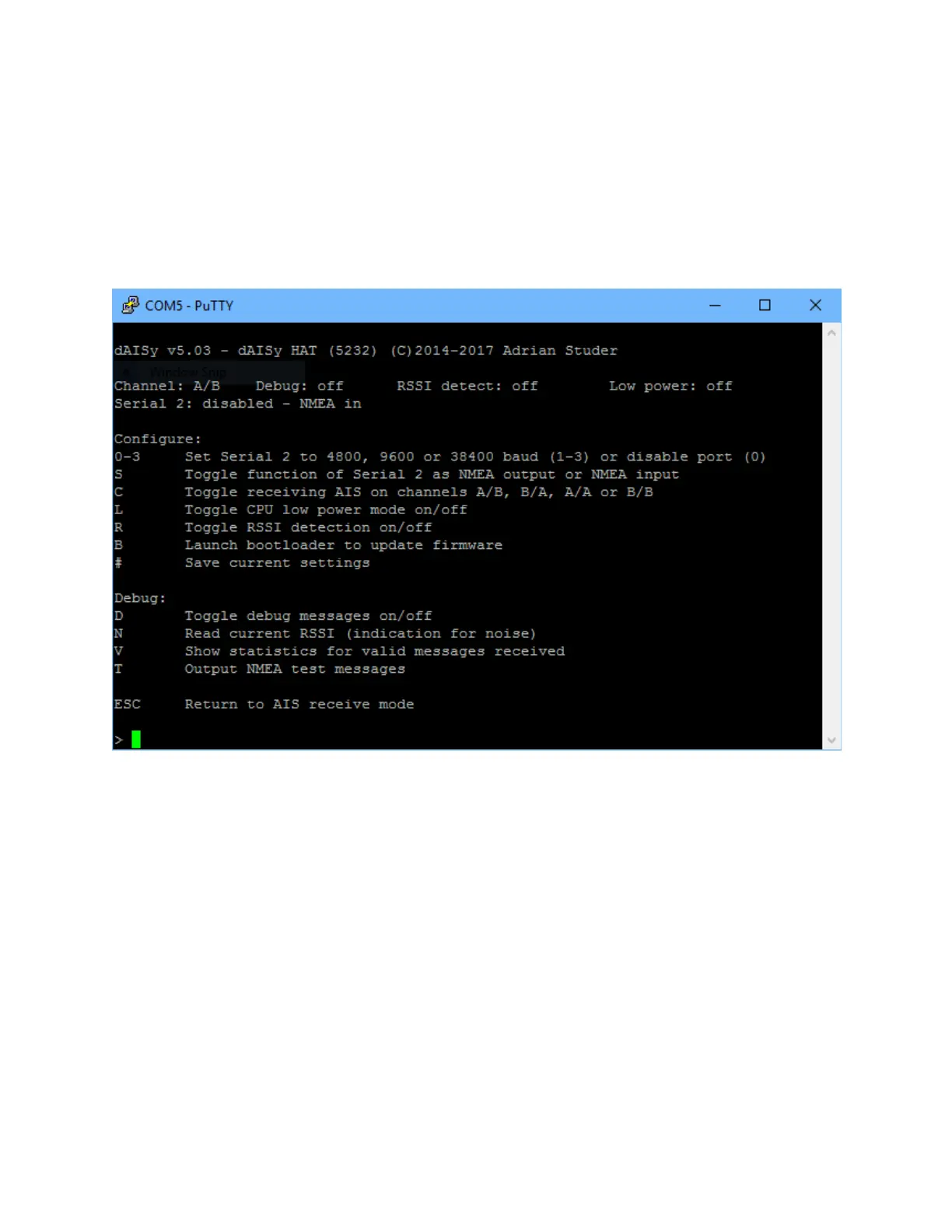
4.2 Configuration and debug menu
When connecting to dAISy with a serial terminal (e.g. screen), pressing ESC will bring up a menu with a
few configuration and debug options.
The most commonly used options are:
0-3: Controls the Serial 2 header on the HAT. 1 enables the port at 4800 baud, 2 is for 9600, and 3 is for
38400 baud. 0 turns Serial 2 off.
S: Selects the function of Serial 2. Serial 2 can either:
- Output AIS messages, for example to a Bluetooth module, RS-422/NMEA0183 adapter, or a data
logger.
- Act as an input for NMEA messages, for example from a GPS module. All data received through
Serial 2 will be forwarded to the Raspberry Pi.
D: Toggles debug messages, when in receive mode signal strength as well as information about invalid
packets will be displayed. It’s normal to receive a lot of broken packages, as there always will be radio
noise and ships just barely out of reach. With some experience, you can use the debug messages to
analyze and improve reception issues.


 To Next Page