6
IMPORTANT: Place your scale on a hard at surface, and be ready to
record your rst weight entry on the last step.
This scale can be customized for up to 8 users.
Setup User
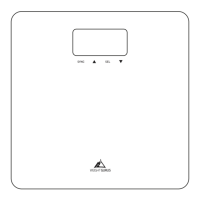
1. Press-Awake your scale ON
2. Press and hold SEL
3. Use and to make selections, then tap SEL to select and
continue for each option below.
User Number Choose a user prole number
Weight Mode Choose “#” for Traditional or “+/-” for Weightless
IMPORTANT: YOU MUST NOW WEIGH TO RECORD YOUR INITIAL WEIGHT ENTRY
Weight Step on the scale with bare feet, evenly
distribute your weight.
*At any time in the setup process, if you have to leave or the screen shuts o due to
inactivity, just start over from number one above.
Weight Modes Description
Traditional Traditional Mode displays your actual weight
Weightless Weightless mode displays your + or - changes in
weight relative to your rst time weighing.
User Setup


 To Next Page