13
NOTE: If you are using this calculator to track PointsPlus values,
after every seven days of tracking, your calculator will ask you to
confirm or update your weight to help you progress towards your
goal (see page 19-20).
Now that you’ve personalized your calculator with your daily
PointsPlus Target, you are ready to begin tracking. Your calculator
can track both the PointsPlus values that you calculate and the
PointsPlus values for foods you already know.
To track the PointsPlus values that you have calculated:
Every time you calculate a PointsPlus value for
a new food, the word USE? will appear on your
screen. (See page 4 for calculating PointsPlus
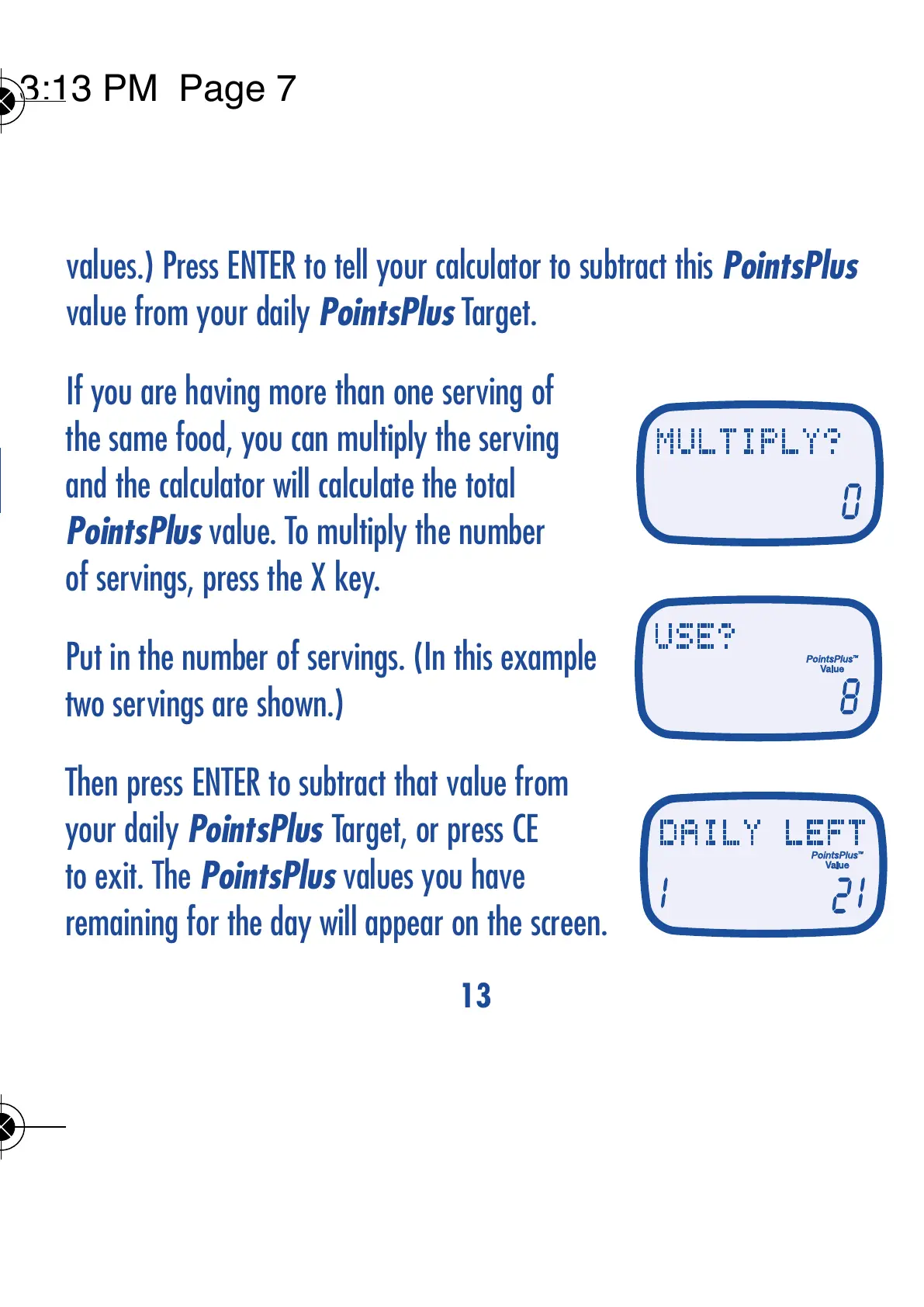
values.) Press ENTER to tell your calculator to subtract this PointsPlus
value from your daily PointsPlus Target.
If you are having more than one serving of
the same food, you can multiply the serving
and the calculator will calculate the total
PointsPlus value. To multiply the number
of servings, press the X key.
Put in the number of servings. (In this example
two servings are shown.)
Then press ENTER to subtract that value from
your daily PointsPlus Target, or press CE
to exit. The PointsPlus values you have
remaining for the day will appear on the screen.
12
TRACK YOUR DAILY PointsPlus
TM
VALUES


 To Next Page
 Loading...