WP8024ADAM User’s Manual V1.42
check) ,8,1
0003-set communication parameter 19200,N(no
check) ,8,1
0004-set communication parameter 38400,N(no
check) ,8,1
0005-set communication parameter 4800,E(even
check) ,8,1
0006-set communication parameter 9600,E(even
check) ,8,1
0007-set communication parameter 19200,E(even
check) ,8,1
0008-set communication parameter 38400,E(even
check) ,8,1
1814 2 CRC check code CRC check code for all data
Receive
:
01 06 00 65 00 02 18 14
(
example/hexadecimal
)
This command means to send a code to the module and set the communication parameter as “9600, N (No check), 8, 1”.This
setting could be saved when power off. The default communication parameter is “9600, N (no check), 8, 1”. Attention is
required, when electing the correct communication parameter in communication setting and restarting the communication
terminal, setting will be done.Normally, the lower of baud rate, the lower of the transaction speed but the higher of transaction
stability. The opposite is also true.When module receives correct command, corresponding action will be taken and response
will be sent back to the master. This is successful communication.
6
、
Indicator LED description
When module powered on, Led is green.
When module is under communication, LED is twinkling.
when module receive correct command, LED is green.
when module receive incorrect command or command for other modules, LED is red.
7
、
PC debugging instruction
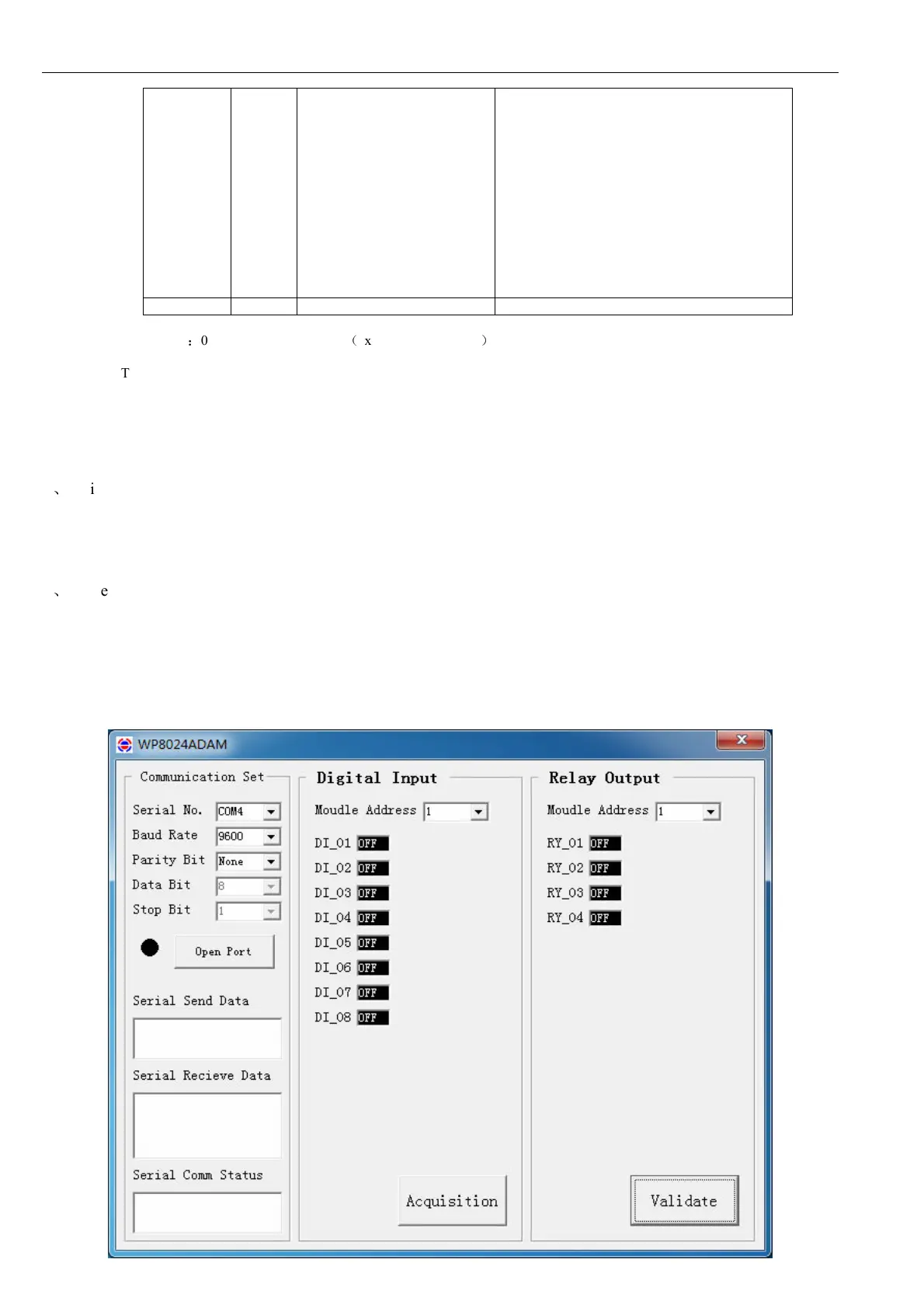
This module provides software for parameter setting and function test. Please follow the steps below:
Connect the module and computer using RS485 converter.
Connect 12V or 24V power with module and power on. To avoid any unnecessary damage, please make sure the power
positive & negative terminals are correctly connected before power on.
Open the software, select the correct module number, you will see the window of function test or parameter setting.
Set correct parameter, open communication interface.
Select corresponding setting, collection and control items.


 To Next Page