EasyManua.ls Logo

Wellsys WS 15000 - User Manual

Wellsys WS 15000
23 pages
Print Icon
To Next Page IconTo Next Page
Loading...
®
Question and Answer IconNeed help?

Do you have a question about the Wellsys WS 15000 and is the answer not in the manual?

Overview

This document is the user manual for the Wellsys WS 15000 water dispenser, which provides "Water for Wellness."

Function Description

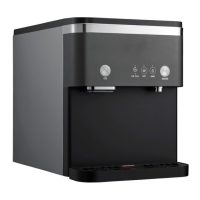
The Wellsys WS 15000 is a water dispenser that provides soft, chewable ice, hot water, and ambient temperature water. It incorporates several advanced features to ensure water quality, safety, and energy efficiency.
Important Technical Specifications

  • Model Name: WS15000
  • Rated Voltage: AC 120 V/60 Hz
  • Allowable Pressure: 14 ~ 100 psi (1 ~ 7 kgf/cm²)
  • MAX Current/Power: 4.5 A (505 W)
  • Weight: 71.9 lbs (32.6 kg)
  • Refrigerant/Weight: R-134a (1.48 oz ± 0.03 oz)
  • Design Pressure: 280 Psig (19.3 bar) (High side)
  • Dimensions (W x D x H): 360 W x 550 D x 450 H (mm) / 14.2 W x 21.7 D x 17.7 H (inch)
  • Place of Installation: Indoor
  • Storage Capacity:
    • Hot Water: 1.25 L (42.3 oz)
    • Ice: 6.6 lbs (3 kg) (Max)
  • Climate Class: N Class (32 °C ± 1 °C) (89.6 °F ± 33.8 °F)
  • Safety Device: Overheating protector, Water level detector, Water leakage shut-off valve, Fuse
  • Power Cord: 1.9 m (6.3 ft) (74.8 inch)
  • IP Class: IPX1
  • Room Temperature: Maximum: 100 °F (37.7 °C), Minimum: 50 °F (10 °C)
  • Source Water Temperature: Maximum: 90 °F (32.2 °C), Minimum: 40 °F (4.5 °C)
  • Relative Humidity: 55% at 78 °F (25.5 °C)

Usage Features

  • Ice and Two Types of Water: Dispenses soft, chewable ice, hot water, and ambient temperature water.
  • Hot Water Safety Function: Defaults to ambient water to prevent accidental hot water dispensing. Users must select the hot icon and then push the dispense button. The unit reverts to ambient water after 5 seconds of inactivity to re-engage the safety feature.
  • UV LED Sanitation: Features a state-of-the-art LED UV-C light system (200-280 nanometers) with a life of 20,000 hours. This light activates for 1 hour every 2 hours, sanitizing all water that melts from the ice tank and is re-used for ice making, reducing bacterial growth and bad taste.
  • Ice Filter and Ice Door Damper: The ice bin is sealed off from external contaminants by a door that opens only when ice is dispensed and an air filter on the reservoir. This creates a sealed system for cleaner ice and water.
  • ECO Mode: Automatically engages after 1 hour of inactivity once the ice tank is full. In ECO Mode, ice making and hot water functions are turned off for 6 hours or until the system is used again, conserving energy and improving system reliability.
  • Display and Control Panel: The unit features a control panel with LED indicators for ice readiness (ICE LED), UV operation (LED UV LED - yellow), filtered water operation (Filtered LED - white), hot water selection (HOT WATER LED - red), ambient water selection (AMBIENT WATER LED - white), and water readiness (WATER LED). Buttons are available for ice dispense, hot water select, ambient water select, and water dispense.
  • Water Dispense Method: To dispense ice, press the ICE DISPENSE button. To dispense ambient water, press the AMBIENT WATER SELECT button, then the WATER DISPENSE button. To dispense hot water, press the HOT WATER SELECT button, then the HOT DISPENSE button. LEDs blink during dispensing.
  • Audible Beep Indicator: The machine has an audible beep when water or ice is dispensed. This can be turned off/on by simultaneously pressing and holding the HOT WATER and AMBIENT WATER select buttons for 5 seconds until all LED indicators flash 5 times.
  • Installation: Requires checking incoming water pressure (60-70 PSI) and installing a pressure reducing valve if pressure exceeds 70 PSI. Filters must be flushed before use. The RO membrane is shipped disconnected and must be connected during installation. The ice bin and water reservoir should be sanitized with a hydrogen peroxide and water blend (20% hydrogen peroxide to 80% water) before initial use. Filters are connected to the WS 15000, and a 3 to 4-gallon bladder tank must be used. The bladder pressure should meet manufacturer recommendations before filling. After installation, allow 30-60 minutes for ice to be used and ensure the hot tank is completely filled before turning on the hot water switch (located on the back of the system behind the caution sticker).
  • Stand and Bracket Fastening: The product can be secured to a stand using M6 hexagonal bolts and to a wall using a bracket to prevent falling.

Maintenance Features

  • Filter Change Schedule: Only genuine Wellsys filters should be used and changed on time.
    • Pre-Sediment Filter: 1 year or 2500 gallons max
    • Pre-Carbon Filter: 1 year or 2500 gallons max
    • Reverse Osmosis: 3 years or 4500 gallons max
    • BIO-Sure Plus: 1 year or 750 gallons
    • TCR: 2 years or 2500 gallons
    • Air Filter: 2 years in office environment
    • Note: Filter schedule is an estimate and does not guarantee life; factors like water quality, pressure, installation, and neglect can impact filter life.
  • Water Dispense Spout Cleaning: Turn the faucet to the left, wipe the inside with a soft cloth (do not use detergents, thinners, benzene, or wax), then reassemble by turning to the right.
  • Ice Bin Cleaning & Evaporator Cleaning:
    • Requires 100 ml (3.4 oz) and 2.0 L (67.6 oz) measuring cups, and drain hoses.
    • Descaling Operation: Recommended annually or every six months depending on unit condition. Mix 100 ml (3.4 oz) of cleaning fluid with 2 liters (67.6 oz) of pre-prepared clean water and pour slowly into the WATER RESERVOIR and EVAPORATOR. Wait 30 minutes, then drain. Wash the detached ICE BASKET. Pour another 2 liters of clean water into the reservoir and drain again.
    • General Cleaning: Remove the water tray, top cover, and front cover by loosening screws. Pay attention to wires. Connect drain hoses to the two DRAIN VALVES at the bottom front to drain completely. Remove the ICE BIN COVER, disassemble the 2 AUGERS (being careful not to lose CAPS and screws), and remove the ICE BASKET.
    • Ice Bin Cleaning (Hydrogen Peroxide): Spray the inside of the tank with a 20% hydrogen peroxide to 80% water blend and wipe with a clean paper towel.
  • Ice Dispense Chute Cleaning: Pull down the chute to remove, clean, then reinsert tab #1 into the hole and push upward, ensuring front three tabs (#2) are locked.
  • Product Assembly and Verification (After Cleaning): Attach the ICE BASKET and 2 AUGERS (ensuring CAPS are tightly inserted). Open the water supply valve and assemble the ICE BIN COVER & FRONT COVER. Verify water dispenses when hot water is selected and the dispense button is pressed. Attach the TOP COVER and WATER TRAY. Check for normal operation and that the tank heats without water (temperature detection will cut power).
  • Cleaning Checkpoints: Wash hands and use sanitary gloves. Clean the tank with a soft cloth or dry cleaner. Dispose of used cleaner and gloves. Ensure the tank cover is firmly installed. Clean the tank regularly every 6 months to a year.

Troubleshooting Guide

  • Display not on, unit not operating:
    • Check power outlet. If working, plug power cord into outlet properly. If issue persists, request maintenance.
  • Unit does not dispense water (Ambient / Hot):
    • Check if source water is supplied. If not, wait until it's properly supplied while keeping the unit unplugged. If issue persists, request maintenance.
  • Hot water not hot enough:
    • Check if the Hot Water Switch is off (on the back of the product). If off, turn it on.
    • Wait 5-10 minutes for water to heat. If hot water still doesn't dispense, request maintenance.

Wellsys WS 15000 Specifications

General IconGeneral
BrandWellsys
ModelWS 15000
CategoryDispenser
LanguageEnglish

Related product manuals