- 7 -
Postmate 3 User’s Manual
1
3
2
8
7
6
10
12
11
4
13
5
9
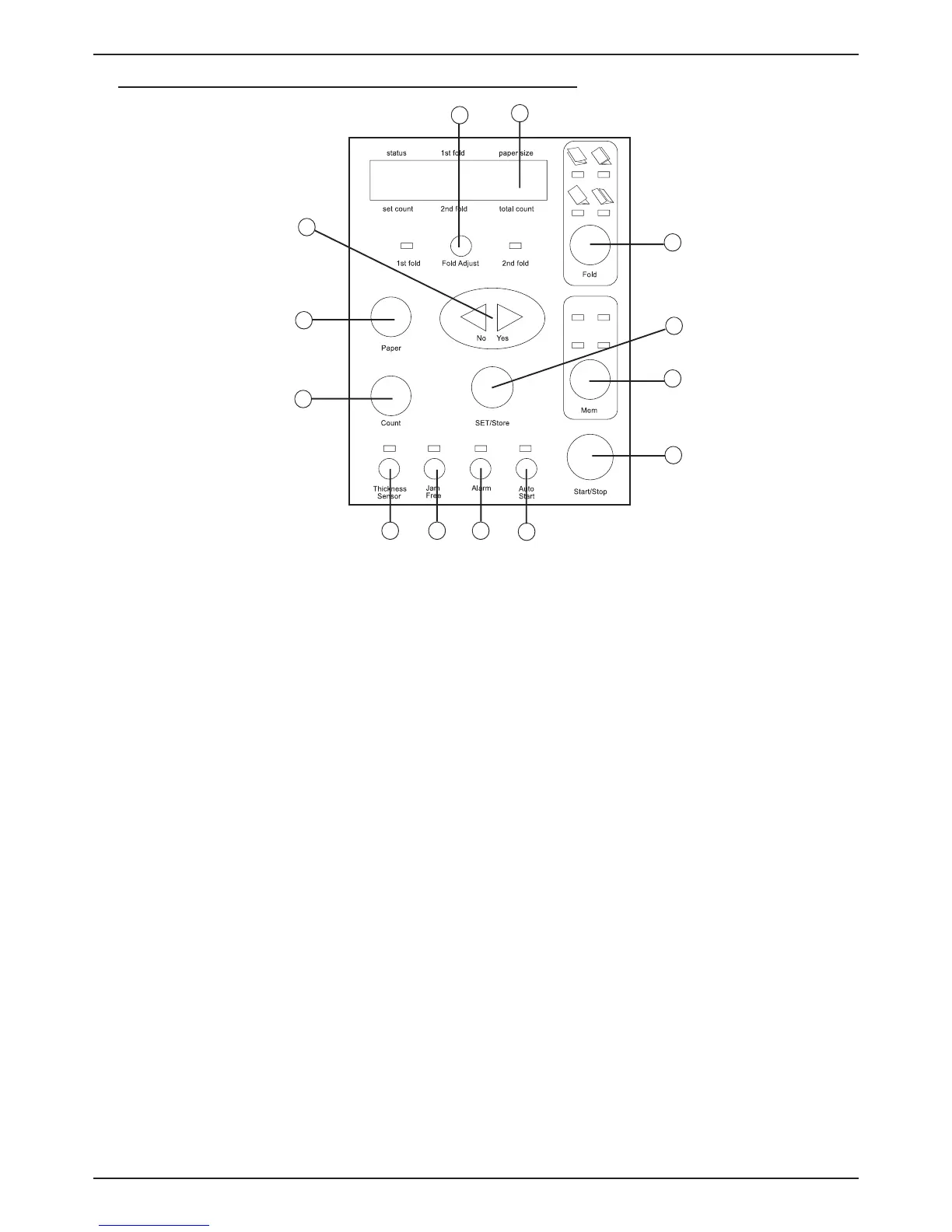
Name and Function of Each Button (Postmate 3 L)
-
+
1. Display Panel : shows the setting condition and working of the machine.
2. Start/Stop button : starts and stops the machine. If you press during setting, it returns to the prior
condition.
3. Set/Store button : sets and stores the selected function.
4. Mem button : memorizes the present selected fold type and call the memorized setting fold type.
5. Paper setting button : set the length of sheet. (ex: A4, Letter, etc.)
6. Folding type setting button : sets the folding type.
7. Fine adjustment button for fold cassette : adjusts the position of folding cassette stopper.
8. Count setting button : sets the job volume in order to process.
9. No/Yes (- / +) button : selects yes/no or increase/decrease numerical value when you set.
10. Function button for sensing double feeding : protects the double or multiple feeding by sensing the
characteristics of paper by digital sensor.
11. Alarm setting button : notifi es the error or setting with alarm.
12. Jam free button : automatic removal of paper jam at folding roller or press roller.
13. Auto start button : re-starts the process after selected time when the job reaches preset count.


 To Next Page