48
TOPITEC
®
TOUCH User Manual | 11-2020
Alternative procedure:
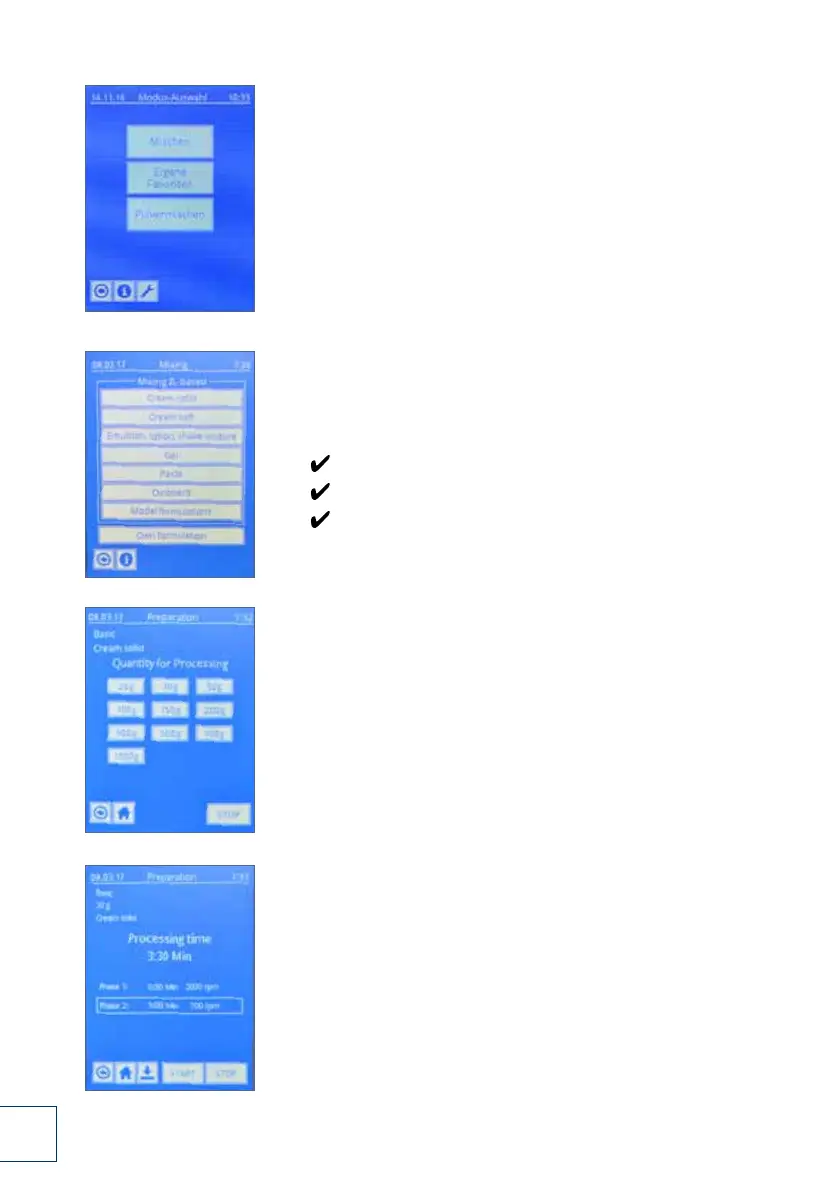
18. In the start menu, select “Mixing” mode.
In the TOPITEC
®
TOUCH menu option:
Mixing / ZL-based
you find a number of preset system parameters and formulations.
The formulations have been tested in a project
over several years in cooperation with the Central Laboratory of
German Pharmacists ZL, whereby homogeneous distribution of the
active substances has been verified. For more information regard-
ing the tested and stored formulations, please refer to the
formulation handbook,at www.topitec.de
19. Production example:
You want to process the following substances with the
TOPITEC
®
TOUCH:
20 g cooling cream DAB + triamcinolone acetonide 0.1%
analyse characteristic of the formulation:
Quantity to be produced: 20 g
Base = “Cream (firm)”
Select menu option: Cream (firm)
20. Please select the quantity you wish to produce.
In our example "20 g".
21. The system parameters for the production of
“20 g cream (firm)” are displayed. From here,
follow the instructions from page 20, figure 7 to page 23,
figure 10. Start the production process
by pressing the "Start" button. The subsequent procedure
for the production and the various displays
correspond to those shown in figures 11 to 17.
19.
20.
21.
18.
DSC_0232.JPG
DSC_0234.JPG
DSC_0233.JPG
DSC_0235.JPG


 To Next Page
 Loading...