54
TOPITEC
®
TOUCH User Manual | 11-2020
7.1.4 Mode: Mixing / own favourites
You have the option to save up to 91 different formulations/processing instructions in the
TOPITEC
®
TOUCH. These can then be called up and run at any time. Furthermore, you can add
your own details regarding the formulation or the patient to these records.
After a process run has been completed and the in-process check has been successful,
press the [ ] button to call up the "Own favourites" menu.
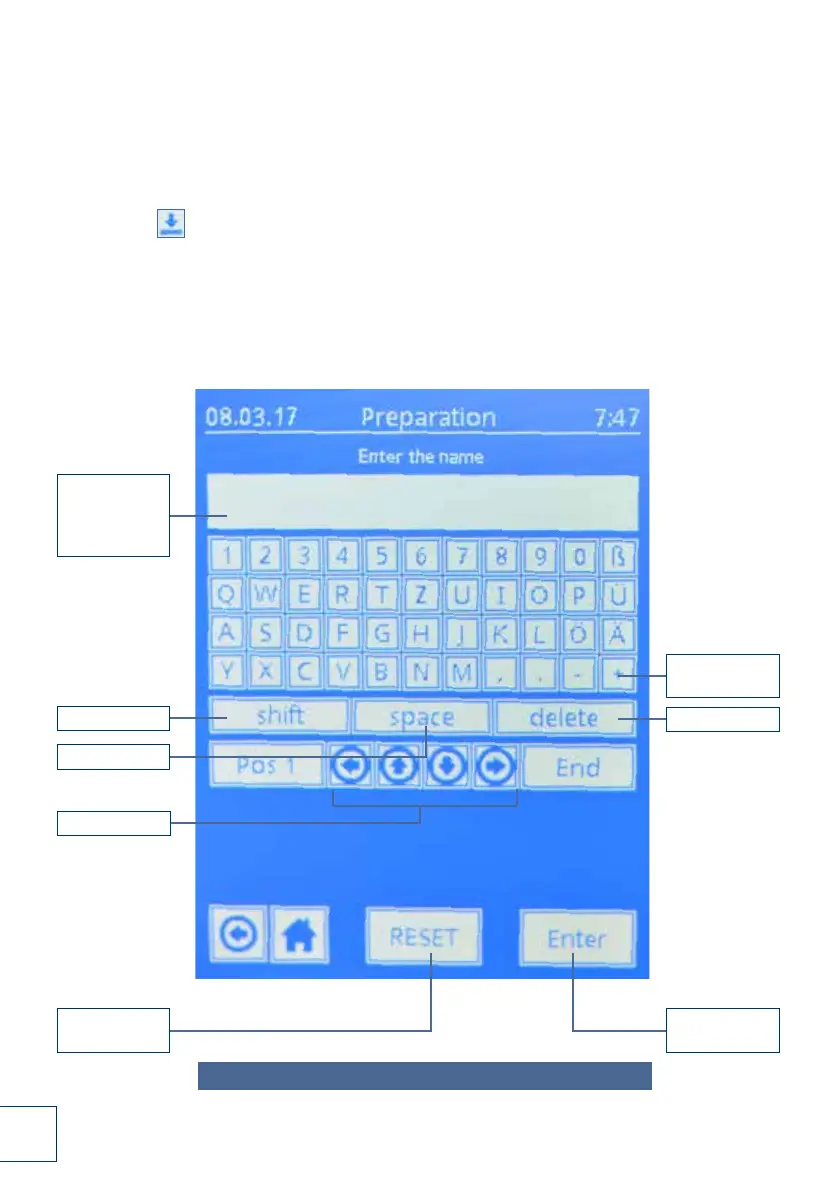
The touch screen keyboard is displayed.
1. Enter the name of your formulation (max. number of characters: 78).
Confirm with [ ENTER ]. Accept the entered text by pressing the [ yes ] button.
If you need to make corrections to the text, use the [ delete ] button (to delete individual
characters) or the [ RESET ] button (to delete entire entry).
Formulation:
Quantity /
base /
active substance
SHIFT key
SPACE key
Reset entry
Confirm
entry
Delete entry
Text input
fields
Always use the touch pen to operate the touch screen keyboard!
Cursor control
Fig. 7-4 Mode: Mixing / own favourites (pages 54-55)


 To Next Page
 Loading...