23
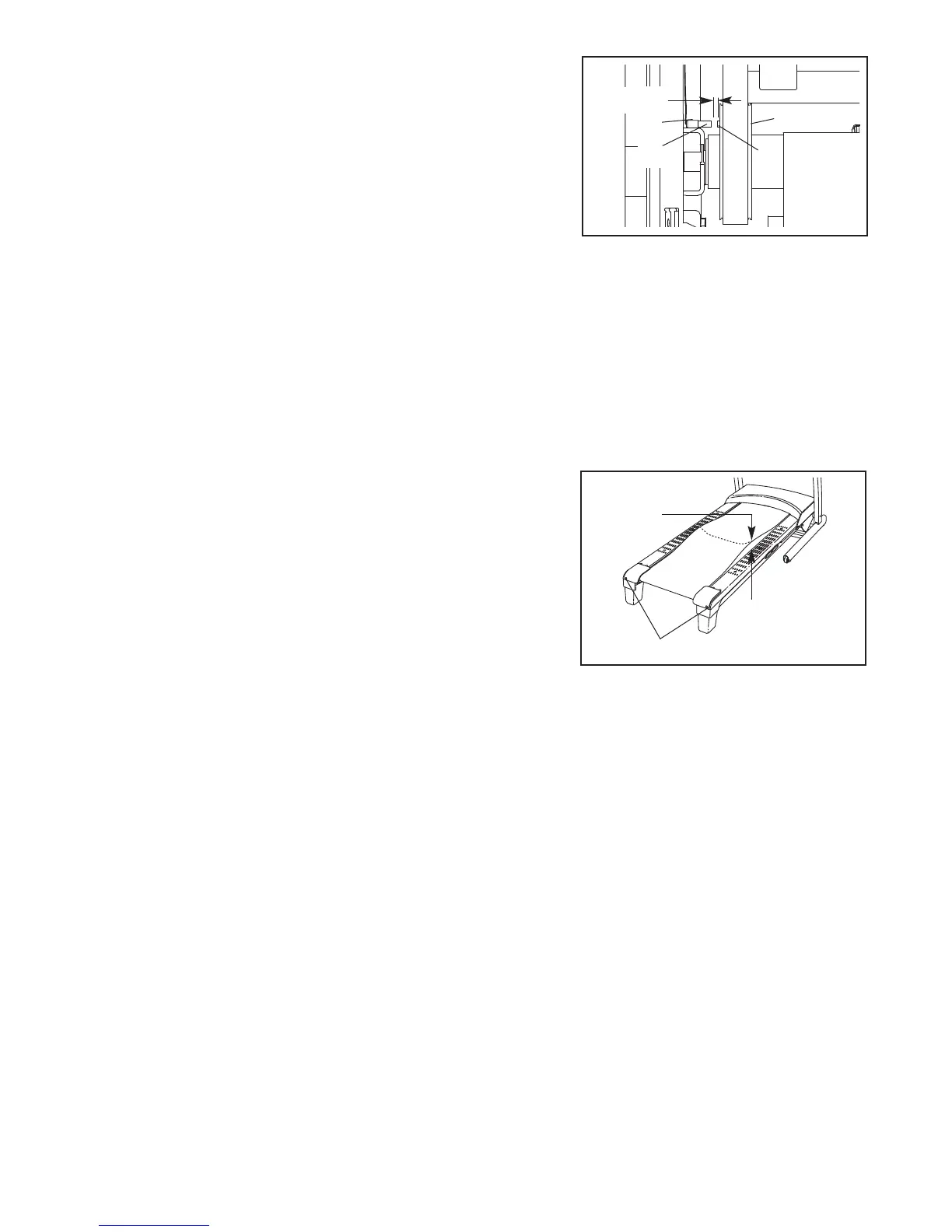
Locate the Reed Switch (55) and the Magnet (49)
on the left side of the Pulley (58). Turn the Pulley
until the Magnet is aligned with the Reed Switch.
M
ake sure that the gap between the Magnet and
the Reed Switch is about 1/8 in. (3 mm). If nec-
e
ssary, loosen the M4.2 x 13mm Screw (38), move
the Reed Switch slightly, and then retighten the
Screw. Reattach the Motor Hood (not shown), and
run the treadmill for a few minutes to check for a
correct speed reading.
PROBLEM: The incline of the treadmill does not change correctly
SOLUTION: a. With the key in the console, press one of the Incline buttons. While the incline is changing, re-
move the key. After a few seconds, re-insert the key. The treadmill will automatically rise to the
maximum incline level and then return to the minimum level. This will recalibrate the incline system.
PROBLEM: The walking belt slows when walked on
SOLUTION: a. If an extension cord is needed, use only a 3-conductor, 14-gauge (1 mm
2
) cord that is no longer
than 5 ft. (1.5 m).
b. If the walking belt is overtightened, treadmill perfor-
mance may decrease and the walking belt may be-
come damaged. Remove the key and UNPLUG
THE POWER CORD. Using the hex key, turn both
idler roller bolts counterclockwise, 1/4 of a turn.
When the walking belt is properly tightened, you
should be able to lift each edge of the walking belt
2 to 3 in. (5 to 7 cm) off the walking platform. Be
careful to keep the walking belt centered. Then,
plug in the power cord, insert the key, and run the
treadmill for a few minutes. Repeat until the walk-
ing belt is properly tightened.
c. If the walking belt still slows when walked on, see the front cover of this manual.
49
58
Idler Roller Bolts
5–7 cm
b
Top
View
1
/8 in.
3
8
55





 To Next Page